
beanstalk
commands
PLAYER (beanstalk.user)
- /flight on - enable flight if they have duration remaining
- /flight off - disable flgiht
- /flight status - show how much time they have remaining
ADMIN (beanstalk.admin)
- /beanstalk generate - generate a consumable item for the target player that awards supplied duration
- /beanstalk status - view the time duration remaining of target player
- /beanstalk modify - modify the targets remaining
usage
players with flight time duration remaining may active flight with /flight on, and then every second they are flying it will tick down, fall damage is prevented when flight expires.
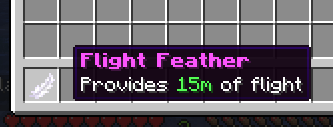
players may claim the generated item (a feather by default) to claim the duration it contains
configuration is simple and you can also customize all messages
support given in my discord or github
Quick facts
- Edition: Minecraft Java
- File type: .jar
- Minecraft version listed: 1.21
- How to install: Install the matching mod loader (Forge, Fabric or NeoForge) for your Minecraft version. → Download the .jar. → Put it in the .minecraft/mods folder and launch that loader profile.
- Where to get it: Opens on Modrinth — not every file is mirrored on our own servers.
Install steps are the general flow for this file type — How to install Minecraft Java mods & modpacks walks through it step by step.
Verified by MCModsHub
- Ships as beanstalk.jar — drop this file into the mods folder
- Download size: 2.1 MB
- Download link checked 31 Aug 2026 — working
These come from our own check of the pack file, not from the source page.