
PlotSquared PlaceholderAPI Expansion
A lightweight and efficient PlaceholderAPI expansion for PlotSquared that provides real-time plot ownership detection and flag checking. This expansion allows server administrators and plugin developers to check whether a player is currently standing on their own plot and query plot flags, enabling dynamic content, conditional permissions, and enhanced gameplay mechanics.
🎯 What Does This Expansion Do?
This expansion adds powerful placeholders that return true or false based on plot ownership and flag status. This is particularly useful for:
- Conditional Menus: Show different menu items based on plot ownership or flags
- Dynamic Permissions: Grant special permissions only when players are on their own plots
- Custom Scoreboards: Display plot ownership and flag status in real-time
- Chat Formatting: Add special prefixes or badges for plot owners
- Action Bars & Boss Bars: Show ownership and flag notifications
- Conditional Commands: Execute commands only when players are on their plots or when specific flags are set
- Economy Systems: Charge different prices based on plot location and flags
- Protection Systems: Add extra security layers based on plot flags
- PvP Zones: Create dynamic PvP areas based on plot flags
- Flight Control: Manage flight permissions based on plot flags
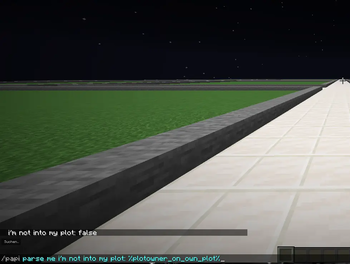
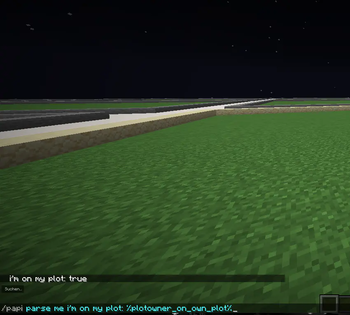
Example GIF
📝 Available Placeholders
| Placeholder | Description | Return Value | Use Case |
|---|---|---|---|
%plotowner_on_own_plot% |
Checks if the player is standing on their own plot as the owner | true or false |
Perfect for conditional logic in any plugin that supports PlaceholderAPI |
%plotowner_on_own_plot_<flag>% |
Checks if a specific flag is set on the current plot | true or false |
Check plot flags like PVP, FLY, USE, etc. |
Important Note: The ownership placeholder specifically checks for plot ownership. Players who are only trusted or added as members will receive false.
Flag Examples
%plotowner_on_own_plot_pvp%- Returnstrueif the PVP flag is set on the current plot%plotowner_on_own_plot_fly%- Returnstrueif the FLY flag is set on the current plot%plotowner_on_own_plot_use%- Returnstrueif the USE flag is set on the current plot%plotowner_on_own_plot_explosion%- Returnstrueif the EXPLOSION flag is set on the current plot
✨ Key Features
- Lightweight: Minimal performance impact on your server
- Real-time Detection: Instant updates when players move between plots
- PlotSquared Integration: Uses official PlotSquared API for reliable detection
- Flag Support: Check any PlotSquared flag on the current plot
- Easy to Use: Simple true/false output works with any plugin
- No Configuration: Works out of the box after installation
- Proper Lifecycle: Correctly unregisters when removed and reloaded
- Error Handling: Gracefully handles edge cases and errors
📋 Requirements
- Minecraft Server: 1.21.x (Paper or Spigot)
- Java Version: Java 21 or higher
- Required Plugins:
- PlaceholderAPI (Latest version)
- PlotSquared (Version 7.x)
🔧 Installation Guide
Step 1: Download
Download the latest release JAR file
Step 2: Install
Place the downloaded JAR file into your server's PlaceholderAPI expansions folder:
plugins/PlaceholderAPI/expansions/
Important: Do NOT place this in the main plugins folder. This is an expansion, not a standalone plugin.
Step 3: Reload
Run the following command in your server console or in-game:
/papi reload
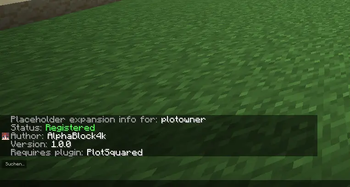
Step 4: Verify Installation
Check if the expansion loaded successfully:
/papi list
You should see plotowner in the list of loaded expansions.
Step 5: Test
Test the placeholders while standing on your plot:
/papi parse me %plotowner_on_own_plot%
/papi parse me %plotowner_on_own_plot_pvp%
You should see true if you're on your own plot, or false if you're not.
📖 Usage Examples
Example 1: DeluxeMenus - Conditional Items
Show a special item only when players are on their own plot:
plot_settings_item:
  material: COMPARATOR
  slot: 13
  display_name: "&6&lPlot Settings"
  lore:
    - "&7Click to configure your plot"
    - "&7Status: &a%plotowner_on_own_plot%"
  view_requirement:
    requirements:
      must_be_on_plot:
        type: string equals
        input: "%plotowner_on_own_plot%"
        output: "true"
  left_click_commands:
    - "[player] plot flag"
Example 2: FeatherBoard - Dynamic Scoreboard
Display plot ownership and flag status on your scoreboard:
board:
  title:
    text:
      - "&6&lMy Server"
  lines:
    line1:
      text: "&7━━━━━━━━━━━━━━━"
    line2:
      text: "&ePlot Owner: &f%plotowner_on_own_plot%"
    line3:
      text: "&ePVP Enabled: &f%plotowner_on_own_plot_pvp%"
    line4:
      text: "&eFlight: &f%plotowner_on_own_plot_fly%"
    line5:
      text: "&eLocation: &f%player_world%"
    line6:
      text: "&7━━━━━━━━━━━━━━━"
Example 3: ConditionalEvents - Flag-Based Events
Execute commands based on plot flags:
pvp_zone_enter:
  type: player_move
  conditions:
    - "%plotowner_on_own_plot_pvp% == true"
  actions:
    default:
      - "message: &c&lYou entered a PVP zone!"
      - "sound: ENTITY_ENDER_DRAGON_GROWL"
🔍 How It Works
The expansion uses the official PlotSquared API to:
- Convert the Bukkit player to a PlotSquared player object
- Get the plot at the player's current location
- Check if the plot exists
- For ownership: Verify if the player's UUID matches the plot owner's UUID
- For flags: Check if the specified flag is set on the plot
- Return
trueorfalseaccordingly
This process is highly optimized and causes minimal performance impact, even with hundreds of players online.
🛠️ Building from Source
If you want to compile the expansion yourself:
Prerequisites
- Java 21 JDK
- Gradle (or use the included wrapper)
Build Steps
# Clone the repository
git clone https://github.com/AlphaBlock4k/PlotSquared-PlaceholderExpansion.git
cd PlotSquared-PlaceholderExpansion

# Build with Gradle
gradle clean build

# Or use the Gradle wrapper
./gradlew clean build  # Linux/Mac
gradlew.bat clean build  # Windows
The compiled JAR will be located in build/libs/Expansion-PlotOwner-1.0.1.jar
🤝 Integration with Other Plugins
This expansion works seamlessly with any plugin that supports PlaceholderAPI, including:
- Menu Plugins: DeluxeMenus, ChestCommands, TrMenu
- Scoreboard Plugins: FeatherBoard, AnimatedScoreboard
- Chat Plugins: ChatControl, VentureChat, EssentialsChat
- Permission Plugins: LuckPerms (with ConditionalPerms)
- Event Plugins: ConditionalEvents, ExecutableEvents
- Hologram Plugins: HolographicDisplays, DecentHolograms
- NPC Plugins: Citizens, ZNPCs
- Combat Plugins: CombatLogX, DeluxeCombat
- And many more!
❓ Frequently Asked Questions
Q: Why does it show "false" when I'm trusted on a plot?
A: This expansion specifically checks for plot ownership. Only the plot owner will receive true. Trusted members and added players will receive false.
Q: Does this work with merged plots?
A: Yes! If you own a merged plot and stand anywhere on it, the placeholder will return true.
Q: Can I use this for road detection?
A: Yes! If the placeholder returns false and the player is in a plot world, they're either on a road or on someone else's plot.
Q: What's the performance impact?
A: Minimal. The expansion uses efficient PlotSquared API calls and includes error handling to prevent lag.
Q: Why is the identifier "plotowner" and not "plotsquared"?
A: PlaceholderAPI already has a built-in expansion with the identifier "plotsquared". To avoid conflicts, this expansion uses "plotowner".
Q: What happens if I delete the expansion and reload?
A: The expansion will be properly unregistered and removed from memory. This was fixed in version 1.0.1.
Q: Can I check any PlotSquared flag?
A: Yes! You can check any flag that PlotSquared supports. Just use %plotowner_on_own_plot_<flagname>% with the flag's name.
Q: What if a flag doesn't exist or isn't set?
A: The placeholder will return false if the flag doesn't exist or isn't set on the plot.
🐛 Troubleshooting
Expansion not loading
- Ensure PlotSquared is installed and running
- Check that the JAR is in
plugins/PlaceholderAPI/expansions/ - Run
/papi reload - Check console for error messages
Placeholder shows nothing
- Verify the expansion is loaded:
/papi list - Test the placeholder:
/papi parse me %plotowner_on_own_plot% - Ensure you're using the correct identifier:
plotownernotplotsquared
Always shows "false"
- Confirm you are the plot owner (not just trusted)
- Check with
/plot infoto verify ownership - Ensure you're standing within plot boundaries
- For flags: Verify the flag is actually set with
/plot flag list
Expansion still registered after deletion
- Make sure you're using version 1.0.1 or higher
- Delete the JAR file from
plugins/PlaceholderAPI/expansions/ - Run
/papi reload - Verify with
/papi listthat it's no longer listed
👤 Author
AlphaBlock4k
🌟 Support
If you find this expansion useful, please consider:
- ⭐ Starring this repository
- 🐛 Reporting bugs in the Issues section
- 💡 Suggesting new features
- 📢 Sharing with other server owners
📊 Version History
v1.0.1
- Added flag checking placeholder:
%plotowner_on_own_plot_<flag>% - Fixed expansion persisting after deletion and reload
- Improved lifecycle management
v1.0.0
- Initial release
- Basic plot ownership detection
- PlotSquared 7.x support
- Minecraft 1.21.x compatibility
Made with ❤️ for the Minecraft community
- Edition: Minecraft Java
- File type: .jar
- Minecraft versions listed: 1.21.4, 1.21.5, 1.21.6
- How to install: Install the matching mod loader (Forge, Fabric or NeoForge) for your Minecraft version. → Download the .jar. → Put it in the .minecraft/mods folder and launch that loader profile.
- Where to get it: Opens on Modrinth — not every file is mirrored on our own servers.
Install steps are the general flow for this file type — How to install Minecraft Java mods & modpacks walks through it step by step.
- Ships as Expansion-PlotOwner-1.0.1.jar — drop this file into the mods folder
- Download size: 3 KB
- Download link checked 31 Aug 2026 — working
These come from our own check of the pack file, not from the source page.