
ElytraEnchants
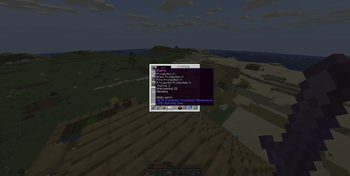
ElytraEnchants lets you add chestplate protection enchantments (like Protection, Fire Protection, Blast Protection, Projectile Protection, Thorns, Binding Curse, and Vanishing Curse) to your elytra in Minecraft!
What Can I Do With This Plugin?
- Add protection enchantments to your elytra using an anvil and enchanted books or chestplates.
- Combine two elytras in an anvil to merge their enchantments.
- Use a simple command to enchant your elytra directly (if you have permission).
- Choose which enchantments are allowed in the config file.
- Customize all plugin messages.
- Combine an elytra with an enchanted chestplate to apply enchants to elytra (you will lose the chestplate)
How to Install
- Download the ElytraEnchants JAR file.
- Place it in your server’s
pluginsfolder. - Restart your server. The plugin will create its config files automatically.
How to Use
- Anvil:
Place your elytra and an enchanted book (or chestplate) in an anvil to add enchantments. - Combine Elytras:
Put two elytras in an anvil to merge their enchantments. - Command:
/elytraenchant <enchantment> <level>
(Non opped players need permission nodes for this command.)
Configuration
- Open
plugins/ElytraEnchants/config.ymlto enable or disable specific enchantments. - Edit
plugins/ElytraEnchants/messages.ymlto change plugin messages.
Changelog
See CHANGELOG.md for detailed version history and bug fixes.
Permissions
elytraenchant.use— Use the/elytraenchantcommandelytraenchant.enchant.<enchantment>— Use a specific enchantmentelytraenchant.enchant.*— Use all enchantments
Supported Minecraft Versions
- 1.16 to 1.21.6 (Bukkit, Spigot, Paper, Purpur)
Need Help?
- If you have questions or issues, open an issue on the plugin’s GitHub page or ask your server admin.
License
- This plugin is open source. You can use, share, or modify it freely.
Support
If you need help or have suggestions, please open an issue on the GitHub repository or join the linked Discord and navigate to # plugin-help
To-Do
- Add more context to When Worn:
- Combine actual chestplate along with enchantments to make "Armored Elytra"
- Suggestions welcome!
Enjoy safer flying!
Quick facts
- Edition: Minecraft Java
- File type: .jar
- Minecraft versions listed: 1.16, 1.16.1, 1.16.2
- How to install: Install the matching mod loader (Forge, Fabric or NeoForge) for your Minecraft version. → Download the .jar. → Put it in the .minecraft/mods folder and launch that loader profile.
- Where to get it: Opens on Modrinth — not every file is mirrored on our own servers.
Install steps are the general flow for this file type — How to install Minecraft Java mods & modpacks walks through it step by step.
Verified by MCModsHub
- Ships as elytra-enchants-1.1.0-Dev1a.jar — drop this file into the mods folder
- Download size: 26 KB
- Download link checked 31 Aug 2026 — working
These come from our own check of the pack file, not from the source page.