



About
mWL - is a modern UUID-based whitelist plugin in which you can customize absolutely everything.
Functional
- Various databases to choose from (YAML, MongoDB (In dev)).
- UUID-based. You can use online or offline UUID's.
- Hex message support with MiniMessage (More about this).
- Large amount of functionality.
- Ability to add a player to the whitelist both temporarily and permanently.
- Easy to understand configuration.
- Regular development and improvement of the plugin
- Open source.
Commands
- All commands required mwl.admin permission
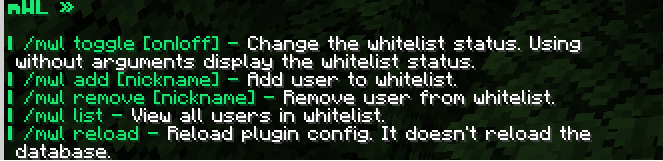
| Command | Description |
|---|---|
| /mwl add [nickname] | Permanently add player to whitelist |
| /mwl addtemp [nickname] [duration] | Temporarily add player to whitelist |
| /mwl remove [nickname] | Remove player from whitelist |
| /mwl list | Get list of all players in whitelist |
| /mwl toggle [enable/disable] | Change the whitelist enabled status. Without args display the current status. |
| /mwl check [nickname] | View whitelist information about player. |
| /mwl info | Some information about whitelist. |
| /mwl reload | Reload plugin configs and database. |
- Duration format example - 1y 2mo 3w 4d 5h 6m 7s (y - year, mo - month, w - week, d - day, h - hour, m - minute, s - second)
Some information
- Plugin work only on Paper and Paper forks. Spigot support will be added in future versions.
- The plugin weighs so much because it integrates some libraries necessary for it to work (mongodb-driver, kyori-adventure).
- You can report problems or ideas in the issue of this repository, or in private messages on Discord - @truec0der

Quick facts
- Edition: Minecraft Java
- File type: .jar
- Minecraft versions listed: 1.18, 1.18.1, 1.18.2
- How to install: Install the matching mod loader (Forge, Fabric or NeoForge) for your Minecraft version. → Download the .jar. → Put it in the .minecraft/mods folder and launch that loader profile.
- Where to get it: Opens on Modrinth — not every file is mirrored on our own servers.
Install steps are the general flow for this file type — How to install Minecraft Java mods & modpacks walks through it step by step.
Verified by MCModsHub
- Ships as mWL-2.2.0.jar — drop this file into the mods folder
- Download size: 174 KB
- Download link checked 1 Sept 2026 — working
These come from our own check of the pack file, not from the source page.