
IP Limit
I don't know my version or loader
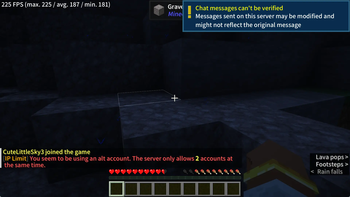
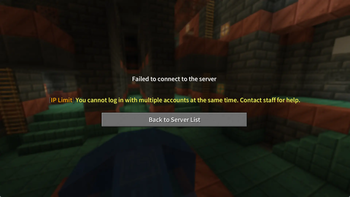
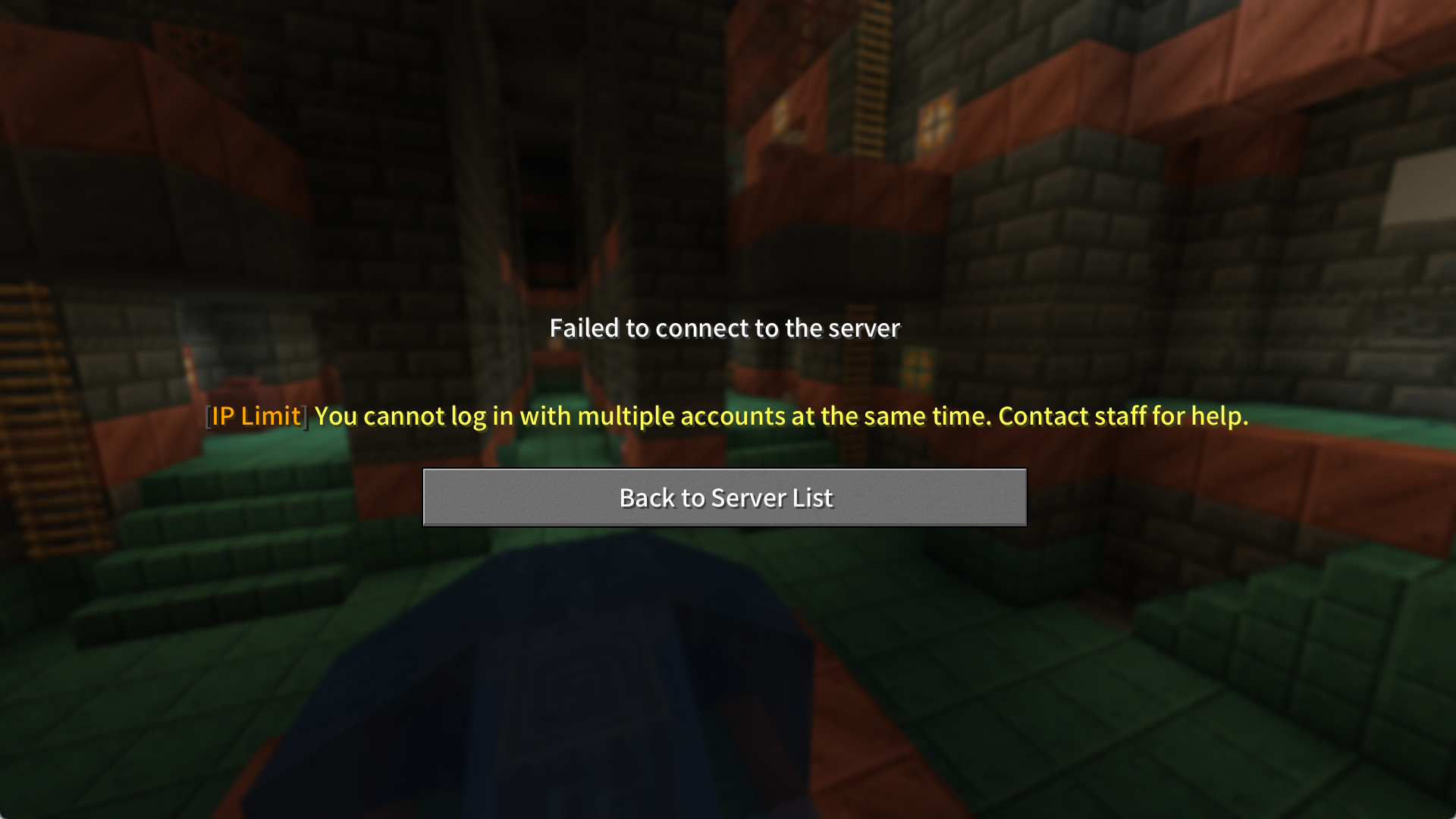
IP Limit —— Limit the Number of Online Players with the Same IP



✨ Features
- IP Connection Limit: Automatically detect and block IP addresses with more than the configured number of connections.
- IP Whitelist: Configure trusted IP addresses to bypass checks (e.g.,
127.0.0.1by default). - Threshold Alerts: Send warnings when a specific number of players share the same IP.
- Permission Bypass: Players with
iplimit.bypasspermission are exempt from restrictions. - Rich Text Support: Supports MiniMessage formatting (gradients, click events, hover text, etc.).
- Velocity Compatibility: Seamlessly switch configs between Bukkit and Velocity. Use the Velocity version for global IP restrictions across proxies, or the Bukkit version for per-server limits (both versions are non-conflicting).
⚙️ Configuration Guide
Default config.yml:
# Maximum connections allowed per IP
max-connections: 3

# Threshold for sending alerts
warn-threshold: 2

# Trusted IPs excluded from rules
ignored-ips:
  - "127.0.0.1"     # Localhost
  - "192.168.1.100" # Internal network device

# Interface language (en/zh)
language: en
Language file example (messages/messages_en.yml):
prefix: "<dark_gray>[<gold>IP Limit</gold>]"
kick-message: "<prefix> <yellow>You cannot log in with multiple accounts at the same time. Contact staff for help."
warning-message: "<prefix> <red>You seem to be using an alt account. The server only allows <yellow><bold><max></bold></yellow> accounts at the same time."
no-permission: "<prefix> <red>You don't have permission!"
reload-success: "<prefix> <green>Config reloaded successfully!"
🛠️ Usage
Permissions:
iplimit.bypass— Bypass connection limits.iplimit.reload— Reload plugin configuration.
Commands:
/iplimitreload— Reload the plugin.
🌍 Localization
| Language | Code | Status |
|---|---|---|
| English | en | ✅ Supported |
| Chinese | zh | ✅ Supported |
❓ FAQ
Q: How to exclude a player's IP from the limit?
A: Add the IP to ignored-ips in config.yml or grant the iplimit.bypass permission (OPs are exempt by default).
Tip: Learn about MiniMessage formatting here.
For a lightweight alternative, try the Skript version. (Writeen by Chinese)
IP Limit —— 限制相同IP在线玩家数量
✨ 功能特性
IP同玩家数限制: 自动检测并阻止超过设定数量的 IP 连接
IP白名单: 支持配置忽略的特殊 IP 地址(默认忽略127.0.0.1)
阈值提醒: 当同IP X位玩家时进行提示
权限绕过: 允许拥有iplimit.bypass权限的玩家不受限制
富文本支持: 支持 MiniMessage 富文本格式(渐变、点击事件、悬停提示等)
Velocity支持: 可无缝切换配置文件(Bukkit/Velocity),如需限制全服IP限制,请使用Velocity版本,如仅需限制单个服务器,请使用Bukkit版本(两者无冲突)
如需使用轻量版本,可使用Skript脚本版
⚙️ 配置指南
默认配置 (config.yml):
# 同一IP允许的最大连接数

# Maximum connections allowed per IP

max-connections: 2

# 触发警告的连接数阈值

# Threshold for sending alerts

warn-threshold: 1

# 忽略检查的IP列表

# Trusted IPs excluded from rules

ignored-ips:

  - "127.0.0.1"     # 本机地址 | Localhost

  - "192.168.1.100" # 内网设备 | Internal network device

# 语言设置 (en/zh)

# Interface language (en/zh)

language: zh
语言文件示例 (messages/messages_zh.yml):
prefix: "<dark_gray>[<gold>IP限制</gold>]"

kick-message: "<prefix> <yellow>你不能同时登录多个游戏账号,如有疑问请联系管理员"

warning-message: "<prefix> <red>您正在使用小号进入服务器,服务器仅允许同时使用 <yellow><bold><max>个</bold></yellow> 账号登录"

no-permission: "<prefix> <red>没有权限执行此操作!"

reload-success: "<prefix> <green>配置重载成功!"
🛠️ 使用说明
权限节点:
iplimit.bypass- 绕过连接限制iplimit.reload- 重载插件权限
命令:
/iplimitreload- 重载插件配置
🌍 多语言支持
英语(默认) 中文
❓ 常见问题
Q: 如何让某个玩家的 IP 不受限制?
A: 将 IP 加入 ignored-ips 列表或在用户组添加 iplimit.bypass 权限(OP默认不限制)
Q/A:插件使用了Adventure API,如Lib内容无法下载,请更换网络环境
Tips:关于MiniMessage的使用,可参考本帖
- Edition: Minecraft Java
- File type: .jar
- Minecraft versions listed: 1.16, 1.16.1, 1.16.2
- How to install: Install the matching mod loader (Forge, Fabric or NeoForge) for your Minecraft version. → Download the .jar. → Put it in the .minecraft/mods folder and launch that loader profile.
- Where to get it: Opens on Modrinth — not every file is mirrored on our own servers.
Install steps are the general flow for this file type — How to install Minecraft Java mods & modpacks walks through it step by step.
- Ships as IPLimit-Velocity-1.0-SNAPSHOT.jar — drop this file into the mods folder
- Download size: 1.9 MB
- Download link checked 1 Sept 2026 — working
These come from our own check of the pack file, not from the source page.