
ModsJava
FrozenShop
I don't know my version or loader
Open the Minecraft launcher and look at the profile you play on — it names both, like fabric-loader-1.21.4. The version also shows in the bottom-right corner of the game's main menu.
No loader in the profile name? Then it's plain Minecraft, and these mods won't run — you need Fabric or NeoForge installed first.
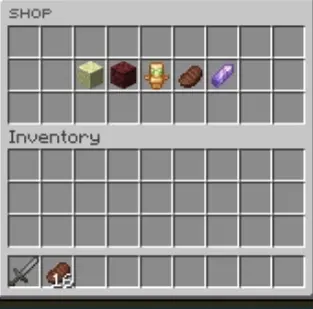
❄️ FrozenShop
A clean, fully configurable GUI shop plugin for Minecraft servers running 1.21 – 1.21.x.
Economy is powered exclusively by Vault.
📋 Requirements
| Dependency | Type | Notes |
|---|---|---|
| Spigot / Paper 1.21+ | Required | Server software |
| Vault | Required | Economy bridge |
| An economy plugin | Required | EssentialsX, CMI, etc. |
| PlaceholderAPI | Optional | Enables %frozenshop_totalspent% |
⚙️ Installation
- Drop
FrozenShop.jarinto your/pluginsfolder - Make sure Vault and an economy plugin are installed
- Start the server — default config and shop files generate automatically
- Edit
plugins/FrozenShop/config.ymlandplugins/FrozenShop/shops/*.yml - Run
/frozenshop reloadto apply changes without restarting
💬 Commands
| Command | Permission | Description |
|---|---|---|
/shop |
frozenshop.open |
Open the main shop menu |
/frozenshop reload |
frozenshop.admin |
Reload all configs live |
/frozenshop addcategory <name> |
frozenshop.admin |
Create a new shop category file |
/frozenshop removecategory <name> |
frozenshop.admin |
Delete a shop category |
/frozenshop addhanditem <category> <price> |
frozenshop.admin |
Add the item in your hand to a shop |
/toggleshopmessages |
frozenshop.toggle |
Toggle purchase messages on/off per player |
🔑 Permissions
| Permission | Default | Description |
|---|---|---|
frozenshop.open |
Everyone | Open the shop |
frozenshop.admin |
OP | All admin commands |
frozenshop.toggle |
Everyone | Toggle personal shop messages |
🗂️ File Structure
plugins/FrozenShop/
├── config.yml        ← Main menu, confirm menu, sounds, messages
├── saves.yml         ← Auto-generated — player data (do not edit)
└── shops/
    ├── end.yml
    ├── farming.yml
    ├── food.yml
    ├── gear.yml
    └── nether.yml    ← Add your own .yml files here for new categories
🛒 Adding a Shop Item
Open any file inside shops/ and add a block under items::
items:
my_item:
price: 500
slot: 9
material: DIAMOND
displayname: '&bShiny Diamond'
amount: 1
giveitem: true
givelore: false
hide_attributes: false
command: ''
lore:
- '&fBuy Price: �bf52b$%price%'
To run a console command instead of giving an item, set giveitem: false and fill command:
    giveitem: false
    command: 'give %player% diamond 1'
⚠️ YAML tip: Every item key under
items:must be unique within the same file. Duplicate keys will cause items to silently disappear from the shop.
📄 Placeholders (PlaceholderAPI)
| Placeholder | Description |
|---|---|
%frozenshop_totalspent% |
Total money a player has spent in the shop |
🔧 Config Tips
confirm-cooldown-ticks— prevents accidental double-purchases (set to0to disable)use-actionbars: true— shows purchase messages in the action bar instead of chatplay-open-sound: true— plays a sound when the main shop opens- All colour codes support legacy
&codes and hex&#RRGGBBformat
👤 Author
Made by DrFrozen
Quick facts
- Edition: Minecraft Java
- File type: .jar
- Minecraft versions listed: 1.21, 1.21.1, 1.21.2
- How to install: Install the matching mod loader (Forge, Fabric or NeoForge) for your Minecraft version. → Download the .jar. → Put it in the .minecraft/mods folder and launch that loader profile.
- Where to get it: Opens on Modrinth — not every file is mirrored on our own servers.
Install steps are the general flow for this file type — How to install Minecraft Java mods & modpacks walks through it step by step.
Verified by MCModsHub
- Ships as FrozenShop-4.0.0.jar — drop this file into the mods folder
- Download size: 62 KB
- Download link checked 1 Sept 2026 — working
These come from our own check of the pack file, not from the source page.