
BungeeViaProxy
A BungeeCord plugin to fix compatibility issues with ViaProxy, enabling seamless multi-version support for backend servers with reduced overhead.
⬇ Download on Modrinth
BungeeViaProxy
TL;DR
BungeeViaProxy is a BungeeCord plugin that fixes compatibility issues with ViaProxy, enabling you to manage multiple backend servers running different Minecraft versions using a single ViaProxy instance.
Why?
ViaBungee was discontinued in Minecraft 1.20.2. To continue using BungeeCord with the latest Minecraft versions, you need ViaProxy.
However, ViaProxy introduces challenges when combined with BungeeCord, such as improper hostname forwarding and duplicate server errors.How does it help?
BungeeViaProxy resolves these issues by ensuring correct hostname forwarding and avoiding duplicate server errors, allowing seamless integration of ViaProxy and BungeeCord.Who should use this?
Minecraft server administrators running networks with BungeeCord and multiple backend servers that need support for Minecraft versions including 1.20.2 and later, but want to avoid the complexity of managing ViaVersion on each backend server.

Table of Contents
Overview
BungeeViaProxy is a BungeeCord plugin designed to address compatibility issues when using ViaProxy with BungeeCord.
This plugin is especially useful for networks with multiple backend servers running different Minecraft versions, where you want to minimize the overhead of maintaining ViaVersion plugins on each backend server.
ViaBungee support was discontinued as of Minecraft 1.20.2, making it necessary to migrate to ViaProxy for compatibility with newer versions of the game.
This guide is valuable for those who wish to continue using BungeeCord with the latest Minecraft versions while avoiding the burden of individually updating ViaVersion on each backend server.
By leveraging ViaProxy with wildcard-domain-handling, a single ViaProxy instance can support multiple backend servers, simplifying updates and reducing resource usage.
Use Case
BungeeViaProxy is ideal for:
- Networks using BungeeCord to manage multiple backend servers running different Minecraft versions.
- Administrators who want to maintain compatibility with the latest Minecraft versions using ViaProxy and Bungeecord.
- Reducing the operational overhead of updating ViaVersion plugins on individual backend servers by centralizing version translation via ViaProxy.
Important: When using ViaProxy in such a setup, it must be placed between BungeeCord and the backend servers. Additionally, in ViaProxy's configuration:
proxy-online-modemust be disabled.auth-methodmust be set toNONE.wildcard-domain-handlingmust be set toPUBLIC.target-addressis ignored (anything is OK) while usingwildcard-domain-handling.
How It Works
Normally, each backend server would require a separate ViaProxy instance.
However, this can lead to increased memory consumption and additional update efforts.
To address this, ViaProxy supports the wildcard-domain-handling feature, allowing a single ViaProxy instance to handle connections to multiple backend servers.
This is achieved by using a specific address format for each backend server:
address.<backend-ip>.port.<backend-port>.version.<backend-version>.f2.viaproxy.<viaproxy-ip>.nip.io:<viaproxy-port>
These addresses can then be listed in the config.yml of BungeeCord, enabling seamless connection management through a single ViaProxy instance.
However, this setup introduces certain challenges, which BungeeViaProxy resolves.
Features
Correct Hostname Forwarding: When
wildcard-domain-handling: PUBLICis enabled in ViaProxy, it may fail to retrieve the hostname specified in BungeeCord's configuration, preventing proper server routing. BungeeViaProxy ensures that any address containing.viaproxy.is forwarded correctly to the backend server.Avoiding Duplicate Server Errors: BungeeCord treats servers with different hostnames as identical if they resolve to the same IP address, resulting in the error:
You are already connected to this server!. BungeeViaProxy resolves this by using unresolvedInetSocketAddressobjects, ensuring unique identification for servers with different hostnames.
Installation
- Download the latest release of BungeeViaProxy.
- Place the plugin
.jarfile into your BungeeCordpluginsdirectory. - Restart your BungeeCord server.
Note
Note: You will need to download and use the latest version of ViaProxy from Jenkins, which is not yet released at this time (2025/1/16, to be included in ViaProxy 3.3.8 release).
https://ci.viaversion.com/view/All/job/ViaProxy/
This allows the use of the f2 format which can be used in BungeeCord config.address.<ip>.port.<port>.version.<version>.f2.viaproxy.hostname
Configuration
No additional configuration is required. BungeeViaProxy automatically handles .f2.viaproxy. addresses and ensures proper server routing.
Example Configuration
Here is an example of how to configure BungeeCord to work with ViaProxy using wildcard-domain-handling
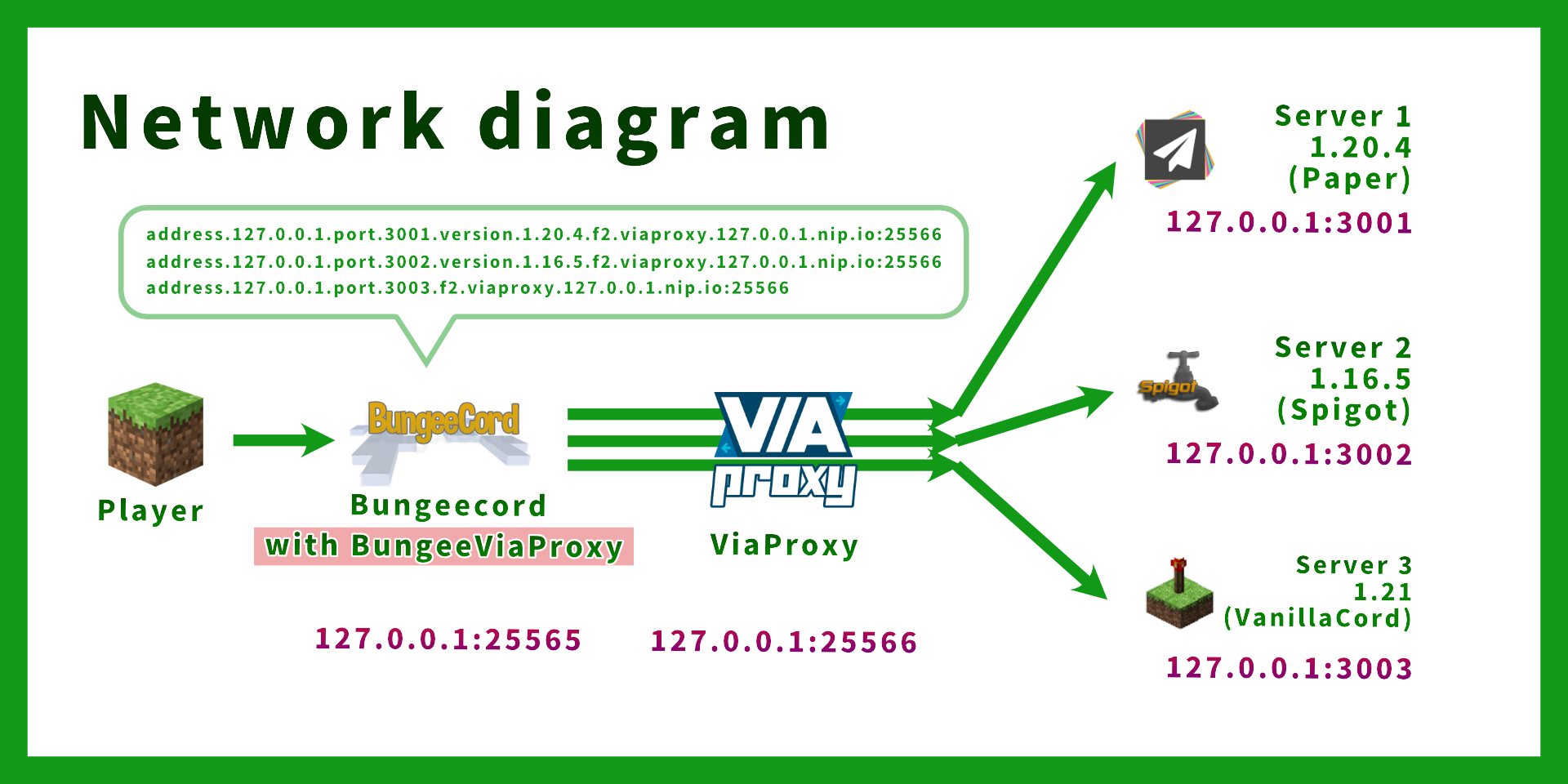
Assuming the following setup:
| Server | IP:Port | Minecraft Version |
|---|---|---|
| BungeeCord | 127.0.0.1:25565 | N/A |
| ViaProxy | 127.0.0.1:25566 | N/A |
| Backend Server 1 | 127.0.0.1:3001 | 1.20.4 |
| Backend Server 2 | 127.0.0.1:3002 | 1.16.5 |
| Backend Server 3 | 127.0.0.1:3003 | 1.21 |
BungeeCord config.yml (only relevant options are shown):
online_mode: true
servers:
  server1:
    # ViaProxy address format: address.<backend-ip>.port.<backend-port>.version.<backend-version>.f2.viaproxy.<viaproxy-ip>.nip.io:<viaproxy-port>
    address: address.127.0.0.1.port.3001.version.1.20.4.f2.viaproxy.127.0.0.1.nip.io:25566
    motd: '&1Example Server 1'
    restricted: false
  server2:
    # In this example,
    # Backend server IP: 127.0.0.1:25566
    # ViaProxy IP: 127.0.0.1:3002
    address: address.127.0.0.1.port.3002.version.1.16.5.f2.viaproxy.127.0.0.1.nip.io:25566
    motd: '&1Example Server 1'
    restricted: false
  server3:
    # Version can be omitted if not needed (version is automatically detected by ViaProxy)
    address: address.127.0.0.1.port.3003.f2.viaproxy.127.0.0.1.nip.io:25566
    motd: '&1Example Server 3 (".version.1.20.4" can be omitted)'
    restricted: false
listeners:
- host: 0.0.0.0:25565
prevent_proxy_connections: false
ip_forward: true
ViaProxy config.yml (only relevant options are shown):
# ViaProxy configuration file

# The address ViaProxy should listen for connections.
# This option is not reloadable.
bind-address: 0.0.0.0:25566

# The address of the server ViaProxy should connect to.
target-address: AnythingIsOK.ThisFieldIsIgnored.example.com

# Proxy Online Mode allows you to see skins on online mode servers and use the signed chat features.
# Enabling Proxy Online Mode requires your client to have a valid minecraft account.
proxy-online-mode: false

# The authentication method to use for joining the target server.
# none: No authentication (Offline mode)
# openauthmod: Requires the OpenAuthMod client mod (https://modrinth.com/mod/openauthmod)
# account: Use an account for joining the target server. (Has to be configured in ViaProxy GUI)
auth-method: NONE

# Allows clients to specify a target server and version using wildcard domains.
# none: No wildcard domain handling.
# public: Public wildcard domain handling. Intended for usage by external clients. (Example: address.<address>.port.<port>.version.<version>.f2.viaproxy.127.0.0.1.nip.io (version is optional))
# internal: Internal wildcard domain handling. Intended for local usage by custom clients. (Example: original-handshake-address\7address:port\7version\7classic-mppass)
wildcard-domain-handling: PUBLIC
Backend Server server.properties (only relevant options are shown):
server-port=3001
online-mode=false
Backend Server spigot.yml (only relevant options are shown):
settings:
  bungeecord: true
Note:
- No ViaVersion plugin is required on the backend servers. (Because version translation is handled by ViaProxy)
- Do not use ViaProxyAuthHook as ViaProxy is placed between BungeeCord and the backend servers.
bStats
BungeePteroPower collects anonymous statistical data using bStats.
You can find the statistics data here.
bStats is used to understand the usage of the plugin and help improve it.
To disable the collection of statistical data, please set enabled to false in plugins/bStats/config.yml
- Edition: Minecraft Java
- File type: .jar
- Minecraft versions listed: 1.8.9, 1.12.2, 1.13.2
- How to install: Install the matching mod loader (Forge, Fabric or NeoForge) for your Minecraft version. → Download the .jar. → Put it in the .minecraft/mods folder and launch that loader profile.
- Where to get it: Opens on Modrinth — not every file is mirrored on our own servers.
Install steps are the general flow for this file type — How to install Minecraft Java mods & modpacks walks through it step by step.
- Ships as bungeeviaproxy-1.0-SNAPSHOT.jar — drop this file into the mods folder
- Download size: 33 KB
- Download link checked 1 Sept 2026 — working
These come from our own check of the pack file, not from the source page.