
F3Name - Edit server brand in debug screen
This is my fork of original plugin that fixes joining issue on 1.20.3+.
Also thanks to Marcelektro, original fix author
Info
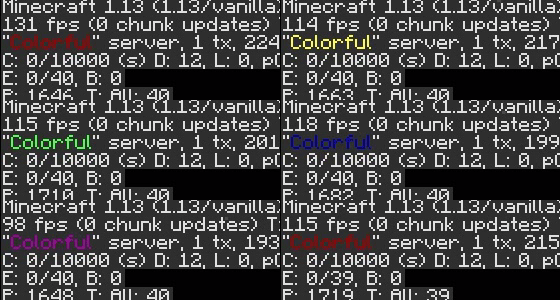
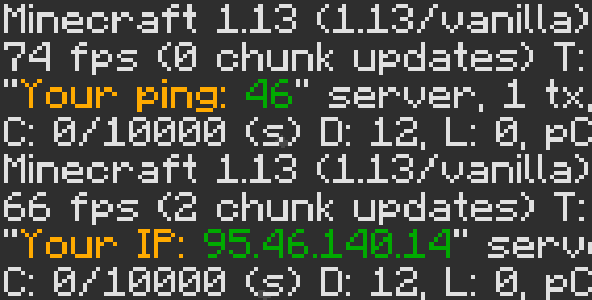
With release of Minecraft 1.13, server owners got an additional place to show information to players. And this place is... debug screen! With this plugin you can easily edit server brand from default ("Spigot", or very long Bungee version) to whatever you want.
Features
- Edit server brand in debug screen (F3)
- Colors and animation
- Easy configuration
- Both BungeeCord and Spigot
- Supports PlaceholderAPI
- Vault (basic) or LuckPerms (advanced) group support
- Built-in placeholders for BungeeCord
BungeeCord placeholders
%player_name%- player name%player_displayname%- player displayname%player_uuid%- player UUID%player_ping%- player ping%server_name%- server name%server_motd%- server motd
Commands
/f3name/debugname/f3n/f3namebukkit- aliases for Bukkit/f3nameb/f3namebungee- aliases for BungeeCord/f3name reload- reload configuration
Permissions
f3name.reload- permission for reload
Quick facts
- Edition: Minecraft Java
- File type: .jar
- Minecraft versions listed: 1.13, 1.13.1, 1.13.2
- How to install: Install the matching mod loader (Forge, Fabric or NeoForge) for your Minecraft version. → Download the .jar. → Put it in the .minecraft/mods folder and launch that loader profile.
- Where to get it: Opens on Modrinth — not every file is mirrored on our own servers.
Install steps are the general flow for this file type — How to install Minecraft Java mods & modpacks walks through it step by step.
Verified by MCModsHub
- Ships as F3Name-3.3.1.jar — drop this file into the mods folder
- Download size: 116 KB
- Download link checked 1 Sept 2026 — working
These come from our own check of the pack file, not from the source page.