
BedrockDeny
Java mod listed for Minecraft 1.21. Downloads from the MC Java Mods app on Android.
Simply Blocks Bedrock players from joining your server, used for proxy setups with geyser floodgate to prevent bedrock joins on one of the servers and not…
I don't know my version or loader

BedrockBlocker
Check out caninecraft.reviverealm.net
BedrockBlocker is a must-have plugin for Minecraft networks utilizing a proxy setup, such as Velocity or BungeeCord, with Geyser and Floodgate. This plugin is designed to help server administrators manage Bedrock Edition player access by installing it on backend servers where you want to restrict Bedrock players from joining.
Key Features
- Proxy Network Integration: Specifically created for networks running Geyser and Floodgate on a proxy. Install BedrockBlocker on individual backend servers to prevent Bedrock players from joining while allowing Java Edition players to connect seamlessly.
- Effortless Bedrock Detection: Automatically detects Bedrock Edition players based on a configurable prefix and restricts access as needed.
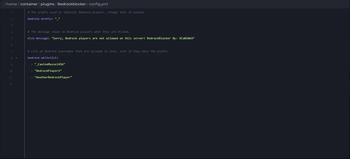
- Customizable Configuration: Personalize the prefix used for Bedrock detection and customize the kick message shown to restricted players.
- Whitelist Support: Create a whitelist of specific Bedrock players who are allowed to join, even on restricted backend servers.
- Admin-Friendly Reload Command: Easily update the configuration on the fly with the
/blocker reloadcommand, available to operators only.
BedrockBlocker is the perfect solution for network administrators who need precise control over where Bedrock players can and cannot join. It ensures a smooth and managed experience across your Minecraft network.
- Edition: Minecraft Java
- File type: .jar
- Minecraft versions listed: 1.21, 1.21.1, 1.21.2
- How to install: Install the matching mod loader (Forge, Fabric or NeoForge) for your Minecraft version. → Download the .jar. → Put it in the .minecraft/mods folder and launch that loader profile.
- Where to get it: Opens on Modrinth — not every file is mirrored on our own servers.
Install steps are the general flow for this file type — How to install Minecraft Java mods & modpacks walks through it step by step.
- Ships as bedrockblocker-1.2.jar — drop this file into the mods folder
- Download size: 5 KB
- Download link checked 2 Nov 2026 — working
These come from our own check of the pack file, not from the source page.