
SoundPlayer
Set a region to play a vanilla sound on enter or a custom made sound/music using items adder or other methods. 1.21+
⬇ Download on Modrinth
SoundPlayer
Version: 1.1 Author: XCaNiNeX
See it in action on caninecraft.reviverealm.net
Overview
SoundPlayer is a plugin that lets you create custom sound regions on your server. Play immersive sounds when players enter specific areas like hubs, spawn points, or mini-games. Regions can now be configured with different playback modes, loop timing, volume, and pitch for more control over how sounds behave.
Commands
Primary command:
/playerAliases:/looper,/spl
Set Region Corners
/player pos1Set the first corner of the region at your location.- Example:
/player pos1
- Example:
/player pos2Set the second corner of the region at your location.- Example:
/player pos2
- Example:
Sound Formats
- Minecraft sound example:
entity.player.levelup - Minecraft Sound List: Minecraft Sound List
- Sounds and Music Discs now added to tab completion!
- Custom sound example:
iamusic:music_disc.mozart(Example of a custom sound provided by ItemsAdder or a resource pack)
Create and Manage Regions
/player set <name> <sound> [message]Create a region with a name, sound, and an optional enter message.- Example:
/player set spawn_area entity.player.levelup &6Welcome to spawn!
- Example:
/player setmode <region> <mode> <loop-delay>Change how a region plays its sound.Long sounds or music discs need delay to match duration
- Modes:
ON_ENTER,LOOP,INTERVAL - Example:
/player setmode spawn_area LOOP <ticks>
- Modes:
/player play <name>Activate the region.- Example:
/player play spawn_area
- Example:
/player stop <name>Deactivate the region.- Example:
/player stop spawn_area
- Example:
/player remove <name>Delete the region permanently.- Example:
/player remove spawn_area
- Example:
Player Controls
/player toggleEnable or disable region sounds for yourself.- Useful for players who prefer silence in hubs or busy areas.
Plugin Management
/player reloadReloads the plugin’s configuration and region data.- Example:
/player reload
- Example:
How It Works
- Define a region: Use
/player pos1and/player pos2to set corners. - Create a region: Use
/player set <name> <sound> [message]to save it. - Choose playback behavior: Use
/player setmodeto control how the sound plays. - Activate: Use
/player play <name>to enable the region. - Manage: Use
/player stopto deactivate or/player removeto delete.
Configuration
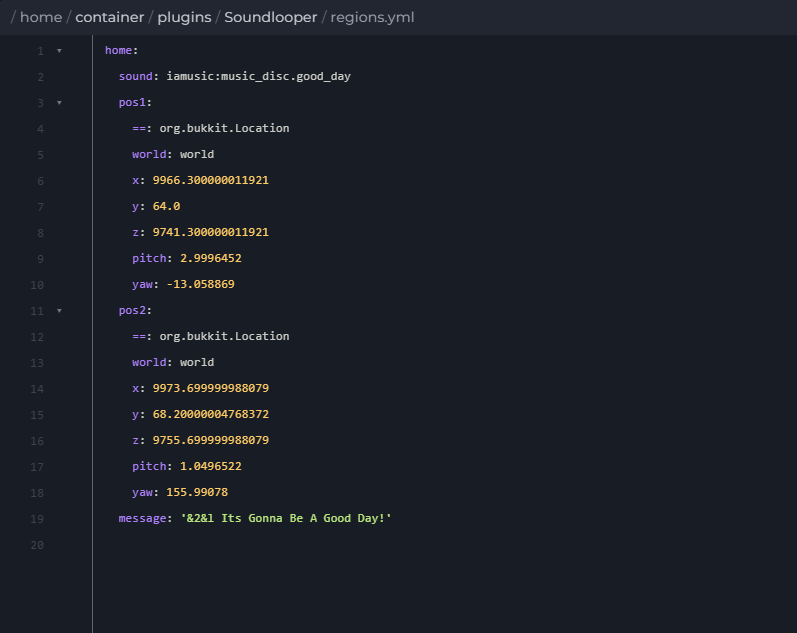
regions.ymlStores region bounds, sounds, messages, playback mode, volume, pitch, and loop timing.active_regions.ymlTracks which regions are active across restarts.
Compatibility
- Minecraft Version: 1.21+
- Dependencies: None
Enjoy creating immersive soundscapes on your server with SoundPlayer.
- Edition: Minecraft Java
- File type: .jar
- Minecraft versions listed: 1.21, 1.21.1, 1.21.2
- How to install: Install the matching mod loader (Forge, Fabric or NeoForge) for your Minecraft version. → Download the .jar. → Put it in the .minecraft/mods folder and launch that loader profile.
- Where to get it: Opens on Modrinth — not every file is mirrored on our own servers.
Install steps are the general flow for this file type — How to install Minecraft Java mods & modpacks walks through it step by step.
- Ships as soundplayer-1.1.jar — drop this file into the mods folder
- Download size: 27 KB
- Download link checked 1 Sept 2026 — working
These come from our own check of the pack file, not from the source page.