
FoodAllergy Plugin
Overview
The FoodAllergy plugin adds an exciting twist to your Minecraft gameplay by implementing a food allergy system. Each player create a unique allergy list upon their first join, determining their sensitivity to a variety of foods. Players will not know their allergies in advance, making the first consumption of an allergenic food a surprising and thrilling experience. This feature encourages players to experiment with diverse food options while managing their allergies, adding an extra layer of strategy and challenge
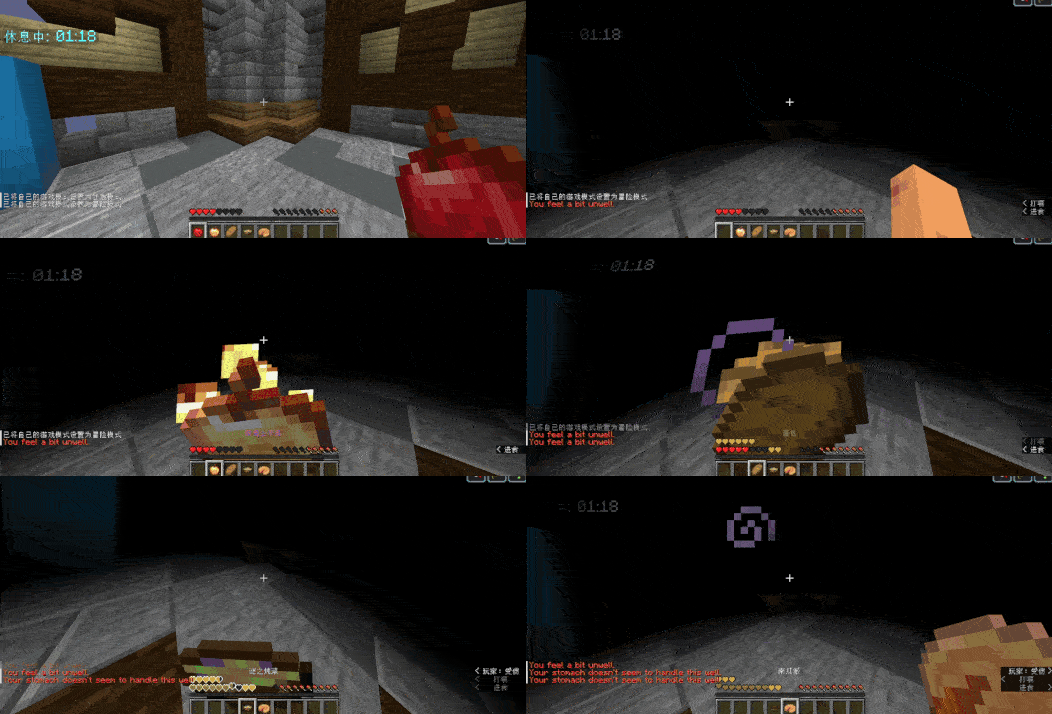
Features
- Randomized Allergy List: Each player receives a unique list of allergies upon first joining the server, ensuring that no two experiences are the same.
- Diverse Food Consumption: Players can explore a wide range of food items, but must be cautious of their allergies to avoid adverse effects.
- Allergy Levels: Allergies are categorized into different levels, each triggering specific potion effects:
- Low Level: Mild effects (e.g., nausea).
- Medium Level: Moderate effects (e.g., poison).
- High Level: Severe effects (e.g., wither).
- Customizable Messages: Server admins can easily customize messages for different allergy levels via the configuration file.
- Configurable Allergy Amount: Adjust the number of allergies a player can have for a tailored experience.
Configuration
The plugin includes a default config.yml file that can be modified to suit your server's needs. Players will not be informed of their allergies unless specified by the admin, adding to the challenge.
Installation
- Download the FoodAllergy plugin from Modrinth.
- Place the plugin in your server's
pluginsfolder. - Restart the server to generate the configuration file.
- Customize the
config.ymlas desired.
For any issues or feature requests, feel free to open an issue on the plugin's repository.
- Edition: Minecraft Java
- File type: .jar
- Minecraft versions listed: 1.8.9, 1.9, 1.9.1
- How to install: Install the matching mod loader (Forge, Fabric or NeoForge) for your Minecraft version. → Download the .jar. → Put it in the .minecraft/mods folder and launch that loader profile.
- Where to get it: Opens on Modrinth — not every file is mirrored on our own servers.
Install steps are the general flow for this file type — How to install Minecraft Java mods & modpacks walks through it step by step.
- Ships as FoodAllergy-1.3.1.jar — drop this file into the mods folder
- Download size: 46 KB
- Download link checked 5 Sept 2026 — working
These come from our own check of the pack file, not from the source page.