
HexaForms
HexaForms – Minecraft menu plugin for Java & Bedrock with PlaceholderAPI. Features: Cross-platform forms, YAML menus, conditions, actions (cmds, msgs…
⬇ Download on Modrinth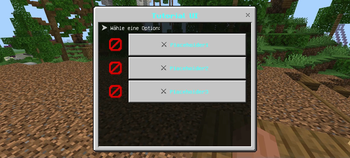
HexaForms
An advanced menu system for Minecraft servers with PlaceholderAPI integration, Bedrock form support, and DeluxeMenus conversion.
Features
- Java & Bedrock Support: Automatic detection of Bedrock players and display of native forms
- Dropdown Menus: Interactive dropdown menus for Bedrock players with custom options
- Multi-Dropdown Forms: Advanced 3-dropdown forms for complex selections (ban commands, etc.)
- DeluxeMenus Converter: Convert DeluxeMenus configurations to HexaForms format automatically
- PlaceholderAPI Integration: Full support for all PlaceholderAPI placeholders
- Flexible Configuration: Simple YAML-based menu configuration
- Condition Checking: Advanced condition checking for menu items
- Action System: 30+ actions including commands, messages, sounds, dropdowns, and more
- Enchantment Support: Support for enchantments and glow effects
- Economy & Permissions: Vault integration for economy and permission management
Installation
Make sure you have the following plugins installed:
- PlaceholderAPI (required)
- Floodgate (optional, for Bedrock support)
- Geyser (optional, for Bedrock support)
- Vault (optional, for economy/permission actions)
Download the HexaForms.jar to your plugins folder
Restart the server
Configure the menus in the
plugins/HexaForms/menus/folder
Quick Start
Convert DeluxeMenus (New!)
If you're migrating from DeluxeMenus:
- Place your DeluxeMenus
.ymlfiles inplugins/HexaForms/dmconvert/ - Run
/hexaconvert deluxemenus all(or/hexaconvert deluxemenus <filename>) - Converted menus appear in
plugins/HexaForms/menus/
See CONVERTER_README.md for detailed conversion guide.
Create a Menu
Create a YAML file in plugins/HexaForms/menus/:
title: "&6&lShop Menu"
size: 27

bedrock_form:
  title: "&6&lShop Menu"
  content: "&7Purchase items and equipment"
  buttons:
    - text: "&a&lWeapons"
      actions:
        - "[command] shop weapons"
        - "[sound] ENTITY_PLAYER_LEVELUP 1 1.5"

items:
  weapons_button:
    slot: 10
    material: DIAMOND_SWORD
    display-name: "&a&lWeapons"
    lore:
      - "&7Click to browse weapons"
    glowing: true
    actions:
      - "[command] shop weapons"
Configuration
Main Configuration (config.yml)
messages:
  player-only: "&cThis command can only be used by players!"
  menu-not-found: "&cMenu '%menu%' not found!"
  no-permission: "&cYou don't have permission!"
  condition-denied: "&cYou don't meet the requirements for this!"
  reloaded: "&aPlugin reloaded successfully!"

default-menu: "main_menu"
auto-save: true
debug-mode: false

placeholders:
  enabled: true
  cache-time: 1000

bedrock:
  enabled: true
  fallback-to-java: true
  image-cache: true
Commands
/menu [menuName]- Opens a menu (default: main_menu)/menureload- Reloads the configuration/hexaconvert <deluxemenus> <all|file_name>- Converts DeluxeMenus to HexaForms (NEW!)
Permissions
hexaforms.menu.use- Allows access to menus (default: true)hexaforms.reload- Allows reloading the plugin configuration (default: op)hexaforms.admin- Allows access to admin menus (default: op)hexaforms.convert- Allows using the converter command (default: op) (NEW!)
Actions
Command Actions
[command] <command>- Executes a command as the player[console] <command>- Executes a command from the console[commandevent] <command>- Executes an unregistered command as the player
Message Actions
[message] <text>- Sends a message to the player[broadcast] <text>- Sends a message to everyone online[minimessage] <text>- Sends a message using MiniMessage format[minibroadcast] <text>- Broadcasts using MiniMessage format[json] <JSON-text>- Sends a JSON message to the player[jsonbroadcast] <JSON-text>- Broadcasts a JSON message[chat] <message>- Sends a message in chat as the player
Menu Control Actions
[command] menu <menu-name>- Opens another menu[close]- Closes the currently opened menu[refresh]- Refreshes items in the current menu view
Network Actions
[connect] <server-name>- Connects the player to a server on BungeeCord
Sound Actions
[sound] <sound> <volume> <pitch>- Plays a sound for the player[broadcastsound] <sound> <volume> <pitch>- Broadcasts a sound to all players[broadcastsoundworld] <sound> <volume> <pitch>- Broadcasts a sound to all players in the world
Economy Actions (Vault required)
[givemoney] <amount>- Gives money to the player[takemoney] <amount>- Takes money from the player
Experience Actions
[giveexp] <amount>L- Gives exp levels (add L) or points to a player[takeexp] <amount>L- Takes exp levels or points from a player
Permission Actions (Vault required)
[givepermission] <perm.node>- Gives a permission to a player[takepermission] <perm.node>- Takes a permission from a player
Meta Data Actions
[meta] <set/remove/add/subtract/switch> <key> <type> <value>- Modifies player meta data
Placeholder Actions
[placeholder] <papi-placeholders>- Parses placeholders for a player
Dropdown Menu Actions (Bedrock Only)
Player Dropdown
[playerdropdown] <title>|<content>|<actions>
Shows a dropdown with all online players.
Placeholders:
%selected_player%- The selected player name%player_name%- The executing player's name
Example:
- "[playerdropdown] &6Teleport|&7Select a player:|[console] tp %player_name% %selected_player%;[message] &aYou have been teleported!"
Custom Dropdown
[dropdown] <title>|<content>|<options>|<actions>
Shows a dropdown with custom options.
Placeholders:
%selected_option%- The selected option text%selected_index%- The index of the selected option (0-based)
Example:
- "[dropdown] &aGamemode|&7Choose:|Survival,Creative,Adventure|[console] gamemode %selected_option% %player_name%"
Multi-Dropdown (NEW!)
[multidropdown] <title>|<content>|<label1>|<label2>|<label3>|<options1>||<options2>||<options3>||<actions>
Shows 3 dropdowns in one form. Perfect for ban commands!
Placeholders:
%selected_option_1%,%selected_option_2%,%selected_option_3%- Selected options%selected_index_1%,%selected_index_2%,%selected_index_3%- Selected indices
Example (Ban Command):
- "[multidropdown] &c&lBan Player|&7Select player, duration, and reason|Player|Duration|Reason|Player1,Player2,Player3||1h,24h,7d,Permanent||Hacking,Spam,Beleidigung||[console] ban %selected_option_1% %selected_option_2% %selected_option_3%;[message] &a%selected_option_1% was banned!"
Action Examples
actions:
  # Commands
  - "[command] warp spawn"
  - "[console] give %player_name% diamond 1"

  # Messages
  - "[message] &aWelcome to the shop!"
  - "[broadcast] &6%player_name% entered the shop!"
  - "[minimessage] <gradient:green:blue>Welcome!</gradient>"

  # Sounds
  - "[sound] ENTITY_PLAYER_LEVELUP 1 1.5"
  - "[broadcastsound] ENTITY_EXPERIENCE_ORB_PICKUP 1 1"

  # Economy
  - "[givemoney] 1000"
  - "[takemoney] 500"

  # Experience
  - "[giveexp] 10L"
  - "[takeexp] 5"

  # Permissions
  - "[givepermission] shop.vip"
  - "[takepermission] shop.basic"

  # Menu Control
  - "[command] menu vip_shop"
  - "[close]"
  - "[refresh]"

  # Dropdowns (Bedrock Only)
  - "[playerdropdown] Select Player|Choose:|[console] tp %player_name% %selected_player%"
  - "[dropdown] Choose|Select:|Option1,Option2|[message] You selected %selected_option%!"
  - "[multidropdown] Ban|Select player, time, reason|Player|Time|Reason|P1,P2||1h,24h||Hack,Spam||[console] ban %selected_option_1% %selected_option_2%"
Conditions
Available Condition Types
permission:<permission>- Checks permissionsplaceholder:<placeholder> <operator> <value>- Checks placeholder valuesworld:<worldname>- Checks the player's worldgamemode:<gamemode>- Checks the game modetime:<range>- Checks the game time
Examples
conditions:
  - "permission:shop.weapons"
  - "placeholder:vault_eco_balance >= 1000"
  - "world:world"
  - "gamemode:survival"
  - "time:0-12000"
PlaceholderAPI
The plugin supports all PlaceholderAPI placeholders:
%player_name%- Player name%vault_eco_balance%- Account balance (Vault)%player_health%- Player health%player_world%- Current world- And many more...
Bedrock Support
For Bedrock players, native forms are automatically displayed:
- Automatic detection of Bedrock players
- Native form API with dropdown support
- Image support (URL and path)
- Interactive dropdown menus for player/option selection
- Multi-dropdown forms for complex selections
- Fallback to Java menus if problems occur
Example Menus
The plugin includes several example menus:
- main_menu.yml - Main navigation menu
- teleport_menu.yml - Player teleport with dropdown (Bedrock)
- shop_menu.yml - Shop with items and categories
- admin_menu.yml - Admin tools and commands
Troubleshooting
Common Issues
- Menu not displaying: Check permissions and configuration
- Placeholders not working: Make sure PlaceholderAPI is installed
- Bedrock forms not working: Check Floodgate/Geyser installation
- Dropdown not showing: Only works for Bedrock players - Java players see chest menus
- Converter not working: Place DeluxeMenus files in
plugins/HexaForms/dmconvert/
Debug Mode
Enable debug mode in config.yml:
debug-mode: true
Version History
See CHANGELOG.md for detailed version history.
Current Version: 1.1.2
- Added DeluxeMenus Converter
- Added Multi-Dropdown Action
- Fixed color code handling for Bedrock forms
- Enhanced placeholder support
Support
For problems or questions:
- Check the server logs
- Make sure all dependencies are installed
- Test with debug mode
- Check CHANGELOG.md for recent changes
- Discord
License
This plugin is licensed under CC-BY-NC-4.0.
- Edition: Minecraft Java
- File type: .jar
- Minecraft versions listed: 1.16, 1.16.1, 1.16.2
- How to install: Install the matching mod loader (Forge, Fabric or NeoForge) for your Minecraft version. → Download the .jar. → Put it in the .minecraft/mods folder and launch that loader profile.
- Where to get it: Opens on Modrinth — not every file is mirrored on our own servers.
Install steps are the general flow for this file type — How to install Minecraft Java mods & modpacks walks through it step by step.
- Ships as HexaForms-1.1.3.jar — drop this file into the mods folder
- Download size: 100 KB
- Download link checked 5 Sept 2026 — working
These come from our own check of the pack file, not from the source page.