
Then this plugin is just for you!
What is BetterNations
BetterNations transforms your Minecraft server into a dynamic world of politics, warfare, and nation-building. Players can create their own countries, forge alliances, raise armies, and conquer rivals—all within the blocky universe they love. This plugin brings grand strategy to life in a way that’s both accessible and endlessly engaging.
Whether your server has 100+ players online or is just a small SMP with a few friends, this plugin works just fine!
Modernized & User-friendly
- Performance in mind: With asynchronous processing, the plugin wouldn't lag with more than millions of claims! (Yes, I've actually tested...)
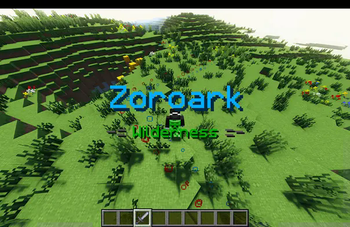
- Intuitive visual effects with particles & holograms!
Features
Nation & Lands
- Democracy or dictatorship, it's your choice
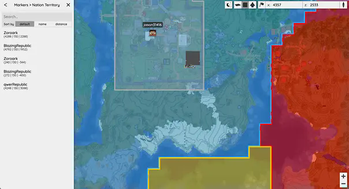
- Claim territory and expand your borders; protect your homeland from enemies!
Diplomacy & Warfare
- Form alliances or declare war on rival nations
- Build armies, strategize battles, and conquer enemy lands
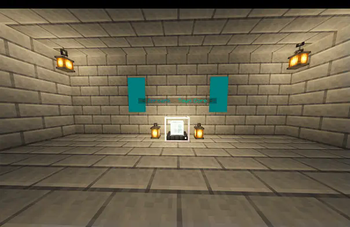
- Construct defenses and fortify your lands
Technology & Crafting
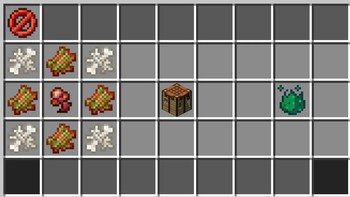
- Players can craft weapons and tools for themselves or put them into barracks to train units
- The recipes/units are COMPLETELY CUSTOMIZABLE!!! You can even add your own items/units into the game!
- The recipes in the plugin by default are only an example. If you are 1.21+ server, you may check out the repository page for a pre-made crafting system configuration!
Plugins supported:
- Vault (and another economy plugin): For economy integrations
- Bluemap (Optional): For web map integrations/border displays
If you are a Chinese server owner, you may also join our QQ group chat: 458787362! Chinese translations and support are provided.
The plugin is still in its BETA phase, which means that there might be some issues and bugs, but I will try my best to fix them as soon as possible!
The GUIs are currently not completed, but their functionalities have been covered by the commands.
If you find any issues in the plugin, please report to me via jason31416@163.com. I will try my best to fix it as soon as possible.
- Edition: Minecraft Java
- File type: .jar
- Minecraft versions listed: 1.20, 1.20.1, 1.20.2
- How to install: Install the matching mod loader (Forge, Fabric or NeoForge) for your Minecraft version. → Download the .jar. → Put it in the .minecraft/mods folder and launch that loader profile.
- Where to get it: Opens on Modrinth — not every file is mirrored on our own servers.
Install steps are the general flow for this file type — How to install Minecraft Java mods & modpacks walks through it step by step.
- Ships as BetterNations-BETA-2.8.4.jar — drop this file into the mods folder
- Download size: 3.6 MB
- Download link checked 5 Sept 2026 — working
These come from our own check of the pack file, not from the source page.