














» MultiWarp is a versatile plugin designed for Minecraft servers to streamline warp creation and management. With MultiWarp, server administrators can easily set up and organize multiple warp points throughout their world, providing players with a convenient way to travel quickly and efficiently.

» All permissions follow the same schema <multiwarp.command.warp.COMMAND>
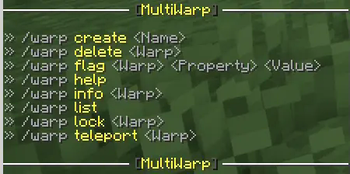
/warp create <Name>
/warp delete <Warp>
/warp flag <Warp> <Property> <Value>
/warp help
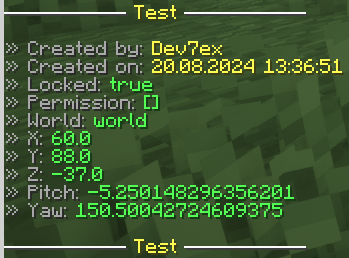
/warp info <Warp>
/warp list
/warp lock <Warp>
/warp teleport <Warp>


Download the Latest Jar File
Go to the Modrinth Page to download the needed version of the MultiWarp plugin and any other required plugins.Put Both Plugins in Your "Plugins" Folder
Ensure both the MultiWorld and FacilisCommon plugins are placed in your server'spluginsfolder.Restart the Server
Restart your Minecraft server to load the plugins and apply the changes.Enjoy!
You're all set to use MultiWorld! Enjoy managing multiple worlds on your server.

[
- Edition: Minecraft Java
- File type: .jar
- Minecraft versions listed: 1.16, 1.17, 1.18
- How to install: Install the matching mod loader (Forge, Fabric or NeoForge) for your Minecraft version. → Download the .jar. → Put it in the .minecraft/mods folder and launch that loader profile.
- Where to get it: Opens on Modrinth — not every file is mirrored on our own servers.
Install steps are the general flow for this file type — How to install Minecraft Java mods & modpacks walks through it step by step.
- Ships as MultiWarp-Bukkit-1.0.2-SNAPSHOT.jar — drop this file into the mods folder
- Download size: 69 KB
- Download link checked 5 Sept 2026 — working
These come from our own check of the pack file, not from the source page.