











VeinGuard is a robust, lightweight anti-xray solution designed to help server administrators identify and monitor suspicious mining patterns in real-time. By tracking specific block breaks and analyzing player behavior, VeinGuard provides the tools necessary to maintain a fair gaming environment without compromising server performance.
Unlike traditional anti-xray plugins that obfuscate blocks, VeinGuard focuses on behavioral detection, giving staff the evidence they need to take action.
🛡️ Core Detection & Analysis
- Intelligent Tracking: Monitors specific block types (configured by you) and calculates break rates over customizable timeframes.
- Violation Level (VL) System: Assigns a "suspicion score" to players based on their mining activity. VL decays over time but triggers automated actions when thresholds are met.
- Mining Incident Model: Groups consecutive alerts into single "incidents" for a cleaner, more accurate overview of mining sessions.
- Anti-Spam Logic: Configurable cooldowns per block or per alert ensure your staff aren't overwhelmed by repetitive notifications.
📢 Multi-Channel Alerts
- In-Game Notifications: Instant alerts via Chat or Action Bar for online staff.
- Discord Integration: Seamless webhook support to log alerts directly to your staff channels.
- Console Logging: Detailed logs for administrative review.
- Automated Actions: Execute custom commands (e.g., mute, freeze, or kick) automatically when a player reaches a specific violation threshold.
🕵️ Staff Tools & Investigation
- Advanced Patrol System: Cycle through online players in Spectator mode with an automated UI and boss bar tracking.
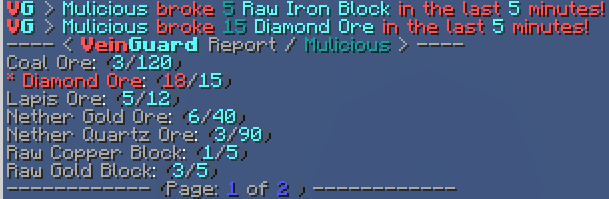
- Detailed Player Reports: Generate instant reports showing exact block counts and highlighted violations.
- History & Leaderboards: Access a persistent database (SQLite/MySQL) to view historical mining data and top violators over time.
- Staff Utility: Easily mute alerts for specific players or toggle your own notification visibility.
⚙️ Customization & Integration
- Dynamic Configuration: Reload settings and language files on-the-fly without restarting the server.
- Granular Bypasses: Exempt players via permissions globally or for specific materials.
- WorldGuard Support: Use the
veinguard-checkcustom flag to enable or disable tracking in specific regions. - Smart Filtering: Automatically ignores players in Creative mode, specific worlds, or above a defined Y-level.
📋 Requirements
- Java: Version 17 or newer.
- Platform: Spigot, Paper, Purpur (1.21+), or any compatible fork.
- Version: Minecraft 1.18+ (Spigot/Paper).
🚀 Quick Start
- Download: Grab the latest
.jarfrom Spigot, Modrinth, Hangar, or GitHub. - Install: Drop the file into your server's
plugins/directory. - Initialize: Start the server to generate the default configuration files.
- Configure: Adjust
config.ymlandlang.ymlto your preference. - Apply: Run
/vg reloadto apply changes instantly.

📖 How to Use
VeinGuard is designed to be intuitive for both administrators and staff. Below is a guide on how to get the most out of the plugin.
👑 For Server Owners & Admins
- Define Tracked Blocks: Open
config.ymlto specify which blocks VeinGuard should monitor (e.g.,DIAMOND_ORE,ANCIENT_DEBRIS). We have already provided a list of common blocks. - Set Thresholds: Configure the
thresholdfor each block. If a player breaks more than the threshold within the timeframe, an alert is triggered. - Configure Automated Actions: Use the Violation Level (VL) system to execute commands automatically (e.g.,
/kickor/freeze) when a player reaches a certain suspicion level. - Manage Regions: Use WorldGuard flags (
veinguard-check: deny) to disable tracking in areas like public mines or other areas where a player shouldn't be tracked.
👮 For Staff & Moderators
- Monitor Alerts: Keep an eye on in-game chat or Discord. Alerts group consecutive breaks into "Incidents" to prevent spam.
- Real-Time Investigation: Use
/vg check <player>to see a player's recent mining activity and current break rates. - Review History: Use
/vg history <player>to pull historical data from the database, even if the player is offline. - Active Patrol: Use
/vg patrol startto automatically cycle through online players in Spectator mode. The Boss Bar will keep you informed of their status. - Manage Notifications: Use
/vg toggle-alertsto hide notifications if you're busy, or/vg mute <player>to silence a specific (trusted) user.
👤 For Players
- Fair Play: Just play normally! VeinGuard is designed to ignore natural mining patterns and only flags highly suspicious, repetitive behavior.
- Privacy: Staff can only see mining statistics for tracked blocks; your other activities remain private.
🔍 Anatomy of a Mining Incident
To better understand how VeinGuard protects your server, let's walk through a typical detection scenario:
- The Trigger: A player mines a tracked block (e.g., Diamond Ore). VeinGuard immediately records this event in its internal cache.
- Threshold Check: If the player mines more blocks than allowed within your configured
timeframe(e.g., 15 diamonds in 5 minutes), an Alert is triggered. - Data Processing:
- In-Game: Staff receive a notification (Chat or Action Bar).
- Discord: A webhook sends detailed info (coordinates, light level, etc.) to your staff channel.
- Database: The incident is logged to the persistent database (SQLite or MySQL).
- Violation Levels (VL):
- Each alert adds to the player's VL score (based on the block's "weight").
- VL Decay: If the player stops mining suspiciously, their VL will naturally decrease over time.
- Automated Action: If the player's VL reaches a specific threshold (e.g., 50 VL), VeinGuard executes your pre-defined Violation Action (e.g.,
/kickor/freeze). - Staff Investigation:
- Real-time: Staff use
/vg check <player>to see the total number of tracked blocks they've mined in the last configured timeframe. - History: Staff use
/vg history <player>to review past incidents starting with the most recent, also displaying details such as block counts, coordinates, and timestamps. - Verdict: Staff can then teleport to the location or use
/vg patrolto monitor the player.
- Real-time: Staff use
🔑 Permissions Overview
veinguard.admin— Full access to all plugin features and commands.veinguard.mod— Standard moderator access. Includes:veinguard.notify,veinguard.bypass,veinguard.command.check,veinguard.command.help,veinguard.command.history,veinguard.command.top,veinguard.command.toggle-alerts,veinguard.command.tracked-blocks.list.
veinguard.notify— Receive in-game alert notifications.veinguard.bypass— Complete exemption from tracking.veinguard.bypass.[MATERIAL]— Exemption for a specific block (e.g.,veinguard.bypass.DIAMOND_ORE).veinguard.unmute— Permission to unmute players.veinguard.resetall— Permission to reset tracking for all players.veinguard.update— Receive update notifications on join.
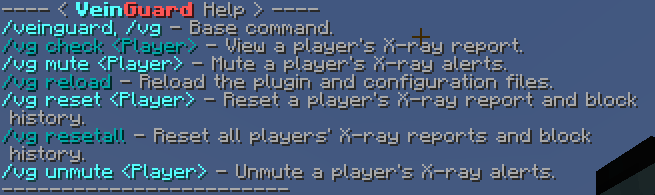
💻 Commands
| Command | Permission | Description | Example Usage |
|---|---|---|---|
/vg help [page] |
veinguard.command.help |
Displays a detailed list of all available commands and their usage. | /vg help 2 |
/vg check <player> |
veinguard.command.check |
Opens a real-time report of a player's recent mining activity, including exact block counts. | /vg check Notch |
/vg history <player> [time] |
veinguard.command.history |
Retrieves historical mining incidents from the database for investigation of offline players. | /vg history Notch 24h |
/vg top [time] |
veinguard.command.top |
Displays a leaderboard of players with the highest violation levels, block counts, and total alerts triggered. | /vg top 7d |
/vg patrol <action> |
veinguard.command.patrol |
Manage the automated staff patrol: start, stop, pause, resume, next, or back. |
/vg patrol start |
/vg msg <player> <msg> |
veinguard.command.msg |
Sends a formatted plugin message to a player (useful for automated violation actions). | /vg msg Notch Fair play only! |
/vg staffmsg <msg> |
veinguard.command.staffmsg |
Broadcasts an administrative message to all staff members with notification permissions. | /vg staffmsg Checking Notch. |
/vg mute <player> |
veinguard.command.mute |
Silences all future alert notifications for a specific player (e.g., for trusted members). | /vg mute Notch |
/vg unmute <player> |
veinguard.command.unmute |
Restores alert notifications for a previously muted player. | /vg unmute Notch |
/vg toggle-alerts [player] |
veinguard.command.toggle-alerts |
Toggles your own alert visibility or manages it for another staff member. | /vg toggle-alerts |
/vg tracked-blocks <add/list/remove> |
veinguard.command.tracked-blocks.[add/list/remove] |
Real-time management of which blocks are being monitored by the system. | /vg tracked-blocks add DIAMOND_ORE 15 Diamond Ore |
/vg reload |
veinguard.command.reload |
Hot-reloads all configuration and language files without requiring a server restart. | /vg reload |
/vg reset <player> |
veinguard.command.reset |
Completely clears a specific player's current break history and Violation Level (VL). | /vg reset Notch |
/vg resetall |
veinguard.command.resetall |
Wipes active tracking data and VL scores for all online players simultaneously. | /vg resetall |
/vg purge <time> [player] |
veinguard.command.purge |
Manually removes old historical data from the database to keep it optimized. | /vg purge 30d |
🔗 Useful Links
- 📖 Documentation & Wiki: Detailed guides and configuration help.
- 🐞 Issue Tracker: Report bugs or suggest new features.
- 💬 Discord Support: Get help and stay updated.
- 📊 Plugin Metrics: View our anonymous usage statistics.
- Edition: Minecraft Java
- File type: .jar
- Minecraft versions listed: 1.18, 1.18.1, 1.18.2
- How to install: Install the matching mod loader (Forge, Fabric or NeoForge) for your Minecraft version. → Download the .jar. → Put it in the .minecraft/mods folder and launch that loader profile.
- Where to get it: Opens on Modrinth — not every file is mirrored on our own servers.
Install steps are the general flow for this file type — How to install Minecraft Java mods & modpacks walks through it step by step.
- Ships as veinguard-2.0.0.jar — drop this file into the mods folder
- Download size: 190 KB
- Download link checked 5 Sept 2026 — working
These come from our own check of the pack file, not from the source page.