
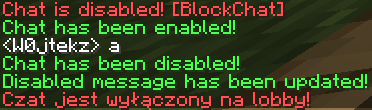
ChatBlocker is a lightweight and easy-to-use chat control plugin for Spigot and Paper servers. It lets you quickly enable or disable the server chat, making it perfect for staff announcements, events, or keeping things calm during busy moments.
Features
- Instant toggle. Turn the chat on or off instantly with a simple command.
- Custom message. Set a personalized message that players see when chat is disabled.
- Saves your settings. Remembers chat state and message across restarts.
- Lightweight and efficient. No dependencies, minimal performance impact.
Commands:
/blockchat— Toggle the chat on or off./blockchat message <text>— Change the message displayed when chat is disabled.
Example:
/blockchat
> Chat has been disabled!

/blockchat message Chat is currently off for maintenance!
> Disabled message has been updated!
Quick facts
- Edition: Minecraft Java
- File type: .jar
- Minecraft versions listed: 1.18, 1.18.1, 1.18.2
- How to install: Install the matching mod loader (Forge, Fabric or NeoForge) for your Minecraft version. → Download the .jar. → Put it in the .minecraft/mods folder and launch that loader profile.
- Where to get it: Opens on Modrinth — not every file is mirrored on our own servers.
Install steps are the general flow for this file type — How to install Minecraft Java mods & modpacks walks through it step by step.
Verified by MCModsHub
- Ships as BlockChat.jar — drop this file into the mods folder
- Download size: 5.6 MB
- Download link checked 5 Sept 2026 — working
These come from our own check of the pack file, not from the source page.