


Effective Minecraft moderation tools designed to prevent cheating, maintaining staff integrity and community trust.
AdminToolbox supports Folia.
Features & Commands
Spectate
/spectate, /admin, /target
Enter admin mode, which creates a separate temporary inventory that is deleted when exiting. The player is placed in Spectator Mode until they reveal or exit admin mode.
While spectating, the player can use the command again to exit admin mode. The player will be teleported back to their original location, placed back into survival mode, and their original inventory will be restored.
Target Locations
/target- Enter admin mode at current location/target <player>- Enter admin mode at a specified player's location/target <x> <y> <z> [world]- Enter admin mode at specific coordinates/target <x> <z> [world]- Enter admin mode at specific coordinates (uses the highest Y-level block at that location)
Targeting Spawn
/spawn, /targetspawn
/spawn- Enter admin mode at the current world's spawn point/spawn <world>- Enter admin mode at the provided world's spawn point
Navigation
/back- Move to previous location in teleport history/forward- Move to next location in teleport history
Reveal
/reveal, /show
While spectating in admin mode, running this command places the player into survival mode at their current location. This makes the admin visible to players during confrontations while maintaining:
- Temporary inventory
- Immunity to damage
- No mob targeting
Fullbright
/fullbright, /nightvision
/fullbright- Toggle fullbright for the current admin session/fullbright <on|off>- Enable or disable fullbright for the current admin session
Yell
/yell <player> <message>
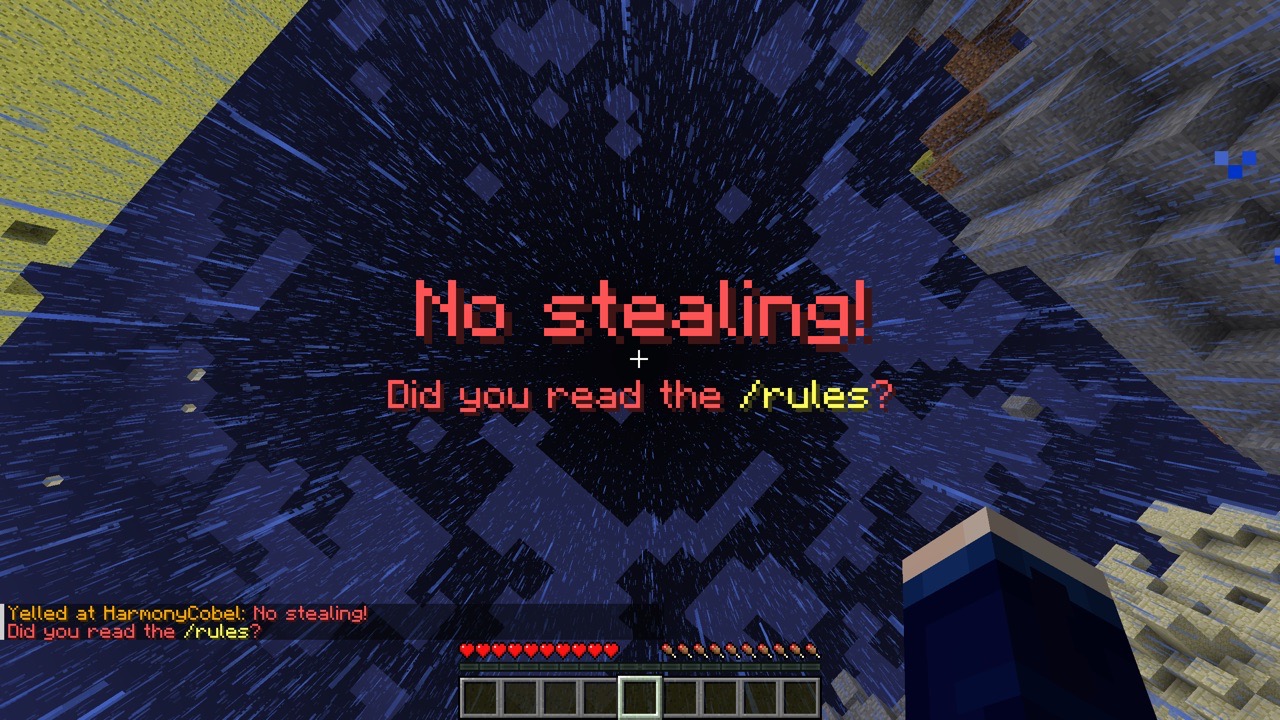
Forcibly displays a large red title on the targeted player's screen.
Use the pipe character (|) to separate title and subtitle: title | subtitle.
Legacy ampersand color codes are supported. (i.e. No stealing! | Did you read the &e/rules&r?)
Freeze
/freeze <player>
Stops the target player from moving until released.
Frozen players:
- can look around freely
- can fall downward
- can use containers
- cannot place or break blocks
- cannot take any damage
- cannot hurt other entities (including players)
- cannot be targeted by mobs
To release a frozen player, use /unfreeze <player>
Streamer Mode
Requires LuckPerms.
/streamermode <duration>, /pausealerts <duration>
Allows players to temporarily disable certain permissions (i.e. those that give them staff-only alerts), intended for use when screen sharing or live-streaming gameplay.
Placeholder
When PlaceholderAPI is available, a placeholder is made available to display when a player has streamer mode active.
%rel_streamermode_tag%: Displays a⬤tag in red when streamer mode is active.%rel_streamermode_prefix%: Displays the tag followed by a space when streamer mode is active.%rel_streamermode_suffix%: Displays the tag preceded by a space when streamer mode is active.
Permissions
| Permission | Description |
|---|---|
admintoolbox.target |
Use /target at current location |
admintoolbox.target.player |
Use /target <player> |
admintoolbox.target.location |
Use /target <x> [y] <z> [world] |
admintoolbox.reveal |
Use /reveal |
admintoolbox.yell |
Use /yell |
admintoolbox.freeze |
Use /freeze and /unfreeze |
admintoolbox.spawn |
Use /spawn in current world |
admintoolbox.spawn.all |
Use /spawn [world] |
admintoolbox.fullbright |
Use /fullbright while in admin mode |
admintoolbox.broadcast.receive |
Receive alerts about others' targets actions. |
admintoolbox.broadcast.exempt |
Do not send alerts to players with admintoolbox.broadcast.receive |
admintoolbox.streamermode |
Use streamer mode |
admintoolbox.streamermode.unlimited |
Bypass maximum streamer mode duration. (Set in config.yml) |
admintoolbox.streamermode.placeholder.wear |
Wear the streamer mode status placeholder. |
admintoolbox.streamermode.placeholder.view |
View other players' streamer mode status placeholders. |
Integrations
- LuckPerms
- Required for streamer mode.
- New in version 1.4.0: Custom context for conditionally applying permissions based on admin state.
admintoolbox:statecan be any ofspectating,revealed, ornormal(not in admin mode).
- BlueMap
- The plugin will hide admins who are revealed from the map.
- PlaceholderAPI
- The plugin provides a placeholder for players' streamer mode status.
- Players must have the appropriate permissions to wear and view the placeholder.
Analytics
Added in version 1.4.0.
For us to better understand how many servers are using AdminToolbox, by default we collect anonymized analytics via
bStats. Server administrators can disable this functionality on their servers by setting enabled: false in
plugins/bStats/config.yml.
The anonymized collected data is viewable publicly at https://bstats.org/plugin/bukkit/AdminToolbox/26406.
- Edition: Minecraft Java
- File type: .jar
- Minecraft versions listed: 1.20.4, 1.20.5, 1.20.6
- How to install: Install the matching mod loader (Forge, Fabric or NeoForge) for your Minecraft version. → Download the .jar. → Put it in the .minecraft/mods folder and launch that loader profile.
- Where to get it: Opens on Modrinth — not every file is mirrored on our own servers.
Install steps are the general flow for this file type — How to install Minecraft Java mods & modpacks walks through it step by step.
- Ships as AdminToolbox-1.5.2.jar — drop this file into the mods folder
- Download size: 109 KB
- Download link checked 26 Sept 2026 — working
These come from our own check of the pack file, not from the source page.