
ClumpsNew
Java mod listed for Minecraft 1.21. Downloads from the MC Java Mods app on Android.
This project adds smart XP orb merging and instant collection to reduce lag, improve performance, and create a smoother, more customizable gameplay…
⬇ Download on Modrinth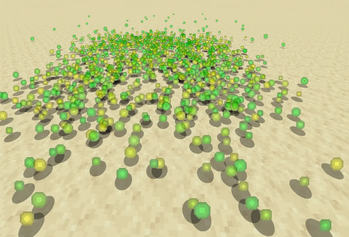
ClumpsNew

Description
ClumpsNew is a Paper plugin designed to improve how XP orbs behave in Minecraft by merging nearby orbs and instantly collecting them when players are close. This reduces lag and provides a smoother gameplay experience.
Features
• XP Orb Merging: Merges nearby orbs to reduce lag
• Instant Absorption: Collect XP instantly when nearby
• Customizable Settings: Fully configurable via config.yml
• XP Boost: Optional multiplier for extra XP
• Merge Animations: Toggleable particle effects
• World Support: Per-world configuration options
• Duplication Protection: Prevents XP duplication issues
The plugin can be easily customized via the config.yml file:
# ClumpsNew Configuration

merge-radius: 2.0
min-xp-to-merge: 5
merge-interval-seconds: 10
instant-collect-radius: 1.5

enable-instant-collect: true
enable-merging: true

xp-boost-multiplier: 1.1
enable-xp-boost: true

enable-merge-animations: true
prevent-orb-duplication: true

world-settings:
  overworld:
    merge-radius: 2.0
    min-xp-to-merge: 5
    merge-interval-seconds: 10
    enable-instant-collect: true
Connect With Us
• Discord - Join our community for support and discussions.
- Edition: Minecraft Java
- File type: .jar
- Minecraft versions listed: 1.21, 1.21.1, 1.21.2
- How to install: Install the matching mod loader (Forge, Fabric or NeoForge) for your Minecraft version. → Download the .jar. → Put it in the .minecraft/mods folder and launch that loader profile.
- Where to get it: Opens on Modrinth — not every file is mirrored on our own servers.
Install steps are the general flow for this file type — How to install Minecraft Java mods & modpacks walks through it step by step.
- Ships as ClumpsNew-1.0.0.jar — drop this file into the mods folder
- Download size: 17 KB
- Download link checked 6 Nov 2026 — working
These come from our own check of the pack file, not from the source page.