
ExtraGreetings
A feature-rich greeting plugin for Minecraft servers with customizable particles, titles, subtitles, action bars, boss bars, chat messages, and more.
⬇ Download on Modrinth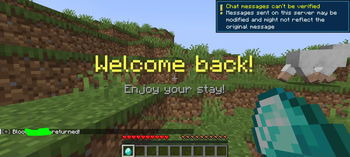
🎉 ExtraGreetings
A feature-rich greeting plugin for Minecraft servers with Folia support, Adventure API, MiniMessage, and optimized for Minecraft 1.20.1+.
✨ Features
- 🎭 Customizable Join Greetings - Welcome players with titles, subtitles, action bars, boss bars, particles, sounds, and chat messages
- 🎪 First-Time Join Detection - Different greetings for new players vs returning players
- 👑 VIP Support - Special greetings for VIP players with permissions (now includes quit messages!)
- 🚪 Permission-Based Quit Messages - VIP and regular quit messages with different effects
- ⚡ Folia Compatibility - Full support for Folia's scheduler
- 🎨 MiniMessage Support - Rich text formatting with gradients, colors, and effects
- 🔧 PlaceholderAPI Integration - Support for custom placeholders
- ⏰ Cooldown System - Prevent spam with configurable cooldowns
- 🎯 Command Execution - Run commands on join/quit events
- 📊 Built-in Statistics - Track player joins and active features
- 🔄 Live Reload - Reload configuration without restarting
- 🛠️ Config Updater - Automatic configuration updates with backup system
- 🧪 Enhanced Test Command - Actually test greetings instead of just logging
📋 Requirements
- Minecraft 1.20.1+
- Folia or Paper server
- Java 17+
- Optional: PlaceholderAPI for additional placeholders
⚙️ Configuration
The plugin generates a default configuration file at plugins/ExtraGreetings/config.yml. Here's an example:
# ExtraGreetings Configuration
settings:
  enableJoin: true
  enableQuit: true
  cooldownSeconds: 60
  debug: false
  joinDelay: 1

join:
  firstTime:
    title: "<gradient:#FF55FF:#55FFFF>Welcome</gradient>"
    subtitle: "<italic>%player% has joined for the first time!</italic>"
    actionbar: "<rainbow>Enjoy your stay!</rainbow>"
    bossbar:
      enable: true
      text: "Welcome, %player%!"
      color: BLUE
      style: SOLID
      duration: 10
    particles:
      enable: true
      effect: "HEART"
      count: 50
      offset: {x: 0.5, y: 1.0, z: 0.5}
      speed: 0.1
    sound:
      enable: true
      effect: "ENTITY_PLAYER_LEVELUP"
      volume: 1.0
      pitch: 1.0
    message: "<bold><gold>[+]</bold> <white>%player%</white> joined for the first time!"
    commands:
      - "give %player% diamond 1"
      - "broadcast &aWelcome new player %player%!"

  recurring:
    title: "<yellow>Welcome back!</yellow>"
    subtitle: "<gray>Enjoy your stay!</gray>"
    message: "<gray>[+]</gray> <white>%player%</white> returned!"

  vip:
    enable: true
    title: "<gradient:#FFD700:#FFA500>VIP</gradient> <gold>Welcome!</gold>"
    subtitle: "<yellow>%player% the VIP has joined!</yellow>"
    # ... more VIP settings

quit:
  # VIP quit greeting (for players with extragreetings.vip permission)
  vip:
    message: "<bold><gold>[VIP]</gold></bold> <yellow>%player%</yellow> has left the server!"
    particles:
      enable: true
      effect: "DRAGON_BREATH"
      count: 30
      offset: {x: 0.5, y: 1.0, z: 0.5}
      speed: 0.15
    sound:
      enable: true
      effect: "ENTITY_ENDER_DRAGON_FLAP"
      volume: 1.0
      pitch: 1.2
    commands:
      - "say VIP %player% has left the server!"

  # Regular quit greeting
  regular:
    message: "<gray>[-]</gray> <white>%player%</white> left the server."
    particles:
      enable: true
      effect: "SMOKE_NORMAL"
      count: 20
      offset: {x: 0.0, y: 0.5, z: 0.0}
      speed: 0.1
    sound:
      enable: true
      effect: "ENTITY_HORSE_SADDLE"
      volume: 0.8
      pitch: 1.0
    commands: []
🎮 Commands
| Command | Description | Permission |
|---|---|---|
/extragreetings |
Show help menu | extragreetings.admin |
/extragreetings reload |
Reload configuration | extragreetings.admin |
/extragreetings info |
Show plugin information | extragreetings.admin |
/extragreetings stats |
Show plugin statistics | extragreetings.admin |
/extragreetings debug [on/off] |
Toggle debug mode | extragreetings.admin |
/extragreetings reset [data/cooldowns] |
Reset plugin data | extragreetings.admin |
/extragreetings test [join/quit] |
Test greetings (actually triggers them!) | extragreetings.admin |
/extragreetings update |
Update configuration to latest version | extragreetings.admin |
Aliases: /eg
🔐 Permissions
| Permission | Description | Default |
|---|---|---|
extragreetings.admin |
Access to admin commands | op |
extragreetings.vip |
Receive VIP greetings (join AND quit) | false |
extragreetings.bypass.cooldown |
Bypass greeting cooldown | op |
🛠️ Configuration Updater
✨ Features:
- Automatic Updates: Updates configuration on plugin startup
- Comment Preservation: Maintains all your configuration comments
- Backup System: Creates timestamped backups before changes
- Manual Updates: Use
/extragreetings updateto force updates - Validation: Checks for invalid sound/particle effects
📁 Backup Location:
Backups are stored in /plugins/ExtraGreetings/backups/config.yml.timestamp.bak
🔄 How It Works:
- Startup: Plugin automatically checks for missing config options
- Updates: Adds new options with default values
- Cleanup: Removes obsolete configuration options
- Preservation: Keeps all your custom settings and comments
📝 Console Messages:
[ExtraGreetings] Added missing config option: quit.vip.message
[ExtraGreetings] Configuration updated successfully!
[ExtraGreetings] Config backed up to: config.yml.1234567890.bak
🎨 MiniMessage Formatting
ExtraGreetings supports full MiniMessage formatting:
title: "<gradient:#FF55FF:#55FFFF>Welcome</gradient>"
subtitle: "<italic><yellow>%player%</yellow> has joined!</italic>"
actionbar: "<rainbow>Enjoy your stay!</rainbow>"
message: "<bold><gold>[+]</gold></bold> <white>%player%</white> joined!"
Available Tags:
<bold>,<italic>,<underlined>,<strikethrough><color:#hex>,<red>,<green>,<blue>, etc.<gradient:#start:#end>,<rainbow><click:run_command:/command>,<hover:show_text:text>
🏷️ Placeholders
Built-in Placeholders
%player%- Player name%player_displayname%- Player display name%player_uuid%- Player UUID%online_players%- Online player count%max_players%- Maximum players%server_name%- Server name%current_time%- Current time%server_uptime%- Server uptime%plugin_version%- Plugin version
PlaceholderAPI Support
When PlaceholderAPI is installed, you can use any available placeholder:
%player_level%- Player level%vault_eco_balance%- Player balance%luckperms_prefix%- Player prefix- And many more!
🎆 Particle Effects
Supported particle effects include:
HEART,VILLAGER_HAPPY,FLAME,SMOKE_NORMALEXPLOSION_LARGE,FIREWORKS_SPARK,ENCHANTMENT_TABLESNOWFLAKE,WATER_BUBBLE,REDSTONE- NEW:
DRAGON_BREATH(used in VIP quit greetings) - And all other Bukkit particle types
🔊 Sound Effects
Supported sound effects include:
ENTITY_PLAYER_LEVELUP,ENTITY_EXPERIENCE_ORB_PICKUPENTITY_ENDER_DRAGON_GROWL,ENTITY_HORSE_SADDLEBLOCK_ANVIL_USE,ENTITY_FIREWORK_ROCKET_LAUNCH- NEW:
ENTITY_ENDER_DRAGON_FLAP(used in VIP quit greetings) - And all other Bukkit sound types
🎯 Boss Bar Configuration
bossbar:
  enable: true
  text: "Welcome, %player%!"
  color: BLUE    # BLUE, RED, GREEN, YELLOW, PURPLE, PINK, WHITE
  style: SOLID   # SOLID, SEGMENTED_6, SEGMENTED_10, SEGMENTED_12, SEGMENTED_20
  duration: 10   # Duration in seconds
🔧 Advanced Configuration
Custom Commands
Execute commands when players join or quit:
commands:
  - "give %player% diamond 1"
  - "broadcast &aWelcome %player%!"
  - "tp %player% spawn"
VIP Configuration
Special greetings for VIP players (both join AND quit):
vip:
  enable: true
  title: "<gradient:#FFD700:#FFA500>VIP</gradient> <gold>Welcome!</gold>"
  # Players need extragreetings.vip permission
Permission-Based Quit Messages
Different quit messages based on permissions:
- VIP Players (
extragreetings.vip): Special quit effects with dragon particles - Regular Players: Standard quit messages
Cooldown System
Prevent greeting spam:
settings:
  cooldownSeconds: 60  # Cooldown in seconds
  joinDelay: 1         # Delay before showing greeting
📊 Statistics
Use /extragreetings stats to view:
- Total players who have joined
- Active cooldowns
- Active boss bars
- Plugin status
🧪 Testing System
Usage:
/extragreetings test join- Tests join greetings (shows actual effects!)/extragreetings test quit- Tests quit greetings (shows actual effects!)
Features:
- Actual Triggering: Shows real greetings instead of just logging
- Permission Detection: Automatically detects VIP status
- Feedback: Shows which type of greeting is being triggered
- Error Handling: Provides clear error messages if something fails
🐛 Troubleshooting
Common Issues
- Greetings not showing: Check if join/quit events are enabled in config
- Particles not spawning: Verify particle effect names are correct
- Sounds not playing: Check sound effect names and volume settings
- PlaceholderAPI not working: Make sure PlaceholderAPI is installed and loaded
- Config not updating: Use
/extragreetings updateto manually update
Debug Mode
Enable debug mode to see detailed logging:
settings:
  debug: true
Or use the command: /extragreetings debug on
🔄 Migration
From Other Greeting Plugins
- Stop your server
- Remove the old plugin and its data files
- Install ExtraGreetings
- Configure the new plugin using this guide
- Start your server
🤝 Support
- Discord: Join our Discord
- Edition: Minecraft Java
- File type: .jar
- Minecraft versions listed: 1.20.1, 1.20.2, 1.20.3
- How to install: Install the matching mod loader (Forge, Fabric or NeoForge) for your Minecraft version. → Download the .jar. → Put it in the .minecraft/mods folder and launch that loader profile.
- Where to get it: Opens on Modrinth — not every file is mirrored on our own servers.
Install steps are the general flow for this file type — How to install Minecraft Java mods & modpacks walks through it step by step.
- Ships as ExtraGreetings-1.5.jar — drop this file into the mods folder
- Download size: 82 KB
- Download link checked 5 Sept 2026 — working
These come from our own check of the pack file, not from the source page.