

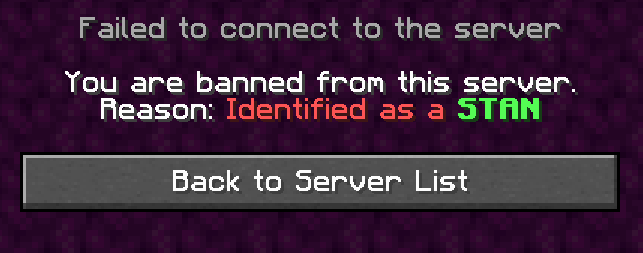
With Stan Removal, you can make sure that your Minecraft server is a stan free environment.
With a customizable config.yml, you can control what terms a player is not allowed to have in their name. All you have to do is write a keyword or phrase in your config.yml and anyone joining your minecraft server that has that keyword in their name will be banned.


This is your config.yml file:
#use the built in banned terms as an example in case you want to add more
banned-terms:
 - 'dream'
  - 'notfound'
  - 'not_found'
ip-ban: false
#if ip-ban is false it wont ip ban stans, otherwise, they will be ip banned
stan-freeze: false
#if stan-freeze is true then stans will be frozen and then
#will require anyone with the stan.admin permission to ban them
Quick facts
- Edition: Minecraft Java
- File type: .jar
- Minecraft version listed: 1.20.4
- How to install: Install the matching mod loader (Forge, Fabric or NeoForge) for your Minecraft version. → Download the .jar. → Put it in the .minecraft/mods folder and launch that loader profile.
- Where to get it: Opens on Modrinth — not every file is mirrored on our own servers.
Install steps are the general flow for this file type — How to install Minecraft Java mods & modpacks walks through it step by step.
Verified by MCModsHub
- Ships as StanRemoval-1.3.1.jar — drop this file into the mods folder
- Download size: 10 KB
- Download link checked 6 Sept 2026 — working
These come from our own check of the pack file, not from the source page.