
ModsJava
CMI Staff Chat Additions
Java mod listed for Minecraft 1.19. Downloads from the MC Java Mods app on Android.
⬇ Download on Modrinth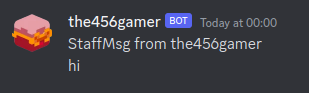
Discontinued
Discontinued in favor of CMI's new event:
with discord srv, simply use that instead
if its still needed for its other uses, let me know through discord @The456gamer#3999 (324638236196601869)
REQUIREMENTS
Paper (NO Spigot compatibility)
CMI from Spigotmc.org
Features
- hooks directly into CMI, so no messages are missed, and is comparable with bungee cord if installed on each server
- multiple destinations, so you can send your messages to multiple channels at the same time
- Works with staff message persistence, including ignoring subcommands to control it
Commands
Only /cmistaffchatadditionsreload Staff chat itself uses CMI's native command
Permissions
cmistaffchatadditions.reloadconfig (given to /op by default)
Uses
- an offline log file just for staff messages
- a separate discord channel just for staff messages, staying in touch privately even when not in the game
- custom actions through the power of console commands (NOTE: currently there is no attempt at escaping user messages. stick to simple placeholders, like UUID and time)
- multiple locations for the same destination, each with their own settings means that different channels can contain different information
Default Config
# A list of handlers with their config options
#
# placeholders
# ${sendername}, ${senderuuid}, ${message}, ${isotime}

# Each handler can Appear multiple times
handlers:
  # Send a message to Console using the plugin's logger
  # CMI auto logs to console, so in most cases this is not needed
#  - type: consolemsg
#    format: "msgint: from:'${sendername}' msg:'${message}'"

  # Logs all messages to a file in the plugins folder
  - type: logfile
    # the format of each line in the log file
    logline-format: "${isotime} - ${senderuuid} \"${sendername}\": \"${message}\""
    # the file to save the log in
    filename-format: "staffmsglog.txt"

  # Sends all staffchat messages to a discord webhook
#  - type: discordwebhook
#    webhook-url: "[REPLACEME]"
#    msg-format: |
#      StaffMsg:
#      from:'${sendername}'
#      msg:'${message}'
#    name-format: "${sendername}"
#    avatarurl-format: "https://mc-heads.net/head/${sendername}/256"

  # Runs a command in console when a staffmsg occurs
#  - type: consolecommand
#    command: "say this command is run in console"

  # Sends the message to a discord SRV channel. another named channels needs to be setup in your discord srv config
#  - type: discordsrv
#    format: |
#      StaffMsg:
#      from:'${sendername}'
#      msg:'${message}'
#    # The Channel name, as in discord srv's config. !!NOT THE CHANNEL NAME ON DISCORD!!
#    channel: "staffchat"

  # Sends the message to a slack webhook
#  - type: slackwebhook
#    webhook-url: "[REPLACEME]"
#    msg-format: |
#      StaffMsg:
#      from:'${sendername}'
#      msg:'${message}'
Quick facts
- Edition: Minecraft Java
- File type: .jar
- Minecraft version listed: 1.19.4
- How to install: Install the matching mod loader (Forge, Fabric or NeoForge) for your Minecraft version. → Download the .jar. → Put it in the .minecraft/mods folder and launch that loader profile.
- Where to get it: Opens on Modrinth — not every file is mirrored on our own servers.
Install steps are the general flow for this file type — How to install Minecraft Java mods & modpacks walks through it step by step.
File checked by MCModsHub
- Ships as CMI-StaffChat-Additions-1.0.1-all.jar — drop this file into the mods folder
- Download size: 845 KB
- Download link checked 16 Oct 2026 — working
These come from our own check of the pack file, not from the source page.