
ZInvisItemFrames
Allow players to craft and place invisible item frames. Folia-compatible invisible item frame plugin.
Features
- Craft invisible item frames
- Customizable crafting recipe. (Can choose ANY ITEM for the recipe)
- Empty invisible frames can have a glowing outline (configurable)
- MiniMessage support for all text formatting
Compatibility
- Paper 1.20.1 -> 1.21.4
- Folia-compatible
- Java 17+
Dependencies
Crafting Recipe
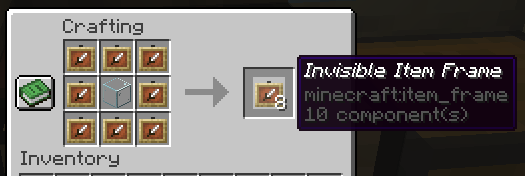
The default crafting recipe is 8 item_frame (or glow_item_frame) in a circle with one custom item in the middle.
You can change the middle-item with /ziif item.
You can also configure how many invisible item frames are crafted from the recipe.
Commands
/ziif help- Show help information/ziif item- Set the recipe item to the item in your hand/ziif reload- Reload the configuration/ziif give <player> <amount> [--glow]- Give invisible item frames to a player
Permissions
zinvisitemframes.craft.item_frame- Allow crafting invisible item frameszinvisitemframes.craft.glow_item_frame- Allow crafting invisible glow item frameszinvisitemframes.place.item_frame- Allow placing invisible item frameszinvisitemframes.place.glow_item_frame- Allow placing invisible glow item frameszinvisitemframes.admin- Access to all plugin commands
Installation
- Download the latest version of ZInvisItemFrames from Modrinth.
- Download the appropriate version of MCKotlin from Modrinth
- Place the downloaded
.jarfiles into your server'splugins/folder. - Restart your server.
- Configure the plugin to your liking by editing the
.ymlfiles in theplugins/ZInvisItemFrames/folder.
Configuration
recipe:
  item: []  # Set with `/ziif item` command
  quantity: 8  # How many frames are crafted per recipe

check-permission: # Whether to check permissions for crafting/placing invis frames
  craft: false
  place: false

empty-frame:
  glow: true  # Whether empty frames should glow
  visible: true # Whether empty invis frames should be visible

name:
  invisible_item_frame: "<italic>Invisible Item Frame"
  invisible_glow_item_frame: "<italic>Invisible Glow Item Frame"
Quick facts
- Edition: Minecraft Java
- File type: .jar
- Minecraft versions listed: 1.20, 1.20.1, 1.20.2
- How to install: Install the matching mod loader (Forge, Fabric or NeoForge) for your Minecraft version. → Download the .jar. → Put it in the .minecraft/mods folder and launch that loader profile.
- Where to get it: Opens on Modrinth — not every file is mirrored on our own servers.
Install steps are the general flow for this file type — How to install Minecraft Java mods & modpacks walks through it step by step.
Verified by MCModsHub
- Ships as ZInvisItemFrames-1.7.jar — drop this file into the mods folder
- Download size: 34 KB
- Download link checked 6 Sept 2026 — working
These come from our own check of the pack file, not from the source page.