

DISCONTINUED (NO LONGER GETTING SUPPORT)
🏆 Canoe Leaderboards
The ultimate leaderboard plugin for your Minecraft server! Track any statistic with beautiful GUIs, modern formatting, and zero lag.
✨ Why Choose Canoe Leaderboards?
📊 Track Everything
- Unlimited leaderboards - Create as many as you want
- Any PlaceholderAPI stat - Money, kills, deaths, playtime, blocks mined, and more
- Smart filtering - Automatically exclude inactive players
- Auto-updates - Configurable intervals keep rankings fresh
🎨 Beautiful & Modern
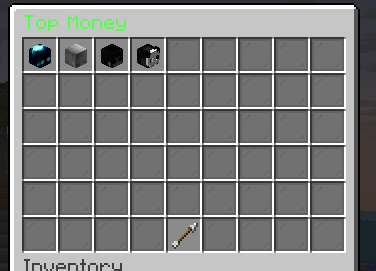
- Interactive GUI - Clean, easy-to-navigate inventory menus
- Player heads - See who's on top at a glance
- MiniMessage formatting - Gradients, colors, hex codes, and styling
- Custom icons - Set unique materials for each leaderboard type
⚙️ Highly Configurable
- Multiple leaderboards - Economy, PvP, building, mining - track it all!
- Custom formats - Design your own rank displays
- Flexible sizes - Top 5, 10, 25, or any number you want
- Branded messages - Add your server's custom prefix
🚀 Performance First
- Async processing - Updates run off the main thread
- No lag - Efficient caching and smart data handling
- Inactive player cutoff - Skip players who haven't joined recently
- Optimized I/O usage - Minimal disk impact
📋 Requirements
⚠️ PlaceholderAPI is required for this plugin to work!
- Minecraft Server - Paper or Spigot (Tested on 1.21+)
- PlaceholderAPI - Download here
- PlaceholderAPI Expansions - Install expansions for the stats you want to track
🎮 Commands & Permissions
| Command | Permission | Description |
|---|---|---|
/leaderboard |
None | Open the leaderboard GUI |
/leaderboard reload |
canoeleaderboards.reload |
Reload configuration |
| None | canoeleaderboards.updatechecker |
Receive update notifications on join |
🔧 Configuration
Main Settings
# How often to update leaderboards (in minutes)
update-interval: 30

# Ignore players who haven't played in X days
last-played-cutoff-days: 30

# GUI Configuration
gui:
  title: "<dark_gray>Leaderboards"
  rows: 3
  fill-item: GRAY_STAINED_GLASS_PANE
  # Whether to show player heads in the leaderboards.
  # Note: Try this if it causes lag when opening the GUI.
  use-player-heads: truev
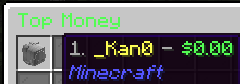
Example Leaderboard
leaderboards:
  money:
    name: "<green>Top Money"
    placeholder: "%vault_eco_balance%"
    icon: GOLD_INGOT
    slot: 11
    size: 10 # Number of players to show
    lore:
      - "<gray>Click to see the richest players"
      - "<gray>on the server!"
    player: # How to display player information in the Leaderboard
      title: "{player}"
      lore:
        - "<gray>Position: <yellow>#{rank}"
        - "<gray>Balance: <red>${value}"
Available Placeholders:
{rank}- Player's position (1, 2, 3...){player}- Player's username{value}- The statistic value
🎨 MiniMessage Formatting
Make your leaderboards stand out with modern text formatting:
- Colors:
<red>,<green>,<blue>,<gold>,<aqua> - Gradients:
<gradient:red:blue>Rainbow Text</gradient> - Hex Colors:
<#FF5555>Custom colors</color> - Formatting:
<bold>,<italic>,<underlined>
📖 Full MiniMessage Documentation
📊 Leaderboard Ideas
💰 Economy Leaderboards
richest:
  name: "<gold><bold>💰 Richest Players"
  placeholder: "%vault_eco_balance%"
  icon: GOLD_BLOCK
  format: "<gray>#{rank} <yellow>{player} <gray>- <gold>${value}"
⚔️ Combat Stats
top_killers:
  name: "<red><bold>⚔️ Top Killers"
  placeholder: "%statistic_player_kills%"
  icon: DIAMOND_SWORD
  format: "<gray>#{rank} <red>{player} <gray>- <red>{value} kills"

top_deaths:
  name: "<dark_red><bold>💀 Most Deaths"
  placeholder: "%statistic_deaths%"
  icon: SKELETON_SKULL
  format: "<gray>#{rank} <dark_red>{player} <gray>- {value} deaths"
⏰ Activity Tracking
playtime:
  name: "<aqua><bold>⏰ Most Active"
  placeholder: "%statistic_time_played%"
  icon: CLOCK
  format: "<gray>#{rank} <aqua>{player} <gray>- <aqua>{value}"
🎯 Perfect For
- Tycoon Servers - Showcase the richest players
- PvP Servers - Display top fighters and warriors
- Survival Servers - Track playtime and achievements
- Skyblock - Monitor island levels and progress
- Prison Servers - Rank miners and grinders
- Any Server - Track literally any statistic!
💡 Pro Tips
- Use gradients for eye-catching leaderboard titles
- Combine multiple stats - Create separate leaderboards for different aspects
- Adjust update intervals - Balance freshness with performance
- Set inactive cutoffs - Keep leaderboards relevant with active players
- Custom icons - Match materials to the stat being tracked
📝 Support & Community
💬 Need help or have suggestions? Join our Discord community!
Get support, share your configurations, and connect with other server owners!
Servers using Canoe Leaderboards
- My Own Private SMP
Send me a message on discord via DM or Ticket to get your server here
📈 bStats Metrics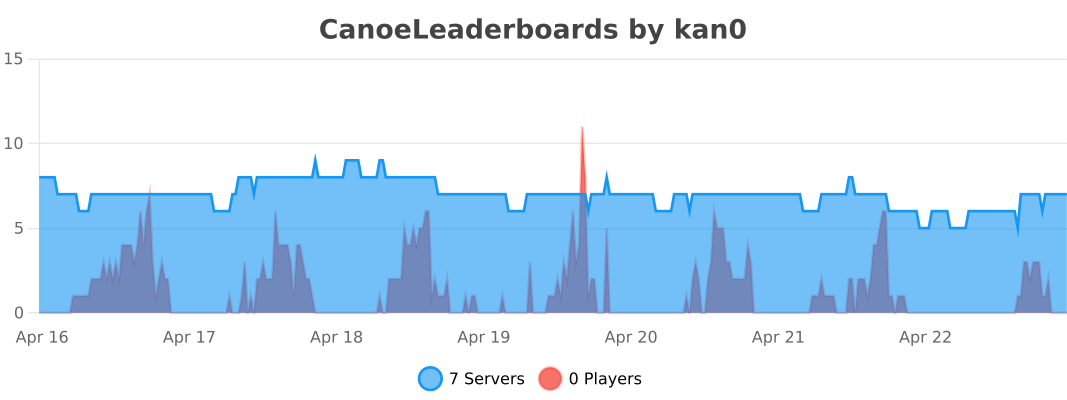
🔄 Updates
This plugin is actively maintained with regular updates and new features. Players with the canoeleaderboards.updatechecker permission will be notified when new versions are available.
- Edition: Minecraft Java
- File type: .jar
- Minecraft versions listed: 1.21, 1.21.1, 1.21.2
- How to install: Install the matching mod loader (Forge, Fabric or NeoForge) for your Minecraft version. → Download the .jar. → Put it in the .minecraft/mods folder and launch that loader profile.
- Where to get it: Opens on Modrinth — not every file is mirrored on our own servers.
Install steps are the general flow for this file type — How to install Minecraft Java mods & modpacks walks through it step by step.
- Ships as CanoeLeaderboards-1.0.3.jar — drop this file into the mods folder
- Download size: 56 KB
- Download link checked 26 Sept 2026 — working
These come from our own check of the pack file, not from the source page.