
Virtual Chests
Virtual Chests is a Paper plugin that gives players secure, private virtual storage (vault) with a History & restore system.
⬇ Download on Modrinth
📦 Virtual Chests
Virtual Chests is a lightweight and powerful Paper plugin that gives server admins full control over who can access private, virtual chests.
Instead of cluttering the world with physical chests, players can securely store their items in virtual chests that only they can access. Admins control access through permissions, making this system both flexible and safe.
✨ Features
- 🔑 Permission-based access – Grant or restrict chest access with ease.
- 📂 Private virtual storage – No physical chest needed, items are safe from griefers.
- 🛠️ Configurable – Easily manage how many virtual chests players can access.
- 🤝 Seamless integration – Works with existing permission plugins (LuckPerms, PermissionsEx, etc.).
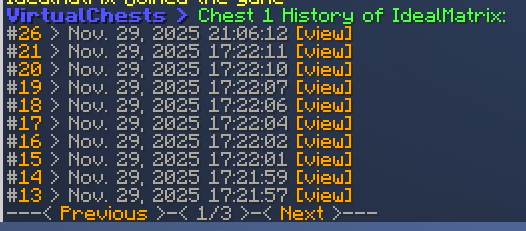
- 📜 History & restore system – View past chest states, preview snapshots, and restore older versions instantly.
🎮 Use Cases
- Reward donators with extra storage.
- Unlock additional chests as achievement rewards.
- Protect inventories without relying on claim plugins.
⚙️ Usage
🔒 Permissions
Control access to virtual chests using simple permissions:
virtualchests.use→ Required to use the base command.virtualchests.open.X→ Grants access to chest numberX(e.g.,virtualchests.open.1).virtualchests.multiple.3→ Grants access to chests 1–3.virtualchests.multiple.5→ Grants access to chests 1–5.virtualchests.multiple.10→ Grants access to chests 1–10.virtualchests.admin→ Allows admins to open other player's virtual chests.
👉 Example: If you want players to have five private chests, simply give them virtualchests.multiple.5.
📝 Commands
/chest <number>→ Opens your own virtual chest with the given number./chest <number> <player>→ (Admin only) Opens another player’s virtual chest./chest <number> <player> history→ (Admin only) Shows the history for the specified player’s virtual chest./chest <number> <player> history -page <page>→ (Admin only) Displays a specific page of the chest’s history log./chest <number> <player> history <id> view→ (Admin only) Opens a preview of the historical chest snapshot./chest <number> <player> history <id> restore→ (Admin only) Restores the chest to the chosen historical snapshot.
📌 Note: The base command /chest can be renamed in the config.yml.
⚙️ Configurable Options
Virtual Chests comes with a flexible config.yml so you can adapt the plugin to your server:
- Choose your storage type: SQLite (default) or MySQL.
- Set the number of rows per chest (1–6).
- Rename the base command to match your server style.
- Customize messages and chest names to fit your language or formatting preferences.
- Fully customize all history-related messages, pagination buttons, and date formatting.
- Control how much history is stored using:
keep_last: Number of history entries to keep per chest (-1to keep all).history_page_size: Number of entries shown per page in the history command.
📌 Tip: The configuration is easy to edit and helps you tailor the plugin for your community.
- Edition: Minecraft Java
- File type: .jar
- Minecraft versions listed: 1.21.1, 1.21.2, 1.21.3
- How to install: Install the matching mod loader (Forge, Fabric or NeoForge) for your Minecraft version. → Download the .jar. → Put it in the .minecraft/mods folder and launch that loader profile.
- Where to get it: Opens on Modrinth — not every file is mirrored on our own servers.
Install steps are the general flow for this file type — How to install Minecraft Java mods & modpacks walks through it step by step.
- Ships as VirtualChests-1.1.0.jar — drop this file into the mods folder
- Download size: 69 KB
- Download link checked 6 Sept 2026 — working
These come from our own check of the pack file, not from the source page.