
English Description
This plugin allows you to change your nickname, give it a color, and edit the name of items in Anvil! All nicknames are saved in config.yml, which is probably not very convenient, but practical.
Requirements
- To display a player's custom nickname in the tab - you need to put any plugin on the tab (e.g. TAB), as well as enable displayName display in its settings (For example, this works via placeholderAPI - You just need to insert placeholder %player_displayname%).
- For displaying custom nickname in achievements - You need to put any plugin on the chat that supports editing messages about achievements, as well as put in it the displayName of the player. (It all depends on the chat plugin itself!).
Commands
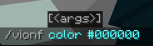
The main plugin command (doesn't do anything by itself) is /vionf .
Subcommands:
- color - supports hexadecimal and minecraft formatting (&l, &0, etc)
- name - (Conditionally was Carde2, and became "Фе". This works with both minecraft formatting and hex codes)
- reset - reset nickname
- reboot - reboot
- help - message with help
- set - Set Nick for player
PLEASE REPORT ALL PLUGIN BUGS IN DISCORD, NOT ON GITHUB!
Russian Description
Данный плагин позволяет вам менять ваш ник, придавать ему цвет, а так же редактировать название предметов в наковальне! Все ники сохраняются в config.yml, что наверно не очень удобно, за-то практично.
Требования
- Для отображения кастомного ника игрока в табе - нужно поставить любой плагин на таб (Например TAB), а так же включить в его настройках отображение displayName (Например это работает через placeholderAPI - Нужно просто вставить плейсхолдер %player_displayname%).
- Для отображения кастомного ника в достижениях - Нужно поставить любой плагин на чат, который поддерживает редактирование сообщений о достижениях, а так же поставить в нём отображение displayName игрока. (Тут уже всё зависит от самого плагина на чат!)
Команды
Главная команда плагина (Сама по себе ничего не делает) - /vionf
Подкоманды:
- color - поддерживает hex и майнкрафт форматирование (&l, &0 и тд)
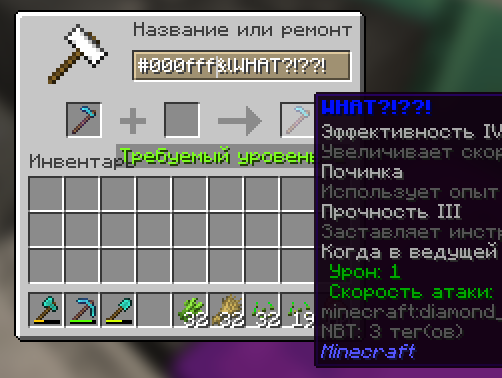
- name - (Условно был Carde2, а стал Фе. Тут работает майновское форматирование, а так же hex коды)
- reset - обнуляет ваш ник
- reload - перезагрузка
- help - сообщение с помощью
- set - позволяет установить ник другому игроку
ПОЖАЛУЙСТА, СООБЩАЙТЕ ОБО ВСЕХ ОШИБКАХ ПЛАГИНА В DISCORD, А НЕ НА GITHUB!
Quick facts
- Edition: Minecraft Java
- File type: .jar
- Minecraft versions listed: 1.20, 1.20.1, 1.20.2
- How to install: Install the matching mod loader (Forge, Fabric or NeoForge) for your Minecraft version. → Download the .jar. → Put it in the .minecraft/mods folder and launch that loader profile.
- Where to get it: Opens on Modrinth — not every file is mirrored on our own servers.
Install steps are the general flow for this file type — How to install Minecraft Java mods & modpacks walks through it step by step.
Verified by MCModsHub
- Ships as Violet-NameFormat-3.0.0.jar — drop this file into the mods folder
- Download size: 377 KB
- Download link checked 6 Sept 2026 — working
These come from our own check of the pack file, not from the source page.