
SkyDrops
A custom airdrops for your Minecraft server!

Installation & Prerequisites
Prerequisites:
- Java 17 or higher
- DecentHolograms (Required for all hologram functionality)
Quick Start:
- Download the SkyDrops JAR.
- Place the JAR into your server's
plugins/directory. - Restart the server.
- Configure global settings via
/skydrops settings. - Define airdrop contents via
/skydrops edit-drops.
Core Functionality
In-game Configuration
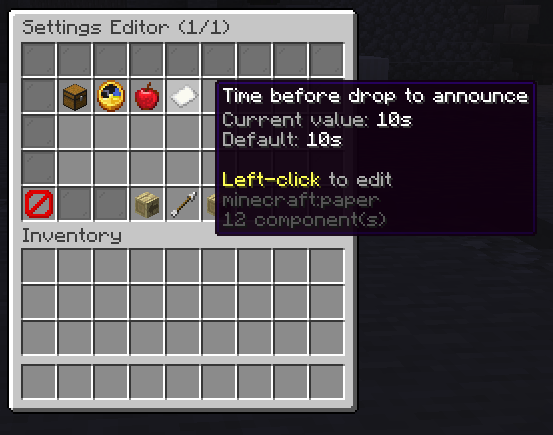
SkyDrops features a complete GUI-based settings editor, eliminating the need for manual file editing. All core parameters, including drop announcement times and scheduled intervals, are configurable in real-time.

Drop Claim Mechanics
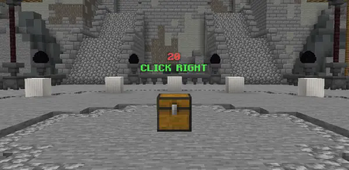
To secure an airdrop's contents, players must interact with the drop chest a pre-configured number of times. This introduces a controlled delay to the claim process.

Commands
| Command | Permission | Description |
|---|---|---|
/skydrops settings |
skydrops.ingame.settings |
Opens the GUI for global plugin configuration. |
/skydrops edit-drops |
skydrops.edit.drops |
Opens the GUI for modifying airdrop loot tables. |
/skydrops reload |
skydrops.command.reload |
Reloads all plugin configurations (non-drop-related). |
/skydrops removedrops |
skydrops.command.removedrops |
Removes all active, unclaimed airdrops from the world. |
/skydrops spawn-drop <location> |
skydrops.command.spawndrop |
Manually initiates an airdrop at the specified coordinate. |
/skydrops set-next-location <location> |
skydrops.command.setnextlocation |
Overrides the next scheduled airdrop location. |
Permissions
| Permission | Description |
|---|---|
skydrops.command.editdrops |
Grants access to the loot table editing GUI. |
skydrops.command.reload |
Grants permission to reload configurations. |
skydrops.command.removedrops |
Grants permission to forcefully remove active airdrops. |
skydrops.command.spawndrop |
Grants permission for manual airdrop spawning. |
skydrops.command.setnextlocation |
Grants permission to pre-define the next airdrop location. |
skydrops.command.settings |
Grants access to the in-game settings GUI. |
For support or bug reporting, please reach out on Discord: drownek or open an issue on GitHub.
Quick facts
- Edition: Minecraft Java
- File type: .jar
- Minecraft versions listed: 1.17, 1.17.1, 1.18
- How to install: Install the matching mod loader (Forge, Fabric or NeoForge) for your Minecraft version. → Download the .jar. → Put it in the .minecraft/mods folder and launch that loader profile.
- Where to get it: Opens on Modrinth — not every file is mirrored on our own servers.
Install steps are the general flow for this file type — How to install Minecraft Java mods & modpacks walks through it step by step.
Verified by MCModsHub
- Ships as SkyDrops-1.0.0.jar — drop this file into the mods folder
- Download size: 3.2 MB
- Download link checked 6 Sept 2026 — working
These come from our own check of the pack file, not from the source page.