

ChunkAnalyzer
ChunkAnalyzer is a lightweight and efficient plugin for Minecraft servers running Spigot/Paper 1.21.1. It empowers server administrators to monitor and optimize server performance by analyzing loaded chunks for potential lag sources, such as high entity counts, redstone contraptions, or resource-intensive blocks. Featuring a user-friendly GUI, configurable settings, and multi-language support, ChunkAnalyzer is a must-have tool for maintaining a smooth and lag-free server experience.
✨ Features
- ✅ Chunk Monitoring: Tracks entities, players, tile entities, armor stands, redstone components, hoppers, and more in loaded chunks.
- 🚨 Lag Machine Detection: Identifies problematic chunks with excessive entities (>500), armor stands (>50), redstone blocks (>100), or hoppers (>20).
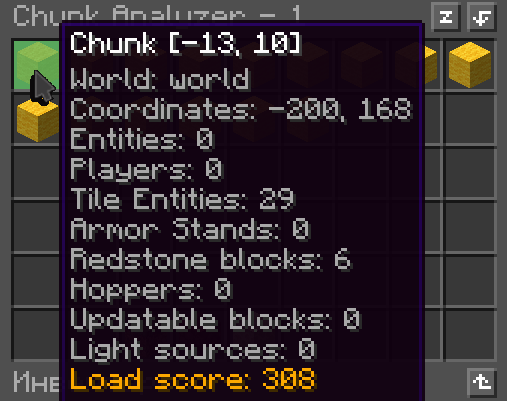
- 📊 GUI Menu: Displays chunk data with load scores, world filters (Overworld, Nether, End), and clickable teleportation to inspect chunks.
- 🌍 Multi-Language Support: Includes English (
en) and Russian (ru) translations, customizable viaconfig.yml. - 🔎 Deep Analysis Option: Scans for redstone, hoppers, updatable blocks, and light sources for detailed performance insights (toggleable).
- 💾 Data Caching: Persists chunk data in
cache.ymlfor fast access and reduced server load. - 🔄 Background Scanning: Scans chunks in batches of 5 every second, with a 30-second cooldown per chunk to minimize performance impact.
- 📡 Event Tracking: Monitors entity spawns, despawns, teleports, and chunk load/unload events for real-time accuracy.
- ⚙️ Configurable: Adjust scanning behavior, language, and display options in
config.yml.
📜 Commands
| Command | Description | Permission |
|---|---|---|
/ca menu |
Opens the chunk analysis GUI. | chunkanalyzer.menu |
🔍 Example Usage
- Open the GUI: Use
/ca menuto view a list of chunks, color-coded by load score (green for low, yellow/orange/red for medium/high, magma for lag machines). - Filter by World: Click the Overworld, Nether, or End buttons to focus on specific worlds.
- Inspect Details: Hover over a chunk item to see its entity count, player count, tile entities, and (if enabled) redstone/hopper details.
- Teleport: Click a chunk to teleport to its center (highest safe Y-level). Example message: Teleported to chunk [12, -34].
- Identify Lag: Chunks flagged as lag machines show a warning: Warning: Possible lag machine at [12, -34].
⚙️ Configuration
The plugin generates a config.yml file in plugins/ChunkAnalyzer with the following settings:
show-green-chunks: false
deep-analyze: true
language: en

messages:
  en:
    player_only: "This command is for players only!"
    usage: "Usage: /ca menu"
    teleport: "Teleported to chunk [%s, %s]"
    lag_machine_warning: "Warning: Possible lag machine at [%s, %s]"
    menu_title: "Chunk Analyzer - %d"
    world_overworld: "Overworld"
    world_nether: "Nether"
    world_the_end: "The End"
    button_previous: "Previous page"
    button_next: "Next page"
    button_current_world: "Current world"
    chunk_info: "Chunk [%s, %s]"
    world: "World: %s"
    coordinates: "Coordinates: %s, %s"
    entities: "Entities: %s"
    players: "Players: %s"
    tile_entities: "Tile Entities: %s"
    armor_stands: "Armor Stands: %s"
    redstone_blocks: "Redstone blocks: %s"
    hoppers: "Hoppers: %s"
    updatable_blocks: "Updatable blocks: %s"
    light_sources: "Light sources: %s"
    load_score: "Load score: %s"
    click_to_teleport: "Click to teleport"

  ru:
    player_only: "Эта команда только для игроков!"
    usage: "Использование: /ca menu"
    teleport: "Телепортирован в чанк [%s, %s]"
    lag_machine_warning: "Предупреждение: Возможная лаг-машина в [%s, %s]"
    menu_title: "Анализатор чанков - %d"
    world_overworld: "Верхний мир"
    world_nether: "Ад"
    world_the_end: "Энд"
    button_previous: "Предыдущая страница"
    button_next: "Следующая страница"
    button_current_world: "Текущий мир"
    chunk_info: "Чанк [%s, %s]"
    world: "Мир: %s"
    coordinates: "Координаты: %s, %s"
    entities: "Сущности: %s"
    players: "Игроки: %s"
    tile_entities: "Tile Entities: %s"
    armor_stands: "Armor Stands: %s"
    redstone_blocks: "Редстоун блоки: %s"
    hoppers: "Воронки: %s"
    updatable_blocks: "Обновляемые блоки: %s"
    light_sources: "Источники света: %s"
    load_score: "Оценка нагрузки: %s"
    click_to_teleport: "Нажмите для телепортации"
Key Settings
- show-green-chunks: Set to
trueto display low-impact chunks (score ≤ 50). Default:falseto focus on problematic chunks. - deep-analyze: Enable (
true) to scan for redstone, hoppers, updatable blocks, and light sources. Disable for better performance on large servers. - language: Choose
en(English),ru(Russian), or add custom languages undermessages.
📥 Installation
- Download the ChunkAnalyzer
.jarfrom [SpigotMC/Modrinth, if available]. - Place the
.jarin your server'spluginsfolder. - Restart the server or load the plugin using a plugin manager.
- Edit
config.ymlinplugins/ChunkAnalyzerto customize settings. - Assign the
chunkanalyzer.menupermission to admins (e.g., via LuckPerms).
🛠️ How It Works
- Background Scanner: Scans 5 chunks per second, respecting a 30-second cooldown per chunk to avoid lag.
- Load Scoring:
- Players: 20 points each
- Non-player entities: 1 point each
- Tile entities: 10 points each
- Armor stands: 2 points each
- (With
deep-analyze): Redstone blocks: 3 points, Hoppers: 5 points, Updatable blocks: 2 points, Light sources: 1 point
- Lag Detection: Flags chunks as lag machines if they exceed thresholds for entities, armor stands, redstone, or hoppers.
- GUI: Shows chunks sorted by score, with pagination and world filters. Chunks are color-coded (green/yellow/orange/red/magma) based on severity.
- Caching: Saves data to
cache.ymlto reduce redundant scans.
💡 Admin Tips
- Disable
deep-analyzeon servers with thousands of loaded chunks to reduce CPU usage. - Prioritize magma-block chunks in the GUI, as they indicate severe lag risks.
- Use world filters to focus on high-traffic areas like the Overworld.
- Check the GUI during peak player times to catch lag sources early.
🌐 Adding Languages
To add a new language (e.g., Spanish):
- In
config.yml, add amessages.essection. - Copy the
enorrumessages and translate them. - Set
language: es.
Example:
messages:
  es:
    player_only: "¡Este comando es solo para jugadores!"
    usage: "Uso: /ca menu"
    teleport: "Teletransportado al chunk [%s, %s]"
    # ... other translations
🐞 Support & Issues
If you have questions, bug reports, or feature requests, please contact: mr_catcraft on Discord. Please provide:
- Server version (e.g., Paper 1.20.4)
- Plugin version
- Description of the issue
- Relevant logs from
logs/latest.log
⚙️ Technical Notes
- Dependencies: None. Works with Spigot/Paper 1.16.x - 1.21.1.
- Performance: Uses
ConcurrentHashMapandConcurrentLinkedQueuefor thread safety. Batch scanning and cooldowns minimize impact. - Events: Listens for entity spawns/despawns, teleports, chunk load/unload, and inventory clicks.
- Storage: Chunk data is cached in
cache.ymlfor persistence.
- Edition: Minecraft Java
- File type: .jar
- Minecraft versions listed: 1.21, 1.21.1, 1.21.2
- How to install: Install the matching mod loader (Forge, Fabric or NeoForge) for your Minecraft version. → Download the .jar. → Put it in the .minecraft/mods folder and launch that loader profile.
- Where to get it: Opens on Modrinth — not every file is mirrored on our own servers.
Install steps are the general flow for this file type — How to install Minecraft Java mods & modpacks walks through it step by step.
- Ships as ChunkAnalyzer-1.0.1.jar — drop this file into the mods folder
- Download size: 26 KB
- Download link checked 6 Sept 2026 — working
These come from our own check of the pack file, not from the source page.