
WaystoneWarps-Squaremap
Displays WaystoneWarps as markers on Squaremap with tooltips showing waystone details.
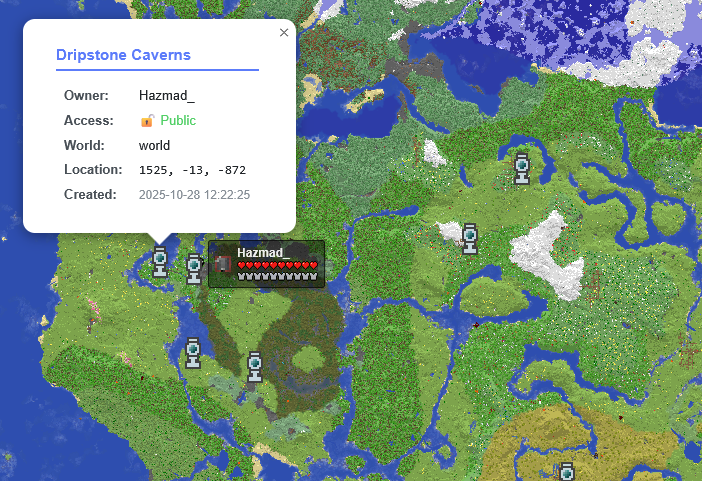
Requirements
- Minecraft: 1.21+ (Paper/Purpur)
- WaystoneWarps: 0.3.4+
- Squaremap: 1.3.9+
Installation
- Install WaystoneWarps and Squaremap
- Download the latest release
- Place the JAR in your
plugins/folder - Restart your server
Waystone markers will appear automatically on the map. Players can toggle the "Waystones" layer in the map controls.
Configuration
Edit plugins/WaystoneWarps-Squaremap/config.yml:
display:
  show-locked-waystones: true  # Show/hide locked waystones
  icon-size: 32                # Icon size in pixels

auto-refresh:
  enabled: true                # Enable automatic marker refresh
  interval: 60                 # Check for changes every 60 seconds
Credits
- WaystoneWarps: Mizarc/waystone-warps
- Squaremap: jpenilla/squaremap
Quick facts
- Edition: Minecraft Java
- File type: .jar
- Minecraft versions listed: 1.21, 1.21.1, 1.21.2
- How to install: Install the matching mod loader (Forge, Fabric or NeoForge) for your Minecraft version. → Download the .jar. → Put it in the .minecraft/mods folder and launch that loader profile.
- Where to get it: Opens on Modrinth — not every file is mirrored on our own servers.
Install steps are the general flow for this file type — How to install Minecraft Java mods & modpacks walks through it step by step.
Verified by MCModsHub
- Ships as waystonewarps-squaremap-1.0.0.jar — drop this file into the mods folder
- Download size: 1.9 MB
- Download link checked 7 Sept 2026 — working
These come from our own check of the pack file, not from the source page.