
Support and Feedback 💬
If you have questions, suggestions, or have found a bug, please contact me: Discord
ArtisanTools 🛠️
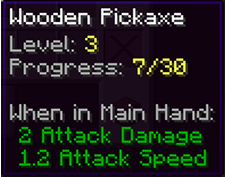
ArtisanTools — is a unique Minecraft plugin that adds a tool leveling system, tool specialization, and many other interesting features. Bring your tools to life, develop them, and gain unique bonuses!
Progress work on the basis of NBT tags, so the plugin does not require and do not use a database.

- Tool Leveling: Tools (pickaxes, axes, shovels, swords) gain experience through use and level up.
- Tool Specialization: After reaching level 5, you can choose a specialization for your tool, granting unique bonuses.
- Customizable Messages: All messages can be configured via the configuration file, and you can choose where they are displayed (chat, bossbar, actionbar).
- Experience Setting: Setting a certain amount of experience per block or creature for each item.
- Lore: Displays the progress in the lore of an item.
- Placeholders: Integration with PlaceholderAPI to display tool information in chat, signs, and other plugins.
- Commands: Convenient commands for managing tools and resetting them.


| Command | Description |
|---|---|
| /artisan info | Show information about the tool in hand (level, experience, specialization). |
| /artisan levelreset | Reset the tool's level and experience. |
| /artisan specialize | Choose a specialization for the tool (available from level 5). |
| /artisan reload | Reload the plugin configuration. |
| Placeholder | Description |
|---|---|
| %artisan_level% | Tool's level. |
| %artisan_experience% | Tool's current experience. |
| %artisan_required_experience% | Experience required for the next level. |
| %artisan_specialization% | Tool's specialization. |

config.yml
messages:
  level_up:
    display: actionbar # Possible values: chat, bossbar, actionbar
    text: "&aYour tool has leveled up! Current level: &e{level}"
  specialize:
    display: chat
    text: "&aYou have chosen specialization: &e{specialization}"
  tool_info:
    display: bossbar
    text: "&aLevel: &e{level}, Experience: &e{experience}/{required_experience}, Specialization: &e{specialization}"
blocks.yml
blocks:
  pickaxe:
    STONE: 1
    COBBLESTONE: 1
    IRON_ORE: 5
    GOLD_ORE: 5
    DIAMOND_ORE: 10
  axe:
    OAK_LOG: 2
    SPRUCE_LOG: 2
    BIRCH_LOG: 2
  shovel:
    DIRT: 1
    GRASS_BLOCK: 1
Update Plans 🚀
- Adding New Specializations: Unique bonuses for each tool type.
- Tool Quests: Tasks to obtain rare upgrades.
- Economy Integration: Ability to purchase upgrades with in-game currency.
- Support for Other Plugins: Integration with Vault, McMMO, and other popular plugins.
- Graphical User Interface (GUI): Convenient menu for selecting specializations and managing tools.
- Unblocking leveling: Initially, the tool progression is blocked and unavailable, but after a certain action on a certain item, it becomes available.
Quick facts
- Edition: Minecraft Java
- File type: .jar
- Minecraft versions listed: 1.16.5, 1.17, 1.17.1
- How to install: Install the matching mod loader (Forge, Fabric or NeoForge) for your Minecraft version. → Download the .jar. → Put it in the .minecraft/mods folder and launch that loader profile.
- Where to get it: Opens on Modrinth — not every file is mirrored on our own servers.
Install steps are the general flow for this file type — How to install Minecraft Java mods & modpacks walks through it step by step.
Verified by MCModsHub
- Ships as ArtisanTools-0.3.jar — drop this file into the mods folder
- Download size: 33 KB
- Download link checked 7 Sept 2026 — working
These come from our own check of the pack file, not from the source page.