
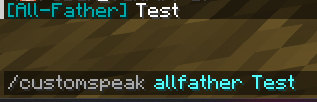
Custom Broadcast Speak
Players can use this plugin to create a more immersive role-playing experience or to enhance communication by representing different characters or roles within the game. Broadcast messages to all online users using a specified "speaker" whose prefix is configured in the plugin's configuration file.
/cs [speaker] {message}: Broadcasts a message from the speaker.
/cw [speaker] [player] {message}: Sends a whisper from the speaker to a specific player.
/rw [speaker] {message}: Allows a player to respond to the speaker.
/cs-reload: Reloads the configuration file.
Speakers and their prefixes can be defined in the plugin's configuration, enabling customization of how messages are presented.
I'd be happy to hear any and all suggestions!
- Edition: Minecraft Java
- File type: .jar
- Minecraft version listed: 1.21.4
- How to install: Install the matching mod loader (Forge, Fabric or NeoForge) for your Minecraft version. → Download the .jar. → Put it in the .minecraft/mods folder and launch that loader profile.
- Where to get it: Opens on Modrinth — not every file is mirrored on our own servers.
Install steps are the general flow for this file type — How to install Minecraft Java mods & modpacks walks through it step by step.
- Ships as CustomBroadcastPlugin-2.jar — drop this file into the mods folder
- Download size: 6 KB
- Download link checked 7 Sept 2026 — working
These come from our own check of the pack file, not from the source page.