

🚫SpicyAzisaBan

📖Description
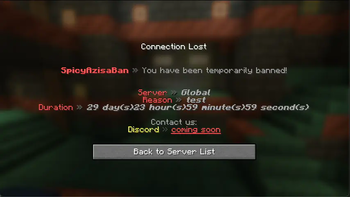
SpicyAzisaBan is an all-in-one punishment system for Velocity. (Heavily inspired by AdvancedBan)
It supports various types of punishments, following are the types of punishments supported by SpicyAzisaBan:
- Ban
- Temp ban
- IP ban
- Temp IP ban
- Mute
- Temp mute
- IP mute
- Temp IP mute
- Warning
- Caution
- Kick
- Note
SpicyAzisaBan also supports multiple servers (such as multiple instances of Velocity), so you can use it in a network environment.
✨Features
- Ban, Mute, Warn, Caution, Kick, Note players
- Discord webhook support
- Support multiple instances of Velocity
- Pre-defined reasons for each server/type of punishment
- Customizable messages
- Ban all alt accounts at once
- Lockdown mode (prevent new players from joining the server)
- Punishment automation via external API (see below for more information)
❗️Requirements
- Java 17 or later
- Internet connection (for fetching dependencies)
- MySQL or MySQL-compatible (e.g. MariaDB) database
- We recommend using supported versions of MariaDB
💻Installation
- Download the plugin from Modrinth and place it in your server's
pluginsfolder. - Start the server once to generate the configuration file. (Or you can just create the file manually)
- Configure the plugin in
plugins/SpicyAzisaBan/config.yml. - Restart the server.
- Do
/sab infoto see if the plugin is working correctly.
📝Configuration
# SpicyAzisaBan config
#
# Important: If you are running from CLI, you only need to configure database settings, and you can just ignore
# anything else.

# Command prefix
# ----------
# You will be able to run command with: /${prefix}command
# So if you set this to "/", you can run command with //command
prefix: ""

# Database settings
# ----------
# MySQL or MySQL-compatible (e.g. MariaDB) database is required to run SpicyAzisaBan.
database:
  host: localhost
  name: spicyazisaban
  user: spicyazisaban
  password: p@55w0rd
  verifyServerCertificate: false
  useSSL: true
  # If true, the plugin will prevent players from joining the server if database is inaccessible.
  failsafe: true

warning:
  # Don't set to 1s, it's too terrible because we fetch the punishments from database every time we check for warnings
  sendTitleEvery: 10s
  titleStayTime: 5s

# These settings below are reloadable by doing /sab reload

serverNames:
  # "server" (key) must not contain UPPERCASE character.
  server: FriendlyServerName
defaultReasons:
  # valid types: ban, temp_ban, ip_ban, temp_ip_ban, mute, temp_mute, ip_mute, temp_ip_mute, warning, caution, kick, note
  # invalid types are ignored
  ban:
    # <server/group/global>: reasons list
    global:
      - "ban reason (global) 1"
      - "ban reason (global) 2"
    lobby:
      - "ban reason (lobby) 1"
      - "ban reason (lobby) 2"
# a player wouldn't be able to bypass with eg /minecraft:tell
blockedCommandsWhenMuted:
  # server: Array<String>
  # "global" would affect all servers
  global:
    - tell
    - r
    - me
  life:
    - rpc
    - me
banOnWarning:
  # if warning count hits 3, 4, 5..., the player would be banned with specified reason
  # this feature will be disabled if you set this value to <= 0
  threshold: 3
  time: "1mo"
  # Available variables: %PREFIX%, %COUNT& (current warnings count), %TIME% (above), %ORIGINAL_REASON% (reason used for /warn)
  reason: "You've got %COUNT% warnings and you've been banned for %TIME%. (Original reason: %ORIGINAL_REASON%)"
customBannedMessage:
  # usually configured via messages.yml, but you can set the message per server here
  # key = server
  # value = message
  rpg:
    - "&cA player has been deleted from the server."

# Discord webhook URLs
# If you don't need this feature, simply uncomment the line below.
#webhookURLs: { __fallback__: {} }
# and comment out the lines below.
webhookURLs:
  __fallback__:
    default: "https://discord.com/api/webhooks/123456/secret"
  server1:
    default: "https://discord.com/api/webhooks/123456/secret"
  global:
    default: "https://discord.com/api/webhooks/123456/secret"
    ban: "https://discord.com/api/webhooks/789012/secret"
Non-exhaustive list of permissions
We recommend using LuckPerms for permission management.
sab.command.spicyazisabansab.command.spicyazisaban.creategroupsab.command.spicyazisaban.deletegroupsab.command.spicyazisaban.groupsab.command.spicyazisaban.infosab.command.spicyazisaban.debugsab.command.spicyazisaban.reloadsab.command.spicyazisaban.deletepunishmenthistorysab.command.spicyazisaban.deletepunishmentsab.command.spicyazisaban.linksab.command.spicyazisaban.unlinksab.checksab.historysab.seensab.banlistsab.proofssab.delproofsab.addproofsab.changereasonsab.unbansab.unmutesab.unpunishsab.punish.globalsab.punish.group.<groupName>sab.punish.server.<serverName>sab.ban.permsab.ban.tempsab.ipban.permsab.ipban.tempsab.mute.permsab.mute.tempsab.ipmute.permsab.ipmute.tempsab.warningsab.cautionsab.kicksab.notesab.notify.bansab.notify.tempbansab.notify.ipbansab.notify.tempipbansab.notify.mutesab.notify.tempmutesab.notify.ipmutesab.notify.tempipmutesab.notify.warnsab.notify.cautionsab.notify.kicksab.notify.notesab.exempt.mutesab.exempt.temp_mutesab.exempt.ip_mutesab.exempt.temp_ip_mute
🔧Developer API
Unfortunately, SpicyAzisaBan itself does not provide helpful APIs for developers to use. (There are a lot of internal APIs that are not intended to be used by other plugins.) If you do rely on internal API, you should be aware that it may change without notice.
If you need to automate the punishment system (but not unpunish) from backend Spigot/Paper server, you can use the API provided by AziPluginMessaging. This is one of our internal plugins, but we provide the API for developers who want to use it. You need to install the plugin on both the backend (Spigot/Paper) server and the proxy (Velocity) server.
You can see the example of using the API in PunishCommand.java.
🛟Support
Support is provided via our Discord server.
📜License
This project is licensed under the GNU General Public License v3.0.
- Edition: Minecraft Java
- File type: .jar
- Minecraft versions listed: 1.16.5, 1.17, 1.17.1
- How to install: Install the matching mod loader (Forge, Fabric or NeoForge) for your Minecraft version. → Download the .jar. → Put it in the .minecraft/mods folder and launch that loader profile.
- Where to get it: Opens on Modrinth — not every file is mirrored on our own servers.
Install steps are the general flow for this file type — How to install Minecraft Java mods & modpacks walks through it step by step.
- Ships as SpicyAzisaBan-Velocity-2.0.0-dev-8d2b31d.jar — drop this file into the mods folder
- Download size: 18.3 MB
- Download link checked 7 Sept 2026 — working
These come from our own check of the pack file, not from the source page.