
Simple light-weight plugin for formatting and processing chat messages sent by players. Decent Chat allows you to modify the traditional <player> message format to whatever you want, for instance player: message or even player » message, as seen on some popular servers.
Decent Chat also supports coloring your own name using the /color command, you can even set your name to a gradient!
On top of that, there are also various activity adjustments that can be done. Such as changing the join/leave message and notifying the rest of the server when someone sleeps, aswell as announcing when someone goes to the nether/the end!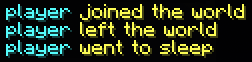
Last off, Decent Chat includes built-in emoji support, allowing text-based symbols to be transformed into anything you want. All which can be modified/disabled in the config.yml file.
The goal of Decent Chat is to stay light weight, which makes it a great addition to any server with an active chat, such as a Survival Multiplayer server!
- Edition: Minecraft Java
- File type: .jar
- Minecraft version listed: 1.21.11
- How to install: Install the matching mod loader (Forge, Fabric or NeoForge) for your Minecraft version. → Download the .jar. → Put it in the .minecraft/mods folder and launch that loader profile.
- Where to get it: Opens on Modrinth — not every file is mirrored on our own servers.
Install steps are the general flow for this file type — How to install Minecraft Java mods & modpacks walks through it step by step.
- Ships as decent-chat-1.3.0.jar — drop this file into the mods folder
- Download size: 48 KB
- Download link checked 27 Sept 2026 — working
These come from our own check of the pack file, not from the source page.