
🌍 TRY THIS PLUGIN LIVE ON BOLT SMP

Website Fixed
🌐 Xpose - Make Your Local Minecraft Server Public With Custom Static Ip
Transform your local Minecraft server into a public server with a beautiful custom domain! No port forwarding needed.
TUTORIAL
✨ Features
- 🌐 Public Access: Make your local Minecraft server accessible to players worldwide
- 🎯 Custom Domain: Get your own static subdomain (e.g.,
myserver.quizyy.funormyserver.mysmp.fun) - 🔒 Secure Tunneling: Uses ngrok's secure tunneling service to bypass firewalls
- 🌍 Global Performance: Multiple region support for optimal player experience
- ⚡ Easy Setup: Simple configuration, no port forwarding needed
- 🎮 Player-Friendly: Share your server address easily with a memorable domain
- 🔄 Auto-Reconnect: Automatically maintains your custom domain
🚀 Quick Start
- Download and install the plugin
- Get your ngrok token from ngrok.com
- Get your Xpose token from xpose.quizyy.fun
- Configure your
config.yml:
# Ngrok configuration
ngrok:
  auth_token: "your-ngrok-token"
  region: "US"  # Choose: US, EU, AP, AU, SA, JP, IN
  server_port: 25565  # Your server port

# Xpose configuration
xpose:
  auth_token: "your-xpose-auth-token"
  subdomain: "myserver"  # Your chosen subdomain
  domain: "mysmp.fun"  # or quizyy.fun
- Start your server and share your custom domain! 🎉
📝 Commands
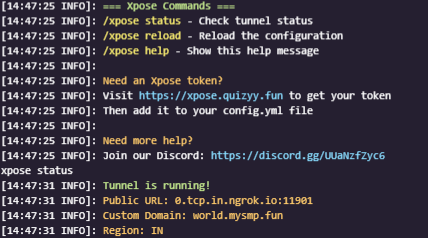
/xpose status- Check your tunnel status/xpose reload- Reload configuration/xpose help- Show help menu (available to all players)
🌟 Why Xpose?
- No Port Forwarding: Works even behind NAT/firewalls
- Static Custom Domain: Give your server a professional, memorable address
- Global Performance: Choose from 7 regions worldwide for best player experience
- Always Online: Auto-reconnect if connection drops
- Simple Sharing: Easy to remember domain names for your players
🌍 Supported Regions
| Region | Code | Location |
|---|---|---|
| 🇺🇸 United States | US | North America |
| 🇪🇺 Europe | EU | Europe |
| 🇦🇺 Australia | AU | Oceania |
| 🇯🇵 Japan | JP | East Asia |
| 🇮🇳 India | IN | South Asia |
| 🇸🇬 Singapore | AP | Asia Pacific |
| 🇧🇷 Brazil | SA | South America |
🛠️ Requirements
- Java 8 or higher
- Minecraft server 1.16+
- ngrok authentication token
- Xpose authentication token
🤝 Support
Need help? We've got you covered!
🎮 Example Usage
Setup your domain:
xpose:
  subdomain: "myserver"
  domain: "mysmp.fun"
Your server will be accessible at:
myserver.mysmp.funChange region for better performance:
ngrok:
  region: "JP"  # For better performance in Asia
📜 Permissions
xpose.admin- Access to status and reload commands- Help command is available to everyone!
🚨 Common Issues
- Domain Already Taken: Choose a different subdomain name
- Connection Failed: Check your ngrok token
- API Error: Verify your Xpose token
🎯 Coming Soon
- 🌈 Multiple tunnel support
- 🔔 Discord notifications
- 📊 Server status page
- 🎨 Custom domain themes
💖 Support the Project
Love Xpose? Show your support:
- ⭐ Star us on Modrinth
- 🤝 Join our Discord
- 🐛 Report bugs and suggest features
Made with ❤️ by Quizy solutions
Quick facts
- Edition: Minecraft Java
- File type: .jar
- Minecraft versions listed: 1.16, 1.17, 1.18
- How to install: Install the matching mod loader (Forge, Fabric or NeoForge) for your Minecraft version. → Download the .jar. → Put it in the .minecraft/mods folder and launch that loader profile.
- Where to get it: Opens on Modrinth — not every file is mirrored on our own servers.
Install steps are the general flow for this file type — How to install Minecraft Java mods & modpacks walks through it step by step.
Verified by MCModsHub
- Ships as Xpose-Custom-Ip.jar — drop this file into the mods folder
- Download size: 606 KB
- Download link checked 7 Sept 2026 — working
These come from our own check of the pack file, not from the source page.