
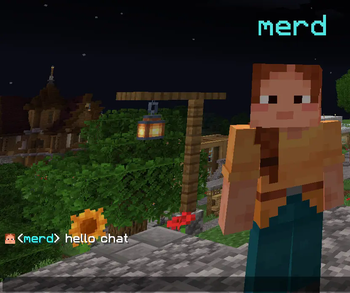
Renk - A Simple Color Plugin
Renk is a plugin that allows players to customize their display name color. It uses hex color codes and translates them to the closest supported Minecraft color for team-based name tag coloring.
Features
- Players can change or reset their color using commands.
- Admins can set the color of other players.
- Player colors are saved to a JSON file (
plugins/Renk/player_colors.json) and applied when they join. - Supports hex color codes (e.g.,
#FF0000) and predefined color names (e.g.,red,blue,green). - Utilizes the MiniMessage library for formatting color codes and messages.
- Uses Scoreboard Teams to approximate the player's display name color on their nametag.
- Configuration file (
config.yml) for customizing messages.
Commands
/renk <#hex | color_name>: Changes the player's own color to the specified hex color or predefined color name. Examples:/renk #FF0000,/renk red./renk set <player> <#hex | color_name>: Allows admins to set the color of another player. Examples:/renk set Kikaru #00FF00,/renk set Kikaru green./renk reset: Resets the player's own color to the default./renk reset <player>: Allows admins to reset another player's color.
Predefined Colors
The following color names can be used instead of hex codes: black, dark_blue, dark_green, dark_aqua, dark_red, dark_purple, gold, gray, dark_gray, blue, green, aqua, red, light_purple, yellow, white.
Permissions
renk.use: Allows the use of the/renkcommand.renk.set.other: Allows the use of the/renk setcommand to change the color of other players.renk.reset.other: Allows the use of the/renk resetcommand to reset the color of other players.
Configuration
The plugin uses a config.yml file located in the plugins/Renk/ directory to store configurable messages. You can customize the messages that are displayed to players by modifying this file. Use color codes with MiniMessage.
- Edition: Minecraft Java
- File type: .jar
- Minecraft version listed: 1.21.4
- How to install: Install the matching mod loader (Forge, Fabric or NeoForge) for your Minecraft version. → Download the .jar. → Put it in the .minecraft/mods folder and launch that loader profile.
- Where to get it: Opens on Modrinth — not every file is mirrored on our own servers.
Install steps are the general flow for this file type — How to install Minecraft Java mods & modpacks walks through it step by step.
- Ships as Renk-1.3.jar — drop this file into the mods folder
- Download size: 13 KB
- Download link checked 7 Sept 2026 — working
These come from our own check of the pack file, not from the source page.