HidePluginsFromPlayers
A plugin that intercepts /plugins, /pl, and /bukkit:plugins commands to block and hide your Minecraft server's plugin list, responding with a customizable…
⬇ Download on Modrinth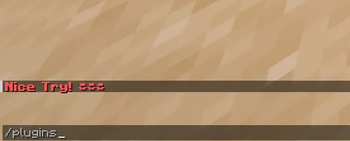
A simple plugin that blocks /plugins, /pl, and /bukkit:plugins commands from revealing your server's plugin list. Players receive a customizable Nice Try message instead, protecting your server's security.
Features:
- Blocks /plugins, /pl, and /bukkit:plugins commands
- Customizable denial message
- Lightweight performance
- Compatible with Bukkit/Spigot/Paper servers
How to use: Simply install the plugin and it automatically intercepts plugin list commands and displays your custom message.
Permissions: hideplugins.bypass - Allows players to bypass the block and view plugins normally. Server operators have this by default.
- Edition: Minecraft Java
- File type: .jar
- Minecraft version listed: 1.21.10
- How to install: Install the matching mod loader (Forge, Fabric or NeoForge) for your Minecraft version. → Download the .jar. → Put it in the .minecraft/mods folder and launch that loader profile.
- Where to get it: Opens on Modrinth — not every file is mirrored on our own servers.
Install steps are the general flow for this file type — How to install Minecraft Java mods & modpacks walks through it step by step.
- Ships as HidePluginsFromPlayers-1.1.jar — drop this file into the mods folder
- Download size: 5 KB
- Download link checked 7 Sept 2026 — working
These come from our own check of the pack file, not from the source page.