
ModsJava
GappleOptions
I don't know my version or loader
Open the Minecraft launcher and look at the profile you play on — it names both, like fabric-loader-1.21.4. The version also shows in the bottom-right corner of the game's main menu.
No loader in the profile name? Then it's plain Minecraft, and these mods won't run — you need Fabric or NeoForge installed first.
Features
General
- Completely override golden apples, set potion effects, saturation, health, and toggle effect stacking.
- Toggle golden apples entirely, toggle their crafting.
- Prevent usage in certain worlds or regions (WorldGuard).
- Permission-based cooldowns (go.user.cooldown.crapples.(seconds>)). Dual cooldowns option.
- Run custom commands on usage or after the cooldown is over.
- Set cooldowns for enderpearls & wind-charges.
Norska Development Resource Quality
- Auto-updating configurations on plugin updates.
- Fully customizable messages including chat (option to auto-center), actionbars, and titles. (RGB Support)
- Fully customizable sounds (option for power and pitch), for every command and event.
- Use any PlaceholderAPI placeholder in plugin messages.
Gallery
YouTube Video
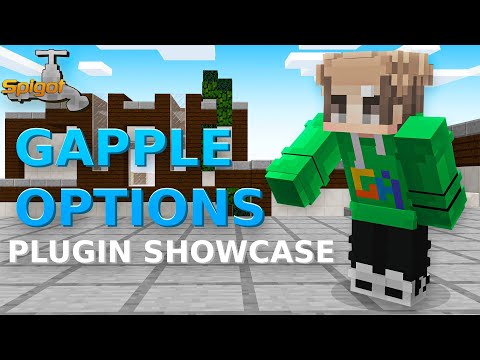
Default configurations
Developer API
- Information about the available Developer API can be found here
Quick facts
- Edition: Minecraft Java
- File type: .jar
- Minecraft versions listed: 1.8.8, 1.8.9, 1.9
- How to install: Install the matching mod loader (Forge, Fabric or NeoForge) for your Minecraft version. → Download the .jar. → Put it in the .minecraft/mods folder and launch that loader profile.
- Where to get it: Opens on Modrinth — not every file is mirrored on our own servers.
Install steps are the general flow for this file type — How to install Minecraft Java mods & modpacks walks through it step by step.
Verified by MCModsHub
- Ships as GappleOptions-2026.07.jar — drop this file into the mods folder
- Download size: 509 KB
- Download link checked 7 Sept 2026 — working
These come from our own check of the pack file, not from the source page.