
BalancedClay
Makes clay balanced!
This plugin adds recipes to turn clay into any item! Contains an extensive configuration for disabling certain items as outputs, disabling certain types of recipes, as well as specifying a blacklist or a whitelist.
Currently supported recipe types are:
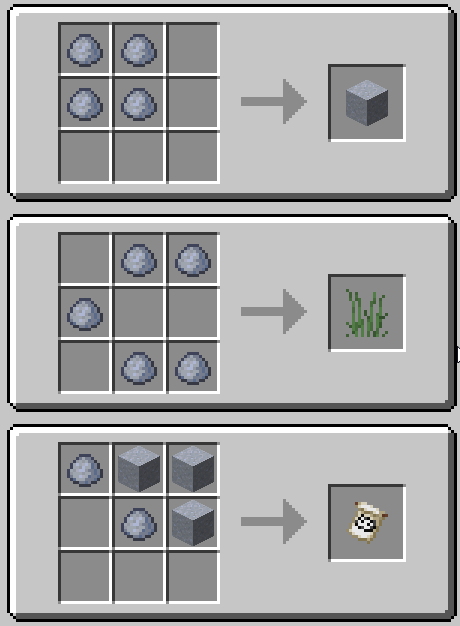
- Crafting Table (generates a unique shaped recipe for each item in the game)
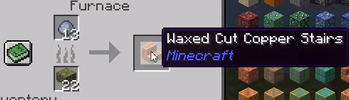
- Furnace (Furnaces, blast furnaces, smokers, and campfires will all result in a random item when smelting clay)
- Blast Furnace
- Smoker
- Campfire
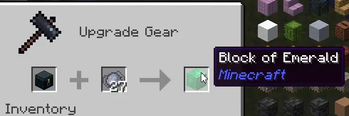
- Smithing Table (smithing tables will allow you to combine any item with clay to turn it into another item)
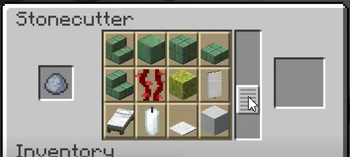
- Stonecutter (stonecutters will allow you to turn clay into any item)
Each recipe type can be toggled in the configuration.
Default Configuration# Whether clay should be able to be crafted into any item
enable-clay-crafting: true
# Whether clay should be able to be smelted into any item, separated into each smelter block
enable-clay-smelting:
furnace: true
smoker: true
blast-furnace: true
campfire: true
# Whether clay should be able to be turned into any item in a stonecutter
enable-clay-stonecutter: true
# Whether clay should be able to be turned into any item in a smithing table
enable-clay-smithing: true
# Items that clay should not be able to be turned into (materials)
blacklist:
- clay_ball # Prevent crafting clay with a custom clay recipe
- clay # Prevent crafting clay blocks with a custom clay recipe
# Whether to use the blacklist as a whitelist instead
use-blacklist-as-whitelist: false
FAQ
Q: Why would anyone want this?
A: Good question, a great question. This question is indeed very excellent. In fact, I'd say it's one of the questions of all time. Next question please.
Q: Why clay?
A: Clay is the most balanced item, so it makes sense to make a plugin that balances it further. You can never outbalance the clay.
Q: I hate this, please delete this plugin.
A: How dare you speak such blasphemy and slander the one and almighty clay. You will experience the most dread̸f̵u̷l̵ ̵o̷f̶ ̵c̸o̵n̴s̴e̴q̸u̷e̴n̵c̵e̸s̴,̴ ̵ ̵̵̵̙̅͛ ̷̼͛a̶̖͗n̶̲̂d̸̬̄ ̷̝̊y̷̯̎o̶̧̅u̴̮̕ ̷̪͋w̵̨̑i̶̮̎l̵̳̈l̶̳͛ ̴̺̈f̸̫̎e̸̛̲ẻ̷̩l̸̟͌ ̴̡̀ṱ̵̎h̶̳͆ȩ̸̕ ̵̤͗w̸̢̾ṙ̴̡a̴̡͌t̷̞̚h̸̘͐ ̶̲͑o̷̖̓f̵̌͜ ̵̛̬č̸̰l̴̦̉ą̶̎y̴̞͌ ̷͜͝e̴̮̊t̷͇̿ē̷͖r̸͎͛n̵̲͘a̷̬̓ḻ̷̂l̴̟͛ẏ̵̤,̷̹̊ ̸̪̌u̴̘̒ṋ̷͒t̴̗̔ǐ̴̬l̶̜͘ ̵̧̈́y̶͈͒ọ̶̽u̷͖͕̗̫͙͒ ̸̧͉͖̲̄̄̈̅ē̷̠̪͈͉̃̎v̸̡̗̹͈͈̉̓̾͊̕è̵̥̘̎̒̒̚n̵̳͆̎̅́ͅṯ̷̢̞̙̮́́̅͐ǔ̵̡̂ͅả̷̯̤͔̾l̶̝̜͛̚l̶̩̝̲̇̂͋̈͝y̶̨̔͋̾̀ ̶͔̗͍̇̎͛̄̽b̶̢̪͕͆̚e̷̡̛͔c̵͕͉̰͖͙͐̂̔͛̌o̷̗̼̳̔͋̀̌m̴̖̳͛̆̓̃e̶̠̤̓͛̄͘͝ ̷̤̯̿̏͝o̷̢̮̫̓͂̊̆͂ṉ̷͛̑̊e̷̛͚͉͔͋̅͛ ̸̨͚̬̤̺͒̅̄w̷̯͇̓́̀̊͜ḯ̷͇̑ẗ̵̩͇̻̝͉́̽̎h̷̛̠̖͖̩̀ ̶͚̻͍̈́͆̎t̶̢̡̰̭͐̐̎ḧ̶͙́̕e̸̤̲͒ ̸̫̠̀c̶̩͔͒̚͘͜l̵͚̄à̴̛̳͍̱̬̟y̵̦̫̽̽͘͜.̴͓͚͓̓͘ ̵̪͈̬͉̠̍͛̋͌
- Edition: Minecraft Java
- File type: .jar
- Minecraft versions listed: 1.16.5, 1.17, 1.17.1
- How to install: Install the matching mod loader (Forge, Fabric or NeoForge) for your Minecraft version. → Download the .jar. → Put it in the .minecraft/mods folder and launch that loader profile.
- Where to get it: Opens on Modrinth — not every file is mirrored on our own servers.
Install steps are the general flow for this file type — How to install Minecraft Java mods & modpacks walks through it step by step.
- Ships as BalancedClay-1.0.0.jar — drop this file into the mods folder
- Download size: 16 KB
- Download link checked 7 Sept 2026 — working
These come from our own check of the pack file, not from the source page.