
BedWars1058-Inviter
A BedWars1058 addon that sends clickable arena start announcements to waiting players and adds a /yq manual invite command with cross‑world broadcasting…
⬇ Download on Modrinth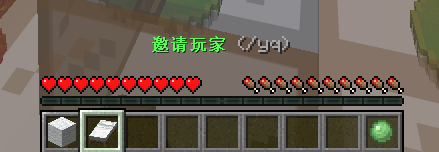





About
BedWars1058‑Inviter is a lightweight yet powerful addon for BedWars1058 that fills your arenas faster, keeps players connected, and puts communication entirely in your hands. It works seamlessly on single‑arena servers, BungeeCord networks, and Velocity proxies (experimental).
Every message, sound, and behaviour is configurable – and the entire plugin is fully localisable through editable YAML language files.
Note: This plugin is closed‑source. You may distribute the compiled JAR file freely, but you may not decompile, modify, reverse‑engineer, or integrate it into other projects without explicit permission from the author.
Features
Automatic Arena Announcements
- Periodically checks waiting or starting arenas (default interval: 30 s).
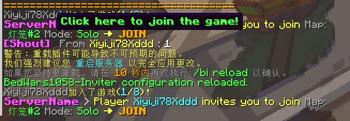
- Broadcasts a clickable invitation to lobby players when an arena has at least the configured minimum number of players.
- Entire feature can be toggled on/off via
enable‑auto‑invite.
Manual Invite (/yq)
- Players inside a waiting or starting arena can send a personalised clickable invitation to the lobby and their current game world.
- Configurable cooldown (default 30 s) with a customisable cooldown message.
- Invitations work during
waitingandstartingstates.
Server‑wide Shout (/hh)
/hh <message>broadcasts to every player on the server, regardless of world.- Separate cooldown (default 90 s) with its own configurable message.
Quick Invite Item
- A customisable item (default: Bed) appears in the player’s inventory while they are waiting.
- Right‑click the item to instantly send a
/yqinvitation. - Fully configurable: material, display name, lore, inventory slot, and optional movement lock.
Force‑Start Game (/bi startgame)
- Players with the
bi.startpermission (op by default) can force‑start the current game immediately – team assignment is skipped, only the arena status is set toSTARTING. - A configurable quick‑start item (default: Diamond, slot 2) is given to players in waiting/starting arenas; right‑click it to trigger the same action.
- If the game is already in the
STARTINGstate, a configurable warning message is shown instead of doing nothing.
Admin Command (/bi)
/bi reload– reloads configuration with a two‑step confirmation (10 s window)./bi language <lang>– switches the server‑wide language on the fly, writing the change directly toconfig.ymlwithout removing any comments or formatting./bi version– displays the plugin author and current version./bi update– triggers a manual update check; the result is sent only to the command sender and does not affect the automatic update checker./bi startgame– force‑starts the current arena (requiresbi.start)./bi help– shows a fully customisable help menu that is defined entirely in the language files.
Config Auto‑Completion
- On every server start, the plugin automatically detects any missing options in
config.ymland appends them – together with their default comments – at the end of the file. - Your existing custom values, formatting, and comments are fully preserved.
- This ensures a seamless upgrade from older versions without manual config edits.
Placeholder System
{arena},{arenagroup},{player},{luckpermprefix}(LuckPerms prefix, empty if not present),{acceptbutton},{rejectbutton},{seconds},{nowarenaplayercount},{maxarenaplayercount},{version}.- Accept / reject buttons: Accept runs
/bw join <arena>, Reject silently dismisses the invitation. - Error messages such as “You are not in a waiting/starting arena” and the force‑start warning are also defined in the language files and can be customised.
Language System
- All player‑visible text (invite lines, button labels, cooldown alerts, help menu, errors, broadcast format, force‑start messages) is stored in editable YAML files inside the
language/folder. - Default languages:
en_usandzh_cn. Create custom languages by copying an existing file and renaming it<language>.yml. - Switch languages instantly with
/bi language <lang>– no restart required. - Language selection is saved in
config.yml(underlanguage) and persists across restarts. The oldlanguage‑settings.ymlfile has been removed to simplify management.
Multi‑Line & Multi‑Proxy
- Invite messages support both a single line and a YAML list (multiple lines).
- Works with BedWars1058
MULTIARENAmode,SHARED(BungeeCord via BedWarsProxy), and Velocity (experimental). - Optional “show invite after game” setting to keep eliminated players informed.
Update Checker
- Automatic update checks run every 60 minutes (if
check_updateis enabled) and notify online players with thebi.updatepermission. - Console update messages are now coloured (via
ConsoleSender) for better visibility in server logs. - All update‑related messages are in English regardless of the server’s language setting.
- Manual checks can be performed at any time with
/bi update.
bStats & Optional Disable
- bStats metrics are enabled by default, but can be disabled globally by setting
bstats-enabled: falseinconfig.yml– ideal for hosts that block outbound HTTPS tobstats.org.
Polished Experience
- Clickable messages with hover tooltips.
- Customisable sounds (works across 1.8 – 1.21).
- Debug mode (0/1/2) for troubleshooting.
- Lightweight – all broadcasts run asynchronously.
Support
Issue Tracker: GitHub Issues
QQ group: 645054843
Technical Requirements
- BedWars1058 (BedWarsProxy optional for BungeeCord)
- Java 11+
- Spigot / Paper 1.8.8 – 1.21
- LuckPerms (optional, for the
{luckpermprefix}placeholder)
Installation
- Drop the
.jarinto your server’splugins/folder. - Restart the server.
- Add
/yqand/hhtoallowed-commandsinplugins/BedWars1058/config.yml:allowed-commands: - shout - bw - leave - yq - hh - Restart again.
- Edit
plugins/BedWars1058‑Inviter/config.ymland the language files inlanguage/. - Apply changes without a restart:
/bi reload.
Important:
/yqand/hhmust be in BedWars1058’sallowed-commandslist; otherwise they will not work in‑game./bi startgamedoes not need to be added to the allowed list – it is handled internally by the/bicommand.
Sound Compatibility: The
Soundoption inconfig.ymlmust match your server version. Examples:
- 1.8.x:
LEVEL_UP- 1.12.x+:
ENTITY_PLAYER_LEVELUP
Commands & Permissions
| Command | Description | Permission |
|---|---|---|
/yq |
Send a manual arena invitation | none (default) |
/hh <msg> |
Server‑wide shout | none (default) |
/bi reload |
Reload configuration (confirmation required) | bi.admin |
/bi language <lang> |
Switch server language (preserves config comments) | bi.admin |
/bi version |
Show plugin author and version | none |
/bi update |
Manually check for updates | bi.admin |
/bi startgame |
Force‑start the current arena | bi.start (default: op) |
/bi help |
Display customisable help menu | none |
bi.use– allows using/yq,/hh, and/bi help(granted by default).bi.admin– allows/bi reload,/bi language, and/bi update.bi.update– receives automatic update notifications (op by default).bi.start– allows/bi startgameand usage of the quick‑start item (op by default).
Stats
- Edition: Minecraft Java
- File type: .jar
- Minecraft versions listed: 1.8.8, 1.8.9, 1.12.2
- How to install: Install the matching mod loader (Forge, Fabric or NeoForge) for your Minecraft version. → Download the .jar. → Put it in the .minecraft/mods folder and launch that loader profile.
- Where to get it: Opens on Modrinth — not every file is mirrored on our own servers.
Install steps are the general flow for this file type — How to install Minecraft Java mods & modpacks walks through it step by step.
- Ships as BedWars1058-Inviter.jar — drop this file into the mods folder
- Download size: 74 KB
- Download link checked 7 Sept 2026 — working
These come from our own check of the pack file, not from the source page.