
Teleport structure
Java mod listed for Minecraft 1.16–1.21. Downloads from the MC Java Mods app on Android.
An advanced teleportation system that allows players to build and link physical structures in the world to create a network of instant travel points.
⬇ Download on Modrinth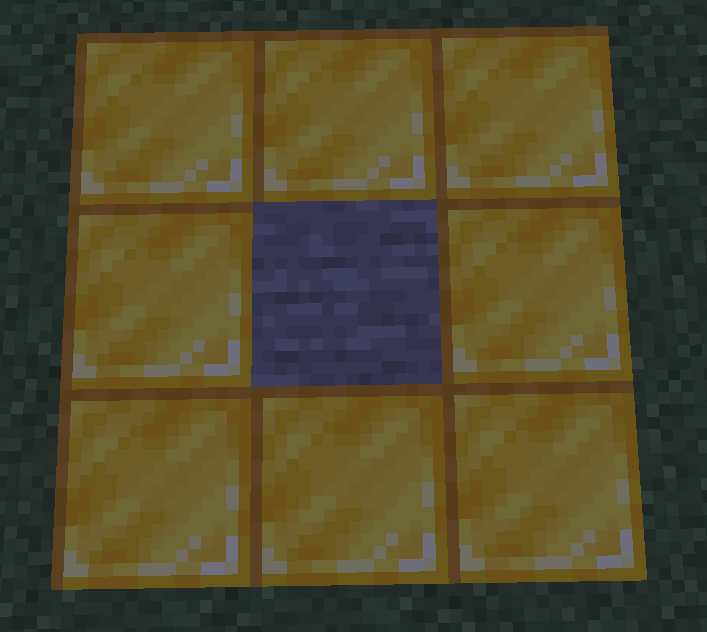
TeleportStructure
Build Your Own Travel Network!
TeleportStructure introduces a balanced and immersive fast-travel system, moving away from simple commands. Players must gather resources and build physical structures in the world to create a permanent and rewarding travel network. It's the perfect solution for survival servers where convenience must be earned.
Features
- Structure-Based Teleportation: No more teleport commands! Travel happens by physically interacting with player-built structures in the world.
- Fully Configurable: Almost every aspect is customizable in a detailed
config.yml, including portal materials, player limits, cooldowns, and all messages. - Survival Mechanics: Enable options like
delete-on-break, where destroying a portal's structure block will permanently remove the portal, andallow-cross-worldto control inter-dimensional travel. - Visual & Audio Effects: Make teleportation feel rewarding with configurable sounds and particle effects for creating and using portals.
- Player-Managed Portals: Players can set their portals to
publicorprivateand view all their portals in an intuitive/portal listGUI. - Admin-Friendly: A full suite of permissions and commands allows server staff to manage any portal and reload the configuration on the fly.
- Lightweight & Performant: Designed to be efficient and have a minimal impact on your server's performance.
How It Works (A Quick Guide)
Click to see the creation process...Build the Structures: First, a player must build two identical structures in the world. By default, this is a Stone surrounded by 8 Gold Blocks.
Link the Points: Using the
/portal create <name>command, the player receives a special tool. They then left-click on the center block of the first structure and right-click on the center block of the second structure to create a permanent link.Travel Instantly: That's it! To teleport, the player simply steps into the space above one of the structures and is instantly transported to the other.
Commands & Permissions
Player Commands
/portal create <name>- Description: Starts the portal creation process and gives the player the linking tool.
- Permission:
teleportstructure.command.create
/portal remove <name>- Description: Removes one of your own portals.
- Permission:
teleportstructure.command.remove
/portal list- Description: Opens a GUI listing all of your created portals and their details.
- Permission:
teleportstructure.command.list
/portal public <name>- Description: Toggles one of your portals between public and private status.
- Permission:
teleportstructure.command.public
/portal help- Description: Shows the command help message.
- Permission:
teleportstructure.command.help
Admin Commands
/portal list <player>- Description: Lists all portals owned by a specific player.
- Permission:
teleportstructure.admin.list
/portal remove <portal_name>- Description: Forcefully removes any portal by its name. Requires admin permission to remove portals owned by other players.
- Permission:
teleportstructure.admin.remove
/portal reload- Description: Reloads the
config.ymlfile from disk. - Permission:
teleportstructure.admin.reload
- Description: Reloads the
- Edition: Minecraft Java
- File type: .jar
- Minecraft versions listed: 1.16, 1.16.1, 1.16.2
- How to install: Install the matching mod loader (Forge, Fabric or NeoForge) for your Minecraft version. → Download the .jar. → Put it in the .minecraft/mods folder and launch that loader profile.
- Where to get it: Opens on Modrinth — not every file is mirrored on our own servers.
Install steps are the general flow for this file type — How to install Minecraft Java mods & modpacks walks through it step by step.
- Ships as TeleportStructure.jar — drop this file into the mods folder
- Download size: 34 KB
- Download link checked 18 Oct 2026 — working
These come from our own check of the pack file, not from the source page.