
LumenSmith
Java mod listed for Minecraft 26.x. Downloads from the MC Java Mods app on Android.
I don't know my version or loader





LumenSmith Configurable Crafting
LumenSmith is a lightweight, beginner-friendly plugin that lets you disable, replace, and create crafting recipes on your Paper or Purpur server entirely through an in-game GUI or a simple config.yml.
No coding. No datapacks. No config editing required, just open the recipe creator and click.
Full documentation and guides on the wiki
What It Does
- Block vanilla crafting outputs, stop items like TNT, TNT Minecart, or Totems from being crafted.
- Add custom recipes for shaped, shapeless, furnace, blasting, smoking, campfire, stonecutting, smithing transform, adjacent-pair, and brewing-stand recipe types.
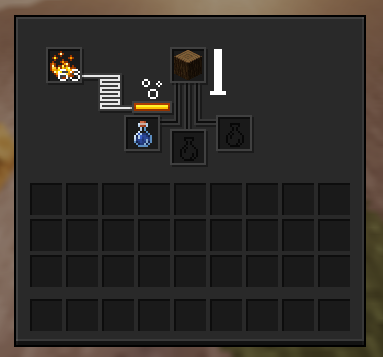
- Custom brewing recipes with any ingredient, including items vanilla normally refuses like logs, blocks, and tools. A full 20-second brew animation plays, blaze powder is consumed, and the bottles are replaced just like vanilla.
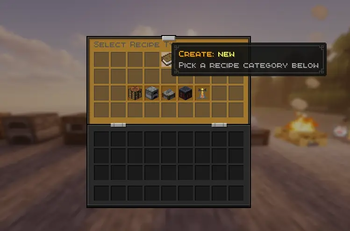
- In-game recipe creator with a categorised type selector (Crafting / Cooking / Stonecutting / Smithing / Brewing). Build recipes visually with
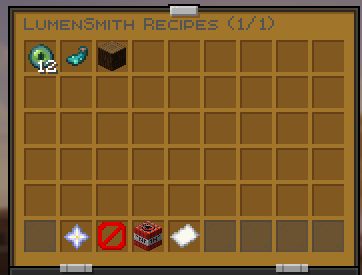
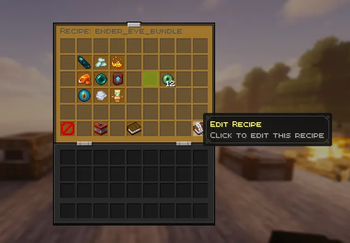
/ls create <key>, click slots, pick items from your inventory, adjust cooking time, fuel restrictions, and more. No config editing needed. - Edit & delete recipes in-game, browse your recipes with
/ls, then edit or delete them with one click. Quick-action buttons in the browser open the creator, toggle a Delete Mode, or switch to a Blocked Outputs view. - Fuel restrictions for cooking recipes (e.g. only Coal and Lava Bucket).
- Custom unlock triggers, pick exactly which items pop the recipe into the recipe book, or leave it on Auto.
- Adjacent pair direction, control whether adjacent-pair recipes work horizontally, vertically, or both.
- Auto-replace vanilla recipes, your custom ones override automatically, and removed vanilla recipes come back the moment you take a custom one out.
- Instant auto-unlock, recipes appear in the recipe book the same tick the trigger item enters the player's inventory.
- World filter support, enable or disable crafting rules per world.
- Instant reloads,
/ls reloadupdates recipes live, no restart needed. - Ultra-lightweight, optimized with O(1) lookups, pre-computed data, and zero per-tick overhead.
Documentation
Everything is on the wiki, organised so you can jump straight to what you need.
| Page | What's on it |
|---|---|
| Home | Overview, screenshots, quick start guide |
| Commands | Every /ls command with examples and the in-game GUI explained |
| Configuration | Global settings, world filter, blocked outputs, full example config.yml |
| Recipes | All 10 recipe types with YAML snippets and field reference |
| Permissions | Permission nodes for crafting, admin, and GUI access |
| Changelog | Version history, what changed, why, and how to migrate |
| Terms | Licence and usage terms |
New here? Start with the Quick Start guide on the home page. Want to build a recipe right now? See /ls create in the command reference.
Commands at a Glance
| Command | Description | Permission |
|---|---|---|
/ls |
Open the recipe browser GUI | lumensmith.gui |
/ls help |
Show command overview | lumensmith.gui |
/ls list |
List blocked outputs and custom recipes | lumensmith.admin |
/ls reload |
Reload config.yml and recipes live |
lumensmith.admin |
/ls rescan |
Force every player's recipe book to update | lumensmith.admin |
/ls create <key> |
Open the in-game recipe creator | lumensmith.create |
/ls delete <key> |
Delete a custom recipe from config | lumensmith.admin |
Full reference with screenshots: Commands wiki page.
Supported Recipe Types
| Type | What it covers |
|---|---|
shaped |
3x3 crafting grid with a specific layout |
shapeless |
Any arrangement, up to 9 ingredients |
adjacent_pair |
Two blocks placed next to each other on the grid |
furnace |
Standard furnace smelting |
blasting |
Blast furnace |
smoking |
Smoker |
campfire |
Campfire cooking |
stonecutting |
Stonecutter |
smithing_transform |
Smithing table (template + base + addition) |
brewing |
Brewing stand (ingredient + bottle to new bottle) |
Field reference and a YAML example for every type lives on the Recipes wiki page. A complete annotated config.yml is on the Configuration page.
Why Use LumenSmith?
- Perfect for SMP, RPG, or custom survival servers.
- Custom brewing-stand recipes even with ingredients vanilla refuses.
- Redesigned in-game creator with a categorised type selector. You never have to touch
config.ymlif you don't want to. - 100 % YAML when you do, clean and commented.
- Fully reload-safe with
/ls reload, no restarts to test new recipes. - Blocks duplication exploits and crafting abuse by default. Removed vanilla recipes restore automatically when a custom one is taken out.
- Runs on Paper / Purpur 1.21.x and the new 26.x API line.
- Ultra-lightweight, no external dependencies, clean console output.
Example in Action


More screenshots on the Home page.
Quick Start
- Drop the matching jar into your
plugins/folder. Uselumensmith-0.1.5-mc1.21.11.jarfor classic Paper 1.21.x, orlumensmith-0.1.5-mc26.1.2.jarfor the new Paper 26.x API line. - Start the server. LumenSmith generates a commented
config.ymlon first run. - Run
/lsin-game to open the recipe browser, or/ls create my_recipeto build a new recipe visually. - Need help? Open the wiki or run
/ls help.
License
All Rights Reserved © 2025 - 2026 NionX, Creator of LumenSmith. Redistribution or modification without permission is prohibited. Full terms: Terms of Service.
- Edition: Minecraft Java
- File type: .jar
- Minecraft versions listed: 26.1, 26.1.1, 26.1.2
- How to install: Install the matching mod loader (Forge, Fabric or NeoForge) for your Minecraft version. → Download the .jar. → Put it in the .minecraft/mods folder and launch that loader profile.
- Where to get it: Opens on Modrinth — not every file is mirrored on our own servers.
Install steps are the general flow for this file type — How to install Minecraft Java mods & modpacks walks through it step by step.
- Ships as lumensmith-0.1.5-mc26.1.2.jar — drop this file into the mods folder
- Download size: 171 KB
- Download link checked 18 Oct 2026 — working
These come from our own check of the pack file, not from the source page.