HomeJavaModsCooperative End Access
Cooperative End Access
ModsJava

Cooperative End Access

by Mizuhara · on Modrinth

Softly restrict the End with vanilla-ish gameplay mechanics that make sure your SMP's dragon fight is always a group activity!

Which build do you need?

This mod ships a separate file for every mod loader and every version of the game. Pick both, then download — the wrong build installs fine and then does nothing in the game.

Mod loader

Minecraft version

⬇ Download for 26.2 · Fabric⬇ Download for 26.1–26.1.2 · Fabric⬇ Download for 26.2 · NeoForge⬇ Download for 26.1–26.1.2 · NeoForge⬇ Download for 1.21–26.2 · Paper⬇ Download for 1.21–26.2 · Purpur
I don't know my version or loader
Open the Minecraft launcher and look at the profile you play on — it names both, like fabric-loader-1.21.4. The version also shows in the bottom-right corner of the game's main menu.
No loader in the profile name? Then it's plain Minecraft, and these mods won't run — you need Fabric or NeoForge installed first.
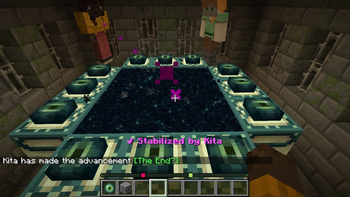
Cooperative End Access — screenshot 1Cooperative End Access — screenshot 2Cooperative End Access — screenshot 3Cooperative End Access — screenshot 4Cooperative End Access — screenshot 5

Your friends tell you to spin up a new SMP for the summer. One friend can't help themself and rushes to beat the dragon immediately. Everyone loses motivation and the SMP ends up DYING...

Sound familiar?

Then Cooperative End Access is for you!

Features

What is Cooperative End Access?

Cooperative End Access is a modification for survival multiplayer servers (SMPs) running Paper, Fabric, and NeoForge for Minecraft 1.21 to 26.2 (Paper) and Minecraft 26.1 to 26.2 (Fabric/NeoForge). It is intended for friend groups that want to restrict the End for one last fight together without an immersion-breaking server restart to toggle allow-end.

The plugin accomplishes this goal by restricting the number of Eyes of Ender that each player can place in a stronghold Ender Portal structure and requiring all players to be present before the portal can open.

How do I use this plugin?

  1. Download the latest version of this plugin for your Minecraft version off Modrinth.
  2. (For Fabric/NeoForge) Download dependencies for your platform off Modrinth.
  3. Move it to your plugins/ directory (or mods/ for Fabric/NeoForge).
  4. (Re)start the server.

You should ideally add this at the very start of your SMP. This plugin does not currently provides tools to locate or close existing Ender Portals or retroactively track existing Eyes of Ender.

What gameplay mechanics does this introduce?

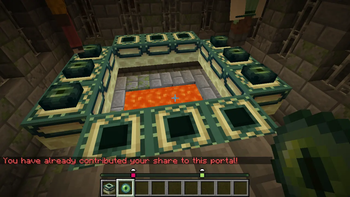
An End Portal structure can no longer be filled by a single player. Each player has a limited number of Eyes of Ender (set by max_eyes_per_player) that they can place in a standard 5x5 End Portal structure.

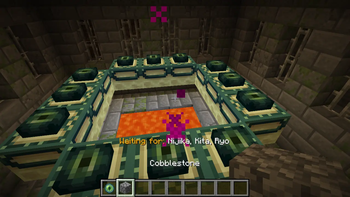
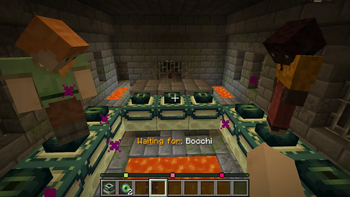
Filling all 12 End Portal frames will not immediately open the End Portal like in vanilla. Placing a single Eye of Ender in a structure marks that player as a "contributor" to that particular Portal. All contributors to a particular End Portal must also be present in the portal room for the portal to open. If a contributor were to leave the portal room, the portal will close.

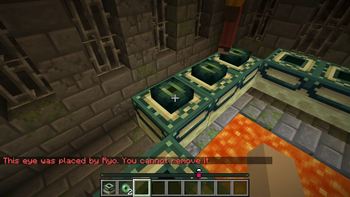
Players may also remove their own Eyes of Ender that they placed into a frame. Removing an eye while a portal is open will close it.

Once the Ender Dragon is defeated for the first time, End Portals will revert to their vanilla functionality.

What should I not expect from this plugin?

On a technical level...

On a social level...

What configuration options do I have?

You can configure this plugin by running the plugin on your server once so it generates its configuration files. Then, you can find the plugin's configuration files at (relative to your server root directory):

Below is the default config.yml. It exhaustively documents all configuration parameters that this plugin accepts.

# Maximum eyes one player can contribute to a single portal structure
# Automatically clamps to range between 0 and 12 (though why would you pick 0??)
max_eyes_per_player: 3

# Distance semantics:
# - Distances below 0 (e.g. -1) are treated as unlimited range, ignoring dimension.
#   In other words, presence in server is enough to trigger the effects.
# - All distances are 3D Euclidean distance from the portal center.

# Maximum distance (in blocks) committed players may be from the portal for it to remain open
activation_radius: 16.0
# Maximum distance (in blocks) a committed player may be from the portal to receive action bar updates
action_bar_radius: 60.0

# For sound keys, see [Paper's documentation](https://docs.papermc.io/paper/dev/command-api/arguments/registry/#sound)
# or [visit the Minecraft Wiki](https://minecraft.wiki/w/Sounds.json#Sound_events).
# For types of sources, use the "Technical name" on the [Minecraft Wiki's Sound page](https://minecraft.wiki/w/Sound#Categories).
# Volume is clamped to 0.0f at minimum and pitch is clamped to [0.5f, 2.0f] (which are limitations imposed by vanilla Java Edition).
# See the [Minecraft Wiki's /playsound page](https://minecraft.wiki/w/Commands/playsound#Arguments) for more details.
sounds:
  # Sound played when the End Portal is created
  portal_open:
    key: "minecraft:block.end_portal.spawn"
    source: "block"
    volume: 1.0
    pitch: 1.0
  # Sound played when the End Portal collapses
  portal_close:
    key: "minecraft:block.beacon.deactivate"
    source: "block"
    volume: 1.0
    pitch: 0.5
  # Sound played when a player enters the activation_radius
  player_enter:
    key: "minecraft:block.amethyst_block.chime"
    source: "player"
    volume: 1.0
    pitch: 1.0
  # Sound played when a player leaves the activation_radius
  player_leave:
    key: "minecraft:block.amethyst_block.break"
    source: "player"
    volume: 1.0
    pitch: 0.5

# Uses MiniMessage format. See [Paper's documentation](https://docs.papermc.io/adventure/minimessage/format/)
messages:
  # Personal chat message error when player tries to place more eyes than max_eyes_per_player
  max_eyes_error: "<red>You have already contributed your share to this portal!"
  # Personal chat message warning when player removes an eye
  rescind_warning: "<yellow>You took your eye back. The portal state may collapse."
  # Personal chat message warning when player tries to remove another player's eye
  # Placeholder: <name> - The player who owns the eye (e.g. "Megumin").
  non_owner_rescind_warning: "<red>This eye was placed by <name>. You cannot remove it."
  # Personal chat message notice when player places an eye
  committed_notice: "<green>You are now committed to this portal."
  # Server-broadcasted chat notice once the dragon has been defeated for the first time.
  dragon_defeat_notice: "<gold>The Dragon has fallen. End Portals are now stabilized permanently!"
  # Action bar text shown while a committed player is in the End
  # Placeholder: <name> - A committed player present in the End (e.g. "Sumi"), chosen implicitly by eye insertion order.
  stabilized_action_bar: "<bold><light_purple>✔ Stabilized by <name>"
  # Action bar shown when a portal is open
  active_action_bar: "<bold><green>✔ Portal Active"
  # Action bar shown when a portal is awaiting all committed players to be present before opening
  # Placeholder: <names> - comma-delimited list of committed player names missing (e.g. "Notch, Elaina, Mizuhara")
  waiting_action_bar: "<gold>Waiting for: <white><names>"

You can also find this file in ./core/src/main/resources/config.yml.

How do I tell you that your plugin is broken?

Report issues with my spaghetti code through the issue tracker on the plugin's GitHub repository.

How do I submit features for this plugin?

If you wrote the code for it, I'll happily accept a pull request for it if I feel like it doesn't bloat the scope of this plugin.

By submitting a contribution to this repository, you agree that your contribution is licensed under the same license as this repository, as published in the LICENSE file.

Quick facts

Install steps are the general flow for this file type — How to install Minecraft Java mods & modpacks walks through it step by step.

Verified by MCModsHub

These come from our own check of the pack file, not from the source page.

Explore more