
BookShelf Info
BookShelfInfo is a Minecraft plugin enabling players to view detailed contents of Chiseled Bookshelves, including book titles and authors. Server admins…
⬇ Download on Modrinth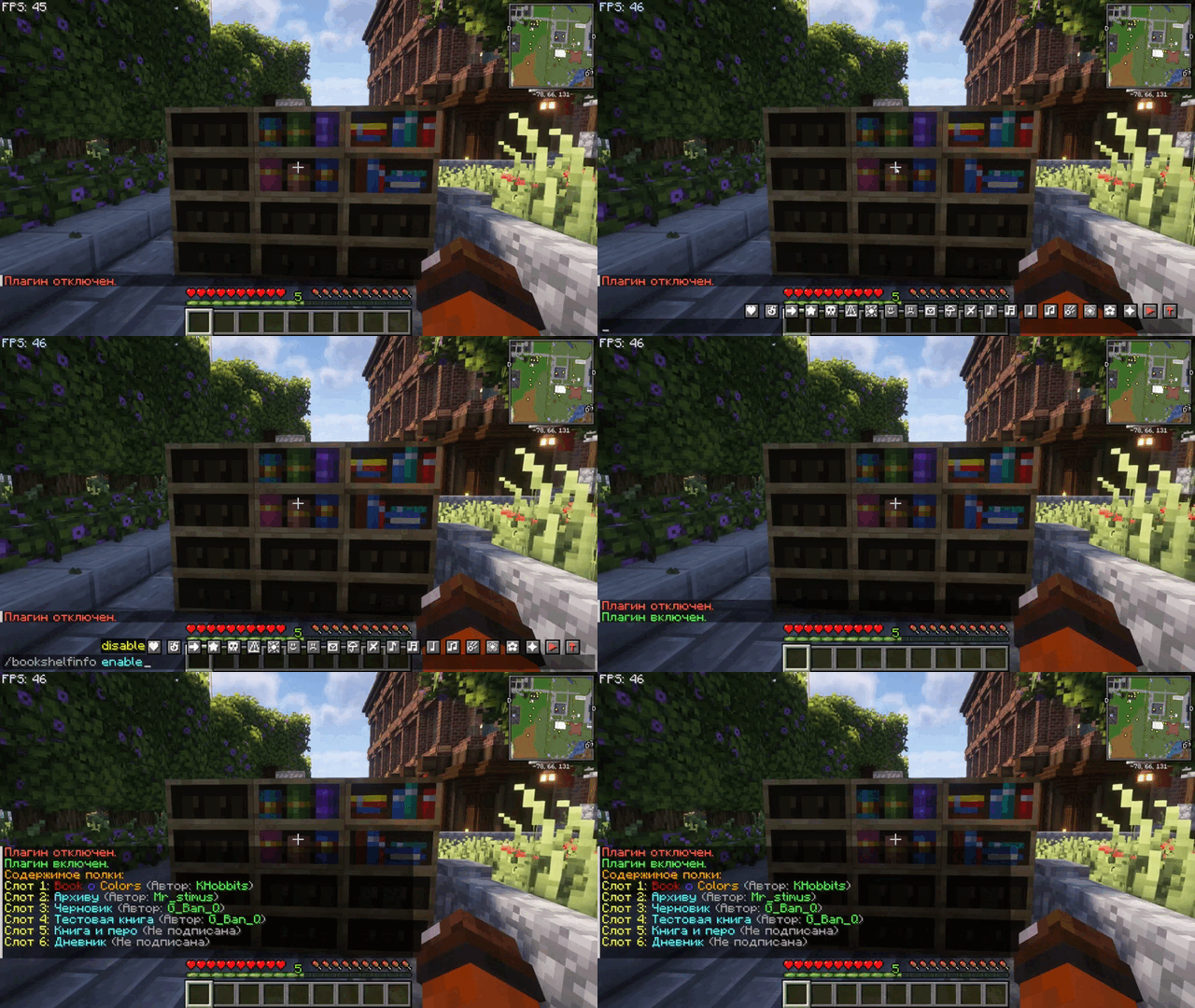
📖 Project Overview
BookShelfInfo is a Minecraft plugin that allows players to interact with and inspect Chiseled Bookshelves in a more detailed manner. With this plugin, players can easily see the contents of bookshelves, including book titles and authors, by simply interacting with them. Server administrators can toggle the plugin's functionality on or off using simple commands.
📋 Features
- View Bookshelf Contents: Players can inspect Chiseled Bookshelves to view the titles and authors of books stored inside.
- Book Metadata Display: The plugin displays detailed metadata, including whether a book is signed or unsigned.
- Admin Control: Administrators can enable or disable the plugin's functionality with simple commands.
- Custom Messages: When a player interacts with a bookshelf, the plugin sends a neatly formatted message displaying the contents of the shelf.
🛠️ Commands
The BookShelfInfo plugin provides simple commands to control its functionality:
| Command | Description | Usage | Permission |
|---|---|---|---|
| /bookshelfinfo enable | Enables the plugin. | /bookshelfinfo enable |
bookshelfinfo.command |
| /bookshelfinfo disable | Disables the plugin. | /bookshelfinfo disable |
bookshelfinfo.command |
🔑 Permissions
The plugin uses a straightforward permission system to manage access to its commands:
| Permission | Description | Default |
|---|---|---|
bookshelfinfo.command |
Allows use of the /bookshelfinfo commands. |
OP |
⚙️ Configuration File
The plugin generates a configuration file (config.yml) that allows administrators to toggle the plugin's status.
Example configuration:
enabled: true
🚀 Quick Start Guide
- Install the Plugin: Download the
.jarfile and place it in your server'spluginsfolder. - Start or Restart the Server: Start the server to enable the plugin.
- Enable or Disable: Use
/bookshelfinfo enableor/bookshelfinfo disableto control the plugin’s functionality.
Using the right mouse button, click on the chiseled bookshelf — the chat will display the titles and authors of the books on that shelf.
- Edition: Minecraft Java
- File type: .jar
- Minecraft versions listed: 1.20, 1.20.1, 1.20.2
- How to install: Install the matching mod loader (Forge, Fabric or NeoForge) for your Minecraft version. → Download the .jar. → Put it in the .minecraft/mods folder and launch that loader profile.
- Where to get it: Opens on Modrinth — not every file is mirrored on our own servers.
Install steps are the general flow for this file type — How to install Minecraft Java mods & modpacks walks through it step by step.
- Ships as BookShelfInfo-1.0-SNAPSHOT.jar — drop this file into the mods folder
- Download size: 9 KB
- Download link checked 8 Sept 2026 — working
These come from our own check of the pack file, not from the source page.