
Region Finder
Allows You To See The Region Of Your Player When You Go To A New One, Great For Giving Rough Coordinates In SMP.
⬇ Download on Modrinth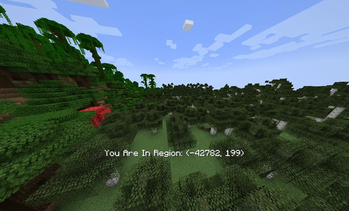
Region Finder
This plugin shows the region to players when they enter a new region, a region is a 32x32 chunk area (512x512 blocks) that is a rough estimate of a players location, its very good for multiplayer as you can send others a region and directions to get to a base, instead of risking leaking coords.
This follows the Minecraft Region Specifications, so if you do advanced Minecraft development then you can use this to see your region instead of finding it via the F3 Menu
This is a simple mod made in Kotlin to learn Paper (and I guess Bukkit, Spigot, and Folia) so there could be bugs.
Licenced Under GPL-3 or Later
- Edition: Minecraft Java
- File type: .jar
- Minecraft versions listed: 1.21, 1.21.1, 1.21.2
- How to install: Install the matching mod loader (Forge, Fabric or NeoForge) for your Minecraft version. → Download the .jar. → Put it in the .minecraft/mods folder and launch that loader profile.
- Where to get it: Opens on Modrinth — not every file is mirrored on our own servers.
Install steps are the general flow for this file type — How to install Minecraft Java mods & modpacks walks through it step by step.
- Ships as regionfinder-1.0.2.jar — drop this file into the mods folder
- Download size: 1.7 MB
- Download link checked 8 Sept 2026 — working
These come from our own check of the pack file, not from the source page.