
Artmap Brushes NBT
Applies configured custom_model_data NBT tags to configured items with specific names. For retexturing renamed Artmap plugin dyes
⬇ Download on Modrinth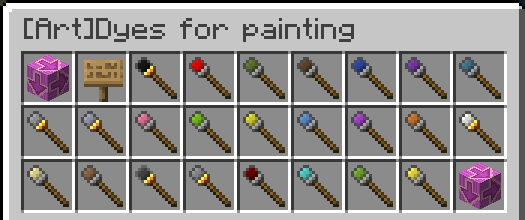
Artmap Brushes
I created this plugin to apply a string to the custom_model_data nbt tag of any item renamed to a color of the artmap plugin. Will also remove the tag if the item is named something else or unnamed or, if the string on it isnt what its supposed to be, it sets it to whats in the config. Recent changes have made old options incompatible with 1.21.4 so I created this. Theoretically it can be used to apply any custom_model_data string to any item for any purpose.
UPDATE 6-30-25:
After experiencing region corruptions on my server I removed this plugin temporarily. It stopped having the issue, so I made the plugin more robust by pausing it when the world is saving or paused. I also added an update checker so future releases can notify your admins! PLEASE update ASAP if you experienced the same. I cannot say with full confidence my plugin caused my issue, please report if you have had the same.
Permissions and commands
Permissions
artmapbrushes.op- allows all commands to be used, admin permission
artmapbrushes.reload- allows usage of the /artmapbrushesreload command
artmapbrushes.admin- allows usage of /artmapbrushesupdate (checks for updates)
Commands
/artmapbrushesreload- Reloads the config to update NBT application without a restart
/artmapbrushespause- Pauses application of strings on named items
/artmapbrushesresume- Resumes application of strings
/artmapbrushesupdate- Checks github for updates
This is only half the equation!
Your players will still need the resource pack to actually see the new textures, this plugin just applies the string the pack reads. I have made a x16 and x32 resource pack that takes all of the hex values from Gengyen's palette and puts them on the tip of their relevant brushes so you can see the color you're painting with. They can be found here
Dependencies!
This plugin requires NBTAPI to run. It handles the NBT.
- Edition: Minecraft Java
- File type: .jar
- Minecraft versions listed: 1.21.4, 1.21.5, 1.21.6
- How to install: Install the matching mod loader (Forge, Fabric or NeoForge) for your Minecraft version. → Download the .jar. → Put it in the .minecraft/mods folder and launch that loader profile.
- Where to get it: Opens on Modrinth — not every file is mirrored on our own servers.
Install steps are the general flow for this file type — How to install Minecraft Java mods & modpacks walks through it step by step.
- Ships as artmapbrushes-1.2 Release.jar — drop this file into the mods folder
- Download size: 32 KB
- Download link checked 8 Sept 2026 — working
These come from our own check of the pack file, not from the source page.