
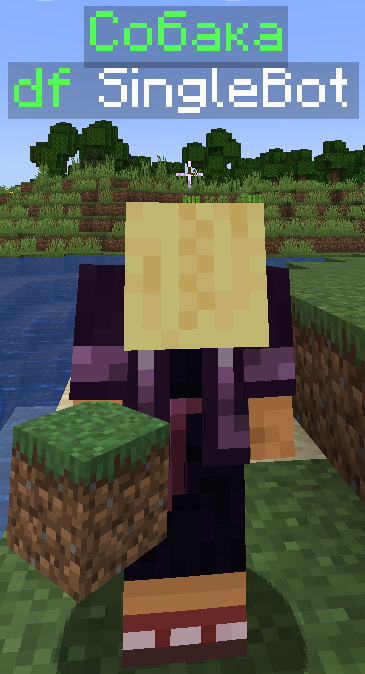
SetWord Plugin is a lightweight plugin that allows players to display custom words above their heads. The text persists even after players log out and rejoin, making it perfect for roleplay servers, VIP designation, or just for fun! Key Features
✅ Set custom text above players with /setword <player> <word>
✅ Automatically saves text and restores it after relog
✅ Configurable via config.yml
✅ Uses TextDisplay for optimized performance
✅ Minimal impact on server performance
How to Use?
1️⃣ Install the plugin in the /plugins/ folder
2️⃣ Restart the server
3️⃣ Use /setword <player> <word>
Permissions
setword.use — Allows using the /setword command (default: OP)
🚀 Enhance your server customization with SetWord Plugin! 🚀
- Edition: Minecraft Java
- File type: .jar
- Minecraft versions listed: 1.20, 1.20.1, 1.20.2
- How to install: Install the matching mod loader (Forge, Fabric or NeoForge) for your Minecraft version. → Download the .jar. → Put it in the .minecraft/mods folder and launch that loader profile.
- Where to get it: Opens on Modrinth — not every file is mirrored on our own servers.
Install steps are the general flow for this file type — How to install Minecraft Java mods & modpacks walks through it step by step.
- Ships as Words42-1.0.jar — drop this file into the mods folder
- Download size: 5 KB
- Download link checked 9 Sept 2026 — working
These come from our own check of the pack file, not from the source page.