
Easyland
Easyland — a high-performance PaperMC land-claim plugin for Minecraft (Paper 1.21.x, Java 21). Provides land creation/claiming, trust management, flexible…
⬇ Download on Modrinth
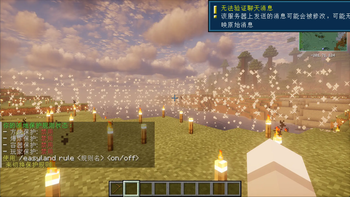
Easyland




A high-performance PaperMC land management plugin that covers land creation, access control, protection rules, and particle-based visualization.
[!note] When updating to version 2.0.0, please use the
migratecommand to migrate data from older versions!
✨ Highlights
- 🏗️ Land Management: Create, claim, abandon, list, rename, and teleport to lands.
- 🏘️ Sub-claims: Create smaller sub-areas within your land for finer control.
- 👥 Trust System: Flexible member management with pre-trust support.
- 🛡️ Protection Policies: Block, explosion, container, player, and entry control protection.
- 💾 Data Storage: Powered by SQLite for secure and efficient data handling.
- 🌈 Visualized Boundaries: Particle effects render land borders directly in-game.
- 🌍 Built-in Localization: Chinese, English, and Japanese translations included.
🛠️ Command Overview
Main command: /easyland (aliases: /el, /land)
| Subcommand | Description | Permission |
|---|---|---|
select |
Get selection tool | easyland.select |
create [id] |
Create land | easyland.create |
claim [id] |
Claim land | easyland.claim |
abandon [id] |
Abandon land | easyland.abandon |
subcreate <parent> [name] |
Create sub-claim | easyland.subcreate |
trust <land> <player> |
Trust player | easyland.trust |
untrust <land> <player> |
Untrust player | easyland.trust |
trustlist <land> |
View trust list | easyland.trust |
info [land] |
View land info | easyland.info |
show [land] [time] |
Show boundaries | easyland.show |
list [page] |
List lands | easyland.list |
rename <land> <new_name> |
Rename land | easyland.rename |
setspawn |
Set land spawn | easyland.setspawn |
tp <land> |
Teleport to land | easyland.tp |
delete <id> |
Delete land | easyland.delete |
rule [land] [rule] [on/off] |
Manage rules | easyland.rule |
reload |
Reload config | easyland.admin |
migrate |
Migrate data | easyland.admin.migrate |
help |
View help | None |
🔐 Permission Nodes
| Permission | Description | Default |
|---|---|---|
| easyland.select | Get selection tool | true |
| easyland.create | Create land | op |
| easyland.claim | Claim land | true |
| easyland.abandon | Abandon land | true |
| easyland.subcreate | Create sub-claim | true |
| easyland.trust | Manage trust | true |
| easyland.info | View info | true |
| easyland.show | Show boundaries | true |
| easyland.list | View list | true |
| easyland.rename | Rename land | true |
| easyland.setspawn | Set spawn | true |
| easyland.tp | Teleport to land | true |
| easyland.rule | Manage rules | true |
| easyland.delete | Delete land | true |
| easyland.admin | Admin bundle | op |
easyland.admin inherits every sub-permission above—no extra assignment required.
⚙️ Core Configuration
| Key | Purpose | Default |
|---|---|---|
land.max-per-player |
Max lands per player | 10 |
land.max-area |
Max area per land | 10000 |
land.min-area |
Min area per land | 100 |
land.min-distance |
Min distance between lands | 5 |
visualization.default-duration |
Boundary show duration (s) | 10 |
sub-claim.max-per-land |
Max sub-claims per land | 5 |
sub-claim.max-depth |
Max sub-claim depth | 2 |
Protection Rules
Each rule provides two flags:
enable: Whether the rule is available on the serverdefault: Default state for newly created lands
| Rule Name | Description |
|---|---|
build |
Allow building/placing blocks |
break |
Allow breaking blocks |
interact |
Allow interaction (chests/doors) |
use |
Allow item usage |
pvp |
Allow PvP |
pve |
Allow PvE (mob damage) |
explosions |
Allow explosions |
fire_spread |
Allow fire spread |
enter |
Allow entry |
mob_spawning |
Allow mob spawning |
🌍 Localization
Set the language value in config.yml to switch the UI language:
# Supported values: zh_cn, en_us, ja_jp
language: en_us
| Code | Language |
|---|---|
zh_cn |
Simplified Chinese |
en_us |
English |
ja_jp |
Japanese |
Community translations are welcome—send a PR to add your language.
📦 Deployment
Environment
- Server: Paper 1.21.x
- Java: 21 or newer
Installation
- Download the latest
easyland-2.0.0.jarbuild. - Drop the plugin into your server's
pluginsdirectory. - Start or restart the server to generate configuration files.
- Adjust
config.ymland permission nodes as needed.
Build from Source (Optional)
- Clone the repository:
git clone https://github.com/railgun19457/Easyland.git. - Run
mvn clean packagein the project root to produce artifacts. - Deploy
target/easyland-2.0.0.jarto your Paper server.
📝 Changelog
v2.0.0 · Major Refactor
- 🔄 Core Refactor: Complete rewrite of the codebase for better architecture and performance.
- 💾 SQLite Storage: Replaced file storage with SQLite database for improved security and efficiency.
- 🏘️ Sub-claims: Added support for sub-claims to manage smaller areas within a land.
- 🚫 Entry Control: Added
enterprotection rule to prevent unauthorized entry (with knockback and visual feedback). - 📍 Teleportation: Added
/el setspawnand/el tpfor easy travel. - ✏️ Renaming: Added
/el renamecommand. - 📢 Better Alerts: Comprehensive Action Bar notifications for clearer feedback.
- 🌍 Localization Sync: Full support for Chinese, English, and Japanese.
v1.4.1
- 🌍 Introduced a full i18n system
- 🐛 Fixed infinite resource duplication caused by vein-miner style plugins
- ➕ Added
reloadandhelpcommands
v1.4 · Paper 1.21.8 Compatibility
- 🚀 Updated to support Paper 1.21.8 and Java 21
- 🐛 Fixed
LandEnterListenerNullPointerException - ⚡ Streamlined explosion protection checks
- 🛡️ Player protection no longer includes natural damage (falling, etc.)
- ♻️ Remains compatible with Paper 1.20.4+
v1.3.1
- 📈 Spatial index optimization improves lookup performance by 60–80%
- 🔒 Adopted
ConcurrentHashMapthroughout for thread safety - 💾 Reduced memory usage by 20–30%
- 🧹 Refactored configuration to remove hard-coded values
v1.3
- 🔁 Completely overhauled the land protection system
- 🆕 Added the
/easyland rulecommand flow - 🗂️ Stored protection rules per land instead of globally
- 🧱 Upgraded configuration structure
v1.2
- 🗃️ Introduced the configuration management system
- 🛠️ Added an administrator permission group
- 🎯
showcommand supports custom durations
v1.1
- 👥 Trust system now supports pre-trusting players
- 📋 Added the
trustlistcommand
v1.0
- 🎉 Delivered the core land management feature set
📄 License
Released under the MIT License. Please retain copyright and license notices when redistributing.
🤝 Support
- ⭐ Star the repository to support the project
- 🐛 Report issues via GitHub Issues
- 💬 Contribute features or translations through Pull Requests
Thanks for choosing Easyland—have fun building thriving communities!
- Edition: Minecraft Java
- File type: .jar
- Minecraft versions listed: 1.21, 1.21.1, 1.21.2
- How to install: Install the matching mod loader (Forge, Fabric or NeoForge) for your Minecraft version. → Download the .jar. → Put it in the .minecraft/mods folder and launch that loader profile.
- Where to get it: Opens on Modrinth — not every file is mirrored on our own servers.
Install steps are the general flow for this file type — How to install Minecraft Java mods & modpacks walks through it step by step.
- Ships as easyland-2.0.1.jar — drop this file into the mods folder
- Download size: 136 KB
- Download link checked 9 Sept 2026 — working
These come from our own check of the pack file, not from the source page.