
✨ What is FootstepsFX?
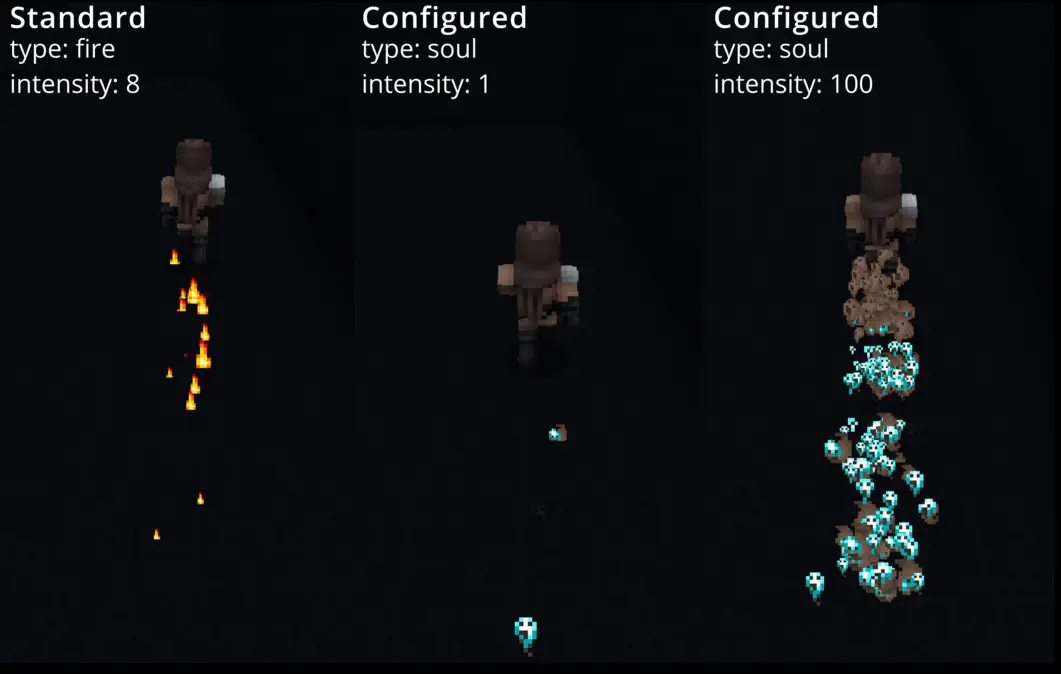
FootstepsFX brings your server to life: Players leave a configurable particle trail behind them as they run. Each player can customize the effect as they wish – from smoke and flames to hearts or musical notes.
🎮 Features
- ✅ Can be turned on/off per player
- ✅ Selection from many particle effects (flame, smoke, heart, note, ...)
- ✅ Adjustable intensity (1–100 particles per step)
- ✅ Lag-friendly: Effects only when changing blocks
- ✅ Storage in JSON: Settings are retained after restarts
- ✅ Easy to use with clear commands
🛠 Commands & permissions
- /trailon – activates the trail (permission: trail.use)
- /trailoff – deactivates the trail (permission: trail.use)
- /trailtype – sets the effect type (permission: trail.use)
- /trailintensity <1–100> – sets the amount per step (permission: trail.use)
- /trailtypelist – displays a list of all effects that can be selected (permission: trail.use)
⚙️ Configuration & storage
Script (volatile – only in RAM)
- {trail::%uuid of player%::enabled} → true/false
- {trail::%uuid of player%::type} → "flame", "smoke", etc.
- {trail::%uuid of player%::intensity} → number (default 8)
Java (persistent – permanently stored)
All player settings are automatically stored in plugins/FootstepsFX/footstepsfx_playerdata.json. Format (JSON structure): { “uuid of player”: { “enabled”: true/false, “effectType”: “effect name”, “intensity”: number }, [...] } The file is loaded at startup and saved when changed/stopped.
📸 Showcase
📂 Installation
- Download FootstepsFX--.jar.
- Place it in your server's plugins folder.
- Restart the server.
📜 Terms of Use – FootstepsFX
✅ You may
- Use FootstepsFX free of charge on private and public servers.
- Modify or extend the code as long as the credits remain intact.
- Include the plugin in server packs if “wolfwriter” is named as the author.
❌ You may not
- Sell FootstepsFX or distribute it for money.
- Pretend to be the author of the plugin.
- Upload manipulated versions as “official.”
⚠️ Disclaimer
- FootstepsFX is provided without warranty.
- Use at your own risk.
- No liability for data loss or server problems.
ℹ️ License
License: GNU General Public License version 3 (GPLv3)
💬 Support & Contact
Do you have questions, feedback, or want to report bugs? Join my Discord and chat directly with the author: 👉 Join Discord server: https://discord.gg/TJgzq9aCxN
- Edition: Minecraft Java
- File type: .jar
- Minecraft version listed: 1.21.11
- How to install: Install the matching mod loader (Forge, Fabric or NeoForge) for your Minecraft version. → Download the .jar. → Put it in the .minecraft/mods folder and launch that loader profile.
- Where to get it: Opens on Modrinth — not every file is mirrored on our own servers.
Install steps are the general flow for this file type — How to install Minecraft Java mods & modpacks walks through it step by step.
- Ships as FootstepsFX-1.1-1.21.11.jar — drop this file into the mods folder
- Download size: 18 KB
- Download link checked 9 Sept 2026 — working
These come from our own check of the pack file, not from the source page.