
Overview
Velocity plugin for easily modifying the MOTD with unquain look for players in server list.

Features
- Beautiful HEX code gradients, and lagacy colors.
- All Minecraft text formating support.
- Build-in placeholders %players% & %maxplayers%.
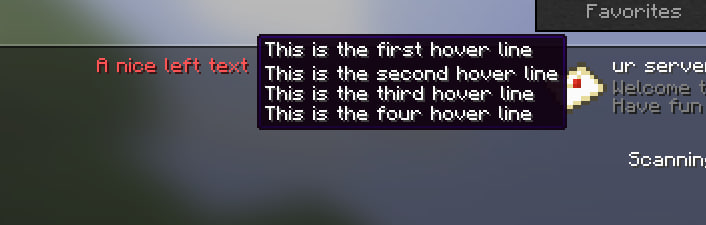
- Unusual text on the right in server list.
- Randomly text pull on every server refresh.
- Maintance mode with alternative ico.
- Fake online players.
- Changing any text in the serverlist.
Commands:
- /motd reload - Hot-reload the MOTD at any time to apply changes.
- /motd maintenance - Enable "Maintenance" mode for the server.
- /motd maxplayers - Change the maximum amount of players for the server.
- /motd fakeplayers - Change the amount of "fake players" shown on the server list.
Config & Showcase:
Default config# Plugin by Shardclay for Shardplex with Gemini and Love
#
# Formatting:
# Colors: <RRGGBB>Text<RRGGBB>
# Gradients: <#RRGGBB>Text<#BBGGRR>
# Styles: <bold>Text</bold>, <italic>, <underlined>, <strikethrough>, <obfuscated>
#-----------------------------------------------------------------------------------------
prefix: '[ShardplexMOTD] '
#-----------------------------------------------------------------------------------------
maxplayer: 20
fakeplayer: false
maintenance: false
#-----------------------------------------------------------------------------------------
favicon:
normal: server-icon.png
maintenance: maintenance-icon.png
#-----------------------------------------------------------------------------------------
motd:
normal:
top:
- 'Welcome to my Server'
- 'Hello and welcome!'
- 'Enjoy your stay on the server!'
bottom:
- 'Have fun playing!'
- 'Good luck!'
- 'We hope you enjoy the experience!'
maintenance:
top: 'Welcome to my Server'
bottom: 'We are currently performing maintenance'
#-----------------------------------------------------------------------------------------
# Formatting:
# Colors: all lagacy only (&c)
# Styles: all lagacy only (&l)
versionname:
left:
- 'A nice left text'
- 'Version 1.0'
- 'Minecraft 1.20'
right:
normal: '%players% / %maxplayers%'
maintenance: 'Maintenance'
hover:
- 'This is the first hover line'
- 'This is the second hover line'
- 'This is the third hover line'
- 'This is the four hover line'
#-----------------------------------------------------------------------------------------
messages:
maintenance:
kick:
- '%prefix%'
- ''
- 'The server is currently under maintenance.'
- 'Please try again later.'
fullserver:
- '%prefix%'
- ''
- 'The server is currently full.'
- 'Please try again later.'

Quick facts
- Edition: Minecraft Java
- File type: .jar
- Minecraft versions listed: 1.21, 1.21.1, 1.21.2
- How to install: Install the matching mod loader (Forge, Fabric or NeoForge) for your Minecraft version. → Download the .jar. → Put it in the .minecraft/mods folder and launch that loader profile.
- Where to get it: Opens on Modrinth — not every file is mirrored on our own servers.
Install steps are the general flow for this file type — How to install Minecraft Java mods & modpacks walks through it step by step.
Verified by MCModsHub
- Ships as ShardplexMOTD-1.1.jar — drop this file into the mods folder
- Download size: 17 KB
- Download link checked 9 Sept 2026 — working
These come from our own check of the pack file, not from the source page.