
HideRank
Let players hide their ranks in chat with a simple toggle command. Lightweight, Vault-integrated, and Folia-ready
⬇ Download on Modrinth
HideRank



Overview
HideRank is a simple yet powerful plugin that allows players to toggle the visibility of their ranks in chat. Whether your players want to go incognito or simply prefer a cleaner chat appearance, HideRank provides a seamless solution with full Vault integration and Folia support for optimal performance.
Demo
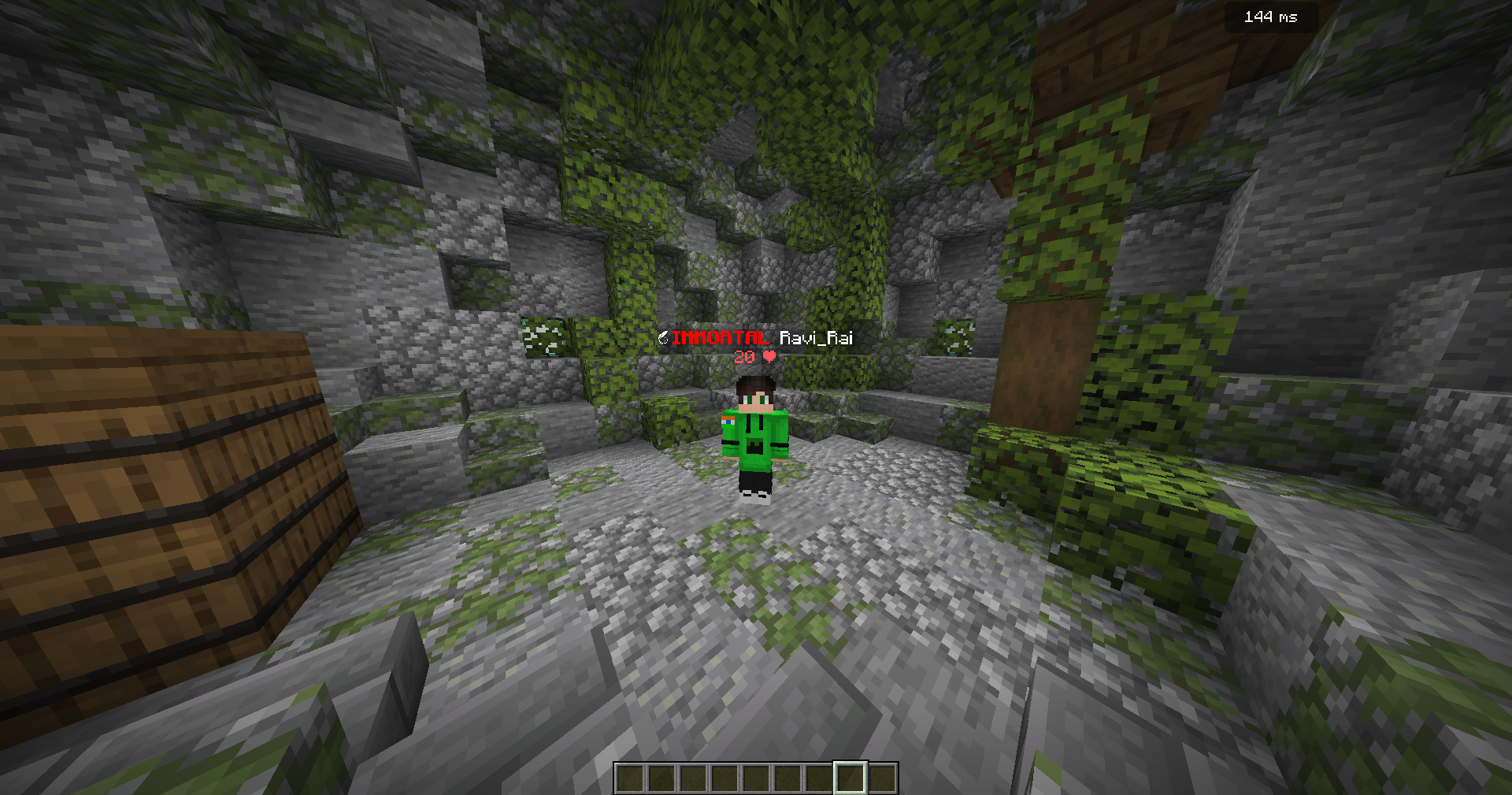
BEFORE /hiderank
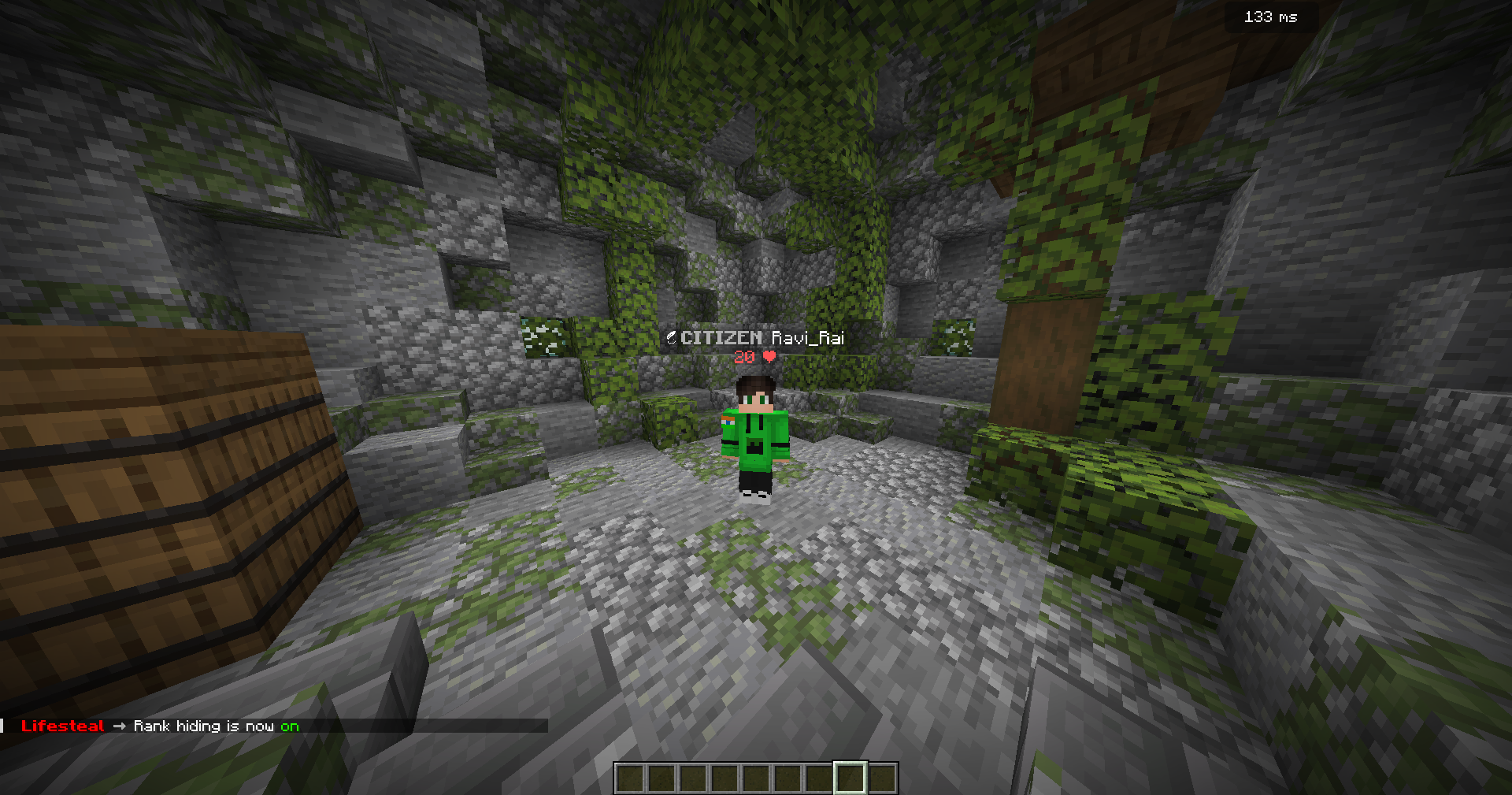
AFTER /hiderank
Video Tutorial:
Features
- Easy Rank Toggling - Players can hide/show their ranks with a simple command
- Vault Integration - Works seamlessly with any Vault-compatible permissions plugin
- Folia Support - Fully compatible with Folia for multi-threaded server performance
- Persistent Data - Player preferences are saved and restored on rejoin
- Customizable Default Rank - Set what rank appears when hiding is enabled
- Command Cooldown - Prevents spam with a 5-second cooldown
- Hex Color Support - Full RGB color support for messages and ranks
- Lightweight - Minimal performance impact on your server
- Multiple Aliases - Use
/hiderank,/hr, or/togglerank - Permission-Based - Control who can use the plugin
Commands
| Command | Description | Aliases |
|---|---|---|
/hiderank |
Toggle rank hiding on/off | /hr, /togglerank |
Permissions
| Permission | Description | Default |
|---|---|---|
hiderank.use |
Allows players to toggle rank hiding | true |
hiderank.* |
Grants access to all HideRank features | false |
Requirements
- Minecraft Version: 1.21+
- Server Software: Paper, Spigot, or Folia
- Required Dependencies: Vault
- Additional Requirements: A Vault-compatible permissions plugin (LuckPerms, GroupManager, etc.)
Configuration
The plugin comes with a simple configuration file where you can customize:
- Default rank displayed when hiding is enabled
- All plugin messages with full hex color support
- Enable/disable the entire system
- Cooldown messages
Example config.yml:
default-rank: "&#AFAFAF&lMEMBER &f"
enabled: true
messages:
enabled: "&#FF0000&lHideRank &7&L➡ &fRank hiding is now FF00on"
disabled: "&#FF0000&lHideRank &7&L➡ &fRank hiding is now &#FF0000off"
no-permission: "&#FF0000You don't have permission to use this command!"
vault-not-found: "&#FF0000Vault plugin not found! HideRank system disabled."
no-chat-service: "&#FF0000No chat service found! HideRank system disabled."
cooldown: "&#FF0000Please wait before using this command again!"
Installation
- Download the latest version of HideRank
- Make sure Vault and a permissions plugin are installed
- Place HideRank.jar in your plugins folder
- Restart your server
- Configure the plugin to your liking (optional)
- Enjoy!
How It Works
When a player uses /hiderank:
- Their current rank/prefix is saved
- Their displayed rank is changed to the configured default rank
- The setting persists across server restarts and rejoins
- Using the command again restores their original rank
Support
Found a bug or have a suggestion?
- Report issues on the issue tracker
- Join the discussion section
- Leave feedback in reviews
Statistics
This plugin uses bStats to collect anonymous usage data. You can opt-out in the bStats config if desired.
If you enjoy HideRank, please leave a ⭐ rating!
- Edition: Minecraft Java
- File type: .jar
- Minecraft versions listed: 1.21, 1.21.1, 1.21.2
- How to install: Install the matching mod loader (Forge, Fabric or NeoForge) for your Minecraft version. → Download the .jar. → Put it in the .minecraft/mods folder and launch that loader profile.
- Where to get it: Opens on Modrinth — not every file is mirrored on our own servers.
Install steps are the general flow for this file type — How to install Minecraft Java mods & modpacks walks through it step by step.
- Ships as HideRank-1.0.0-all.jar — drop this file into the mods folder
- Download size: 80 KB
- Download link checked 9 Sept 2026 — working
These come from our own check of the pack file, not from the source page.