
ModsJava
QAPlugin
Java mod listed for Minecraft 1.19–1.21. Downloads from the MC Java Mods app on Android.
I don't know my version or loader
Open the Minecraft launcher and look at the profile you play on — it names both, like fabric-loader-1.21.4. The version also shows in the bottom-right corner of the game's main menu.
No loader in the profile name? Then it's plain Minecraft, and these mods won't run — you need Fabric or NeoForge installed first.
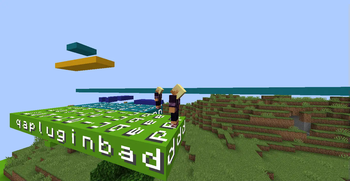
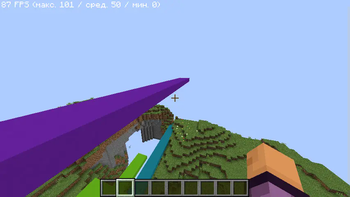
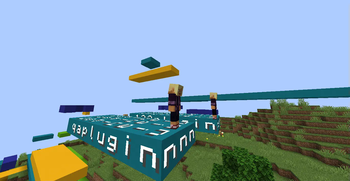
Question and Answer Plugin (QAPlugin)
🎮 Play the Question and Answer game in Minecraft!
The plugin will add a question and answer race to your server! In which the one who knows the longest words wins!👑
🥇 Just try it!
How to use
- A player with game creation permissions uses the command /creategame [gamemode] , specifying the required arguments.
- The player who created the game must then create paths for the players using the command /path [player].
- NOTE: The direction and starting location are set based on the command sender's current position.
- After setting paths for all players, the command /startgame must be executed. This will initialize the game, create the necessary blocks, and teleport all players to their starting points.
⚠️ Before using it
Be sure to test the plugin on a local server, and be sure to check the performance.
⭐️ Features
- ✅ Display Text, Sound, Particles is support ❤️
- ✅ Custom questions support
- ✅ You choose the correct answers, and no one else!
- ✅ Automatic removal of all built blocks at the end of the game.
- ✅ The ability to enable the indestructibility of the world!
- ✅ The plugin is great for playing with friends! ⭐️
Gamemodes
CLASSIC- Classic ModePLEONASMS- Elimination mode
Classic
The winner is the one who has reached the required number of blocks. (There may be several winners)
Plonasms
The winner is the last one left, the game requires at least two players.
Commands
/question <question text>- Ask the players a question/answer <answer>- Answer the current question/creategame <name> [gamemode] <args for gamemode>- Create a new game/startgame <name>- Start the game/deletegame <name>- Delete the game/path <game name> [player]- Invite the player to the game or join the game yourself/acceptgame [game name]- Accept the invitation to the game/denygame [game name]- Deny the invitation to the game/deleteplayer <game name> <player>- Remove a player from the game/deleteblock <playername> [count of layer]- Delete layers from the path for Player/qareload- Reload the plugin configuration
Permissions
qaplugin.game.base- Basic commands for playersqaplugin.game.creator- Basic commands for game managementqaplugin.plugin.base- Basic commands for plugin managementqaplugin.*- Full access to all plugin commands
Quick facts
- Edition: Minecraft Java
- File type: .jar
- Minecraft versions listed: 1.19.4, 1.20, 1.20.1
- How to install: Install the matching mod loader (Forge, Fabric or NeoForge) for your Minecraft version. → Download the .jar. → Put it in the .minecraft/mods folder and launch that loader profile.
- Where to get it: Opens on Modrinth — not every file is mirrored on our own servers.
Install steps are the general flow for this file type — How to install Minecraft Java mods & modpacks walks through it step by step.
File checked by MCModsHub
- Ships as QAPlugin-0.6.9-SNAPSHOT.jar — drop this file into the mods folder
- Download size: 141 KB
- Download link checked 19 Oct 2026 — working
These come from our own check of the pack file, not from the source page.